Excel vs. Financial Consolidation Software: When Is It Time to Move Beyond Excel?
Last Updated: 29 September, 2026
•
Evanka Vinoliya Finance Content Strategist
E
Evanka Vinoliya
Evanka specializes in R2R and Financial Consolidation & Reporting content, crafting SEO-driven resources that help finance professionals navigate modern accounting. She transforms complex finance and automation concepts into clear, research-backed insights, guiding leaders in tech evaluation and trend analysis. With experience across R2R, Consolidation, AP, and AR, she combines data-driven strategies to deliver high-value resources. Beyond work, she enjoys reading, travel, beaches, and new music.
Schedule a Demo
See How HighRadius Increases Consolidation Efficiency By 60%
Excel has earned its place in finance. It rarely becomes a problem on the day a finance team decides to use it. The problem develops later, when the business changes but the consolidation process does not.
Few entities become many. One currency becomes several. A handful of intercompany transactions becomes a recurring reconciliation exercise. Data starts coming from multiple ERPs, local teams maintain separate files, and every close requires more manual collection, validation, mapping, reconciliation, and review.
The challenge is rarely Excel itself. That shift is already visible across finance organizations. PwC’s 2026 CFO research found that 54% of organizations still use spreadsheets to reconcile and consolidate financial and management dataand accounting data is not yet standardized across their group. CFO.com also reports that FP&A teams can spend 75% of their time gathering data before they can use it for analysis.
These numbers point to a broader question: Is the consolidation process still scalable, controlled, and repeatable as the organization grows?
Excel may remain appropriate for simpler consolidation structures, but as dependencies between data, entities, systems, calculations, and reviews increase, maintaining the process can require progressively more manual coordination.
This is where the distinction between Excel consolidation and automated financial consolidation becomes important. The question is not whether Excel can technically consolidate financial data. It is whether the existing consolidation model can continue to support the organization without increasing manual effort and process complexity at the same pace as the business.
This article explores when Excel is still sufficient for financial consolidation, what makes consolidation more complex as a business grows, how to recognize when the process has outgrown Excel, and what actually changes when finance moves to automated financial consolidation software.
Key Takeaways
Excel works for simpler consolidation. It becomes harder to sustain as entities, currencies, systems, and intercompany activity grow.
Consolidation complexity is more than entity count. Data sources, mappings, FX, eliminations, adjustments, and controls can quickly increase process dependencies.
Outgrowing Excel is a process signal, not an entity threshold. Longer closes, manual coordination, version issues, and growing control requirements indicate increasing consolidation complexity.
Automation changes the consolidation operating model. It centralizes data, standardizes recurring processes, and lets finance focus on exceptions, review, and judgment
When is Excel Sufficient for Financial Consolidation?
Financial consolidation in Excel can work well when the organization has a relatively simple reporting structure and the finance team can maintain a controlled process without excessive manual intervention.
Excel may still be sufficient when:
The organization has only a few legal entities.
Entities primarily operate in one currency.
Intercompany transactions are limited and straightforward.
Trial balances come from a relatively small number of systems.
Chart-of-accounts structures are already standardized.
Consolidation adjustments are limited.
A small finance team can maintain the workbook without creating operational dependency on one or two individuals.
In this environment, a well-built consolidation workbook, maintained by a competent controller, can produce accurate, timely consolidated statements without much drama. The attraction is obvious: finance already knows how to use it, models can be changed quickly, and there is no dedicated software implementation to undertake. The issue is not the existence of spreadsheets or Excel. The issue is what the spreadsheet is being asked to manage.
Research found that most organizations still use spreadsheets to reconcile and consolidate financial and management data. Excel therefore does not become unsuitable at an arbitrary entity count. It becomes increasingly difficult to manage when the number of dependencies surrounding the consolidation process grows faster than the organization's ability to govern them.
How Excel Consolidation Complexity Changes as Businesses Grow
The complexity of Excel Consolidation does not increase linearly with company size. Adding one entity does not simply mean adding another column or worksheet. It can introduce a new chart of accounts, currency, ERP, reporting calendar, ownership structure, intercompany relationships, local accounting requirements, and set of data owners.
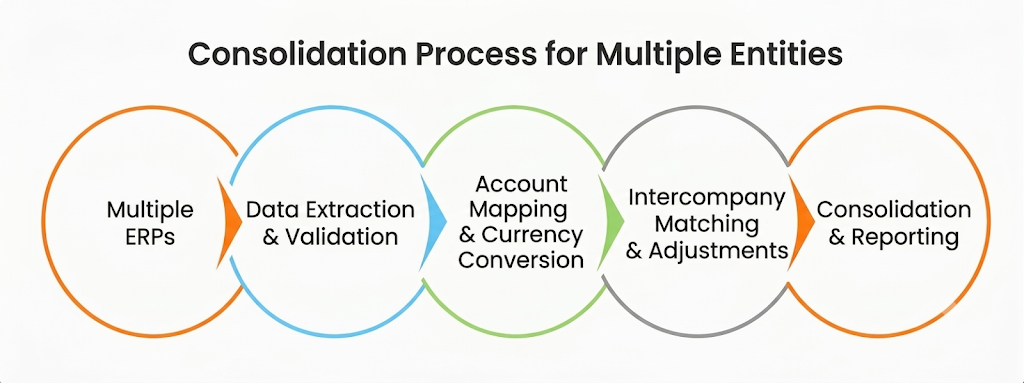
Consider a finance team consolidating three entities in one currency. The process may look relatively straightforward:
Every additional dependency creates another point at which a spreadsheet-based process can require manual intervention.
Entity growth creates process growth: When new subsidiaries are added, finance must determine how their accounts map to the group's reporting structure. The question changes from "Can Excel consolidate this entity?" to "Can the finance team repeat this process consistently for every entity every period?" A workbook can technically accommodate additional entities. The challenge is maintaining the logic around those entities without multiplying manual work.
Multiple currencies introduce another layer of logic: Multi-currency consolidation requires more than converting a final number. Different financial statement items may use different exchange-rate treatments, and finance needs consistent rules for applying those rates. In a spreadsheet model, this can mean maintaining rate tables, formulas, supporting tabs, and validation checks across multiple reporting periods.
Intercompany volume increases reconciliation effort: As transactions grow, finance has to identify counterparties, match balances, investigate differences, determine the appropriate elimination treatment, and document the resulting adjustments. The spreadsheet itself is not necessarily incapable of doing the mathematics. The issue is that the work surrounding the mathematics often remains manual.
The cost of Excel Financial Consolidation is not simply the time required to calculate a consolidated balance. It is the time required to collect the data, confirm that the data is complete, identify the right version, reconcile differences, investigate exceptions, validate formulas, explain adjustments, and reproduce the result when someone asks, "Where did this number come from?"
How Do You Know When You've Outgrown Excel?
There is no single day when a finance team "outgrows" Excel. Instead, there's a set of operational signals that individually look like normal growing pain points but together, describe an organization that has already crossed the line and simply hasn't acted on it yet.
Your close gets longer every time you add an entity. If onboarding one new subsidiary reliably adds days, not hours to your close cycle, your consolidation process isn't scaling with your business; it's fighting it.
Finance spends more time preparing data than analyzing it. When your best analysts spend close weeks reconciling tabs instead of interpreting results, the workbook is consuming the value it was supposed to create.
Multiple versions of the consolidation workbook exist. The moment more than one file claims to be the consolidation model, you've lost your single source of truth and every stakeholder is now working off a number nobody can fully vouch for.
Intercompany discrepancies require extensive manual investigation. Eliminations that should be automatic are instead a forensic exercise, consuming senior finance time that should never be spent hunting for a mismatched entry.
Foreign currency consolidation requires complex spreadsheet logic. Once translation, remeasurement, and CTA calculations start living inside nested formulas rather than a governed engine, the risk of a silent, undetected error rises sharply.
Auditors frequently request additional documentation. If every audit cycle brings a longer list of manual evidence requests because Excel has no built-in audit trail, your compliance risk is growing quietly in the background.
One or two employees understand how the consolidation model works. This is a key-person risk hiding as an operational one and it's one of the clearest signs an organization has outgrown Excel consolidation entirely.
If two or three of these sound familiar, it's worth a closer look. If five or more do, the conversation shouldn't be "should we move off Excel" it should be "how soon can we."
What Changes When Financial Consolidation Becomes Automated?
Moving from Excel to Automated Financial Consolidation changes not just where the calculations happen. It changes how the consolidation process is executed. Instead of finance repeatedly assembling the process every month, the organization establishes a governed process that can be reused across reporting periods.
Data moves into the process instead of being manually assembled
Automated consolidation software can connect with multiple ERP and financial systems, bring entity data into a common environment, validate information, and apply standardized mappings. This reduces the need to manually copy data between workbooks and helps establish a common structure across entities.
HighRadius, for example, describes AI agents that integrate and synchronize financial data across ERP, POS, and external sources while applying validation and account-mapping logic. Its current platform supports integrations with more than 50 ERP systems.
Consolidation rules become repeatable
The advantage of Consolidation Automation is not simply that a calculation happens faster. The same logic can be applied consistently every reporting cycle.
Currency translation rules, account mappings, intercompany elimination rules, ownership logic, approvals, and adjustments can become part of a controlled consolidation process rather than a collection of formulas maintained in individual files. That makes the process more resilient as organizations add subsidiaries or change their operating structure.
Exceptions become the focus of finance effort
Automation should not mean that finance stops reviewing the numbers. It should mean that finance spends less time assembling them.
The system can identify missing information, mapping exceptions, intercompany mismatches, or unusual movements so that finance can focus on reviewing and resolving issues that actually require judgment. That is a fundamentally different operating model from manually checking every stage of a spreadsheet process.
Auditability becomes part of the workflow
An automated process can maintain records of changes, approvals, adjustments, source information, and consolidation activity. That creates a stronger audit trail because evidence is captured during the process rather than recreated afterward.
Current consolidation software platforms increasingly position workflow, permissions, audit trails, period controls, and traceability as core components of consolidation rather than optional reporting features.
Consolidation becomes easier to scale
This is where Automated Financial Consolidation Software creates value for both mid-market and enterprise organizations. For a mid-market company, the objective may be to add entities without adding equivalent administrative workload. For an enterprise, the challenge may be managing dozens or hundreds of entities across currencies, ERP environments, reporting structures, and ownership arrangements.
Excel vs. Financial Consolidation Software: What Actually Changes?
Excel and financial consolidation software can both support consolidation. The difference lies in how the process is managed, controlled, and scaled.
Consolidation Area
Excel Consolidation
Impact
Consolidation Software
Impact
Data Management
Data collected and combined manually
More coordination across sources
Data centralized from connected systems
Less manual data handling
Account Mapping
Mappings maintained in workbooks
Updates require ongoing maintenance
Centralized mapping rules
More consistent group reporting
Consolidation Rules
Formulas and manual calculations
Logic depends on workbook design
Reusable consolidation rules
More repeatable consolidation
Intercompany
Matching and eliminations often require manual review
More reconciliation effort
Automated matching and rule-based eliminations
Finance focuses on exceptions
Controls & Approvals
Files, reviews, and manual sign-offs
Greater process dependency
Built-in workflows and controls
More structured review & approval
Auditability
Supporting evidence maintained separately
Audit support can require reconstruction
Changes and activities captured in-system
Easier traceability
Scalability
Complexity managed through more files, formulas, and processes
Maintenance grows with complexity
Entities and requirements managed within a centralized framework
Easier to scale the process.
In both cases, the underlying requirement is the same: The consolidation process should scale with the business without scaling manual complexity at the same rate.
Scale your Financial Consolidation with HighRadius
Calculate BS and P&L conversions with accurate CTA reporting.
Intercompany Eliminations
Eliminate loans, revenue, & expenses with adjusting JEs.
Chart of Accounts Mapping
Generate cross-entity statutory & managerial CoA hierarchies.
Entity Ownership
Automate NCI metrics, control rules, and reporting.
GL Transaction Download
Automate multi-ERP extraction and CoA-based consolidation.
Top-side Adjustments
Automate topside entries, & audit trails.
When Should You Start Considering Financial Consolidation Software?
Start evaluating Automated Consolidation Software when the organization can still operate the current process, but the cost of maintaining it is becoming disproportionate to the value it provides.
A useful decision framework is to look for four conditions.
Complexity is increasing faster than finance capacity: When adding entities, currencies, ERPs, or acquisitions increases manual workload, your consolidation process is failing to scale, impacting both expanding mid-market companies and enterprise organizations with fragmented financial setups.
Consolidation depends on manual coordination: If the process requires finance teams to constantly request data, merge files, update formulas, chase approvals, investigate mismatches, and recreate reports, there is an opportunity for Consolidation Automation.
Control requirements are increasing: Complex reporting structures require stronger workflows, auditability, standardized rules, and controlled adjustments. At this point, adopting consolidation software becomes essential for meeting core finance operating requirements.
Leadership needs financial information faster: When finance leaders need faster consolidated insights, accelerating spreadsheet tasks is not enough. Connecting data collection, validation, and reporting becomes critical making it time to evaluate Automated Financial Consolidation Software.
HighRadius Financial Consolidation Software: Creating Value Beyond Spreadsheet Replacement
This is exactly where HighRadius Financial Consolidation Software is built to meet finance teams not as a generic system swap, but as a purpose-built replacement for the fragile parts of Excel consolidation that growth exposes first. HighRadius automates intercompany eliminations, multi-currency translation, and minority interest calculations directly from connected ERP sources, giving finance a consolidated view that updates continuously rather than one that waits on a multi-day manual cycle. Built-in audit trails and granular controls address the documentation gaps that trigger repeated auditor requests, while a single governed data model eliminates the "which version is current" problem entirely.
Conclusion
The debate over Excel or Automated Financial Consolidation should not be reduced to whether spreadsheets are outdated. Excel remains useful. For simple organizational structures, it can be practical, flexible, and sufficient.
The issue begins when the consolidation process becomes more complex than the controls surrounding it. More entities create more data dependencies. More currencies create more translation logic. More intercompany activity creates more reconciliation. More reporting requirements create more review and documentation. And more stakeholders create more opportunities for version conflicts and manual handoffs.
At that point, continuing to add formulas and worksheets can solve the immediate problem while making the underlying process harder to govern. The better question for CFOs and Controllers is therefore not: "Can we still consolidate in Excel?" It is: "Can our consolidation process scale, remain controlled, and give leadership trusted financial information without increasing manual effort at the same rate as the business?"
When the answer begins to change, it is time to evaluate Automated Financial Consolidation Software. The goal is not to eliminate Excel from finance. It is to stop using Excel as the infrastructure responsible for carrying the entire consolidation process.
Frequently Asked Questions (FAQs)
1. Can Excel be used for financial consolidation?
Excel can be used for financial consolidation when the organization has a relatively simple reporting structure, limited entities and currencies, standardized financial data, and manageable intercompany activity. The challenge is not whether Excel can perform consolidation calculations, but whether the spreadsheet-based process remains controlled and repeatable as consolidation complexity increases.
Excel can be used for financial consolidation when the organization has a relatively simple reporting structure, limited entities and currencies, standardized financial data, and manageable intercompany activity. The challenge is not whether Excel can perform consolidation calculations, but whether the spreadsheet-based process remains controlled and repeatable as consolidation complexity increases.
2. What are the limitations of Excel for financial consolidation?
The main limitations of Excel for financial consolidation are manual data collection, workbook dependencies, formula maintenance, account mapping, currency conversion, intercompany reconciliation, version control, and limited process-level governance. As these dependencies increase, finance teams can spend more time maintaining the consolidation process and validating inputs rather than reviewing the results.
The main limitations of Excel for financial consolidation are manual data collection, workbook dependencies, formula maintenance, account mapping, currency conversion, intercompany reconciliation, version control, and limited process-level governance. As these dependencies increase, finance teams can spend more time maintaining the consolidation process and validating inputs rather than reviewing the results.
3. When should a company move from Excel to financial consolidation software?
A company should consider moving from Excel to financial consolidation software when the consolidation process becomes difficult to maintain, validate, or scale. Common signals include longer close cycles, increasing manual reconciliation, multiple ERP or source systems, frequent intercompany discrepancies, complex currency requirements, multiple workbook versions, and growing audit or approval requirements. There is no universal entity-count threshold; the right point depends on the complexity of the consolidation process.
A company should consider moving from Excel to financial consolidation software when the consolidation process becomes difficult to maintain, validate, or scale. Common signals include longer close cycles, increasing manual reconciliation, multiple ERP or source systems, frequent intercompany discrepancies, complex currency requirements, multiple workbook versions, and growing audit or approval requirements. There is no universal entity-count threshold; the right point depends on the complexity of the consolidation process.
4. What is automated financial consolidation?
Automated financial consolidation is the use of software to automate recurring activities involved in combining financial information across entities, such as data collection, validation, account mapping, currency translation, intercompany processing, consolidation calculations, and workflow-based review. It does not eliminate finance oversight; instead, it shifts finance teams away from repetitive consolidation mechanics toward exceptions, analysis, and accounting judgment.
Automated financial consolidation is the use of software to automate recurring activities involved in combining financial information across entities, such as data collection, validation, account mapping, currency translation, intercompany processing, consolidation calculations, and workflow-based review. It does not eliminate finance oversight; instead, it shifts finance teams away from repetitive consolidation mechanics toward exceptions, analysis, and accounting judgment.
5. What is the difference between Excel consolidation and automated financial consolidation?
The primary difference is how the consolidation process is managed. Excel typically relies on workbooks, formulas, manual data handling, and spreadsheet-based processes, while automated financial consolidation uses centralized data, governed rules, workflows, and repeatable processes. Both can produce consolidated financial information, but the operating model behind the consolidation is fundamentally different.
The primary difference is how the consolidation process is managed. Excel typically relies on workbooks, formulas, manual data handling, and spreadsheet-based processes, while automated financial consolidation uses centralized data, governed rules, workflows, and repeatable processes. Both can produce consolidated financial information, but the operating model behind the consolidation is fundamentally different.
6. Is Excel good for multi-entity financial consolidation?
Excel can support multi-entity financial consolidation when the number of entities, systems, currencies, transactions, and reporting requirements remains manageable. However, adding entities can also introduce additional ownership structures, data sources, currency requirements, intercompany transactions, mappings, and review requirements. The relevant question is therefore not simply how many entities are being consolidated, but how complex the relationships between them have become.
Excel can support multi-entity financial consolidation when the number of entities, systems, currencies, transactions, and reporting requirements remains manageable. However, adding entities can also introduce additional ownership structures, data sources, currency requirements, intercompany transactions, mappings, and review requirements. The relevant question is therefore not simply how many entities are being consolidated, but how complex the relationships between them have become.
7. How does financial consolidation software handle intercompany eliminations?
Financial consolidation software can use defined rules and workflows to identify, match, and process intercompany transactions and eliminations. This reduces the need to manage recurring elimination logic across multiple spreadsheets and allows finance teams to focus on exceptions that require investigation or judgment.
Financial consolidation software can use defined rules and workflows to identify, match, and process intercompany transactions and eliminations. This reduces the need to manage recurring elimination logic across multiple spreadsheets and allows finance teams to focus on exceptions that require investigation or judgment.
8. How does consolidation software handle multiple currencies?
Financial consolidation software can apply standardized currency translation rules across entities and reporting periods, helping finance teams manage foreign-currency consolidation within a controlled process. This is particularly relevant when organizations consolidate subsidiaries that operate in different functional or reporting currencies.
Financial consolidation software can apply standardized currency translation rules across entities and reporting periods, helping finance teams manage foreign-currency consolidation within a controlled process. This is particularly relevant when organizations consolidate subsidiaries that operate in different functional or reporting currencies.
9. Does financial consolidation software replace Excel?
Financial consolidation software does not necessarily eliminate Excel from the finance function. Excel can continue to be useful for analysis, ad hoc calculations, modeling, and review. The objective is to move recurring, controlled consolidation activities into a governed process while preserving flexibility where finance teams still need it.
Financial consolidation software does not necessarily eliminate Excel from the finance function. Excel can continue to be useful for analysis, ad hoc calculations, modeling, and review. The objective is to move recurring, controlled consolidation activities into a governed process while preserving flexibility where finance teams still need it.
10. What should you look for in Financial Consolidation Software?
Finance teams should evaluate financial consolidation software based on how well it manages the complete consolidation process, not simply the number of automation features it offers. Key considerations include data integration, account mapping, consolidation rules, currency translation, intercompany processing, adjustments, ownership structures, workflows, auditability, controls, scalability, and the ability to manage exceptions without removing finance oversight
Finance teams should evaluate financial consolidation software based on how well it manages the complete consolidation process, not simply the number of automation features it offers. Key considerations include data integration, account mapping, consolidation rules, currency translation, intercompany processing, adjustments, ownership structures, workflows, auditability, controls, scalability, and the ability to manage exceptions without removing finance oversight
Resource Library
Resource Hub
ASSETS
Cash Flow Calculator (FREE)
Track operating and net cash flow while forecasting balances to maintain liquidity and financial control.
HighRadius Named an IDC MarketScape Leader for the Second Time in a Row For AR Automation Software for Large and Midsized Businesses
HighRadius stands out as an IDC MarketScape Leader for AR Automation Software, serving both large and midsized businesses. The IDC report highlights HighRadius’ integration of machine learning across its AR products, enhancing payment matching, credit management, and cash forecasting capabilities.
Forrester Recognizes HighRadius in The AR Invoice Automation Landscape Report, Q1 2023
Forrester acknowledges HighRadius’ significant contribution to the industry, particularly for large enterprises in North America and EMEA, reinforcing its position as the sole vendor that comprehensively meets the complex needs of this segment.