- Bank reconciliation software helps finance teams automate statement ingestion, transaction matching, exception handling, and journal posting while improving accuracy and control.
- The right solution depends on your bank connectivity needs, transaction volume, ERP environment, and how much manual review you’re willing to leave in place.
- This guide compares 10 leading bank reconciliation tools, including HighRadius, NetSuite, Xero, CCH Tagetik, Prophix, Sage Intacct, FloQast, BlackLine, QuickBooks, and Trintech.
- Each platform is evaluated on automation depth, matching logic, bank connectivity, AI capability, ERP integration, controls, and scalability.
- When comparing tools, prioritize how well a platform separates timing differences from genuine exceptions over a headline auto-match rate alone.
- HighRadius stands out for AI agent-led bank reconciliation with deep automation across statement ingestion, matching, and exception resolution for mid-market and enterprise teams.
Struggling with recon errors at close? AI delivers accuracy. Discover 2026’s top 10 AI use cases today.
Download AI GuideKey Takeaways
Reconciliation software has gotten good at matching transactions. It's still less consistent at triage: determining which differences are routine timing issues and which require investigation. A deposit in transit shouldn't receive the same urgency as a duplicate charge or an unauthorized withdrawal.
That's the real test of automation depth. Timing differences like outstanding checks and delayed ACH settlements should be automatically recognized and deprioritized. Genuine exceptions, like missing entries, duplicates, and unrecognized withdrawals, are what deserve an accountant's attention. A high auto-match rate means little if the unmatched 5% still lands in someone's queue with no explanation of why.
This guide ranks the 10 best bank reconciliation tools of 2026 for mid-market and enterprise teams. It looks beyond matching rates and bank connectivity to how much genuine review work is left once the automation is done, covering ERP integration, exception handling, AI capabilities, controls, and scalability.
Best Bank Reconciliation Tools At A Glance
The best bank reconciliation tools do more than match transactions. They automate bank data collection, identify and resolve exceptions, integrate with your ERP, and give finance teams greater control over the reconciliation process. Below are 10 platforms that support different business needs, from simple daily reconciliation to enterprise-scale automation.
| Platform | Best For |
| HighRadius | Mid-market and enterprise finance teams using AI agents to automate bank statement ingestion, transaction matching, exception resolution, and reconciliation across multiple banks and ERPs. Delivers 90% automated reconciliation. |
| NetSuite | Businesses using NetSuite ERP that need built-in reconciliation and transaction matching. |
| Xero | Small businesses managing daily reconciliations with simple, cloud-based tools. |
| CCH Tagetik | Businesses integrating reconciliation with consolidation and financial reporting. |
| Prophix | Financial planning and performance platform supporting account reconciliation as part of its budgeting and reporting workflows |
| Sage Intacct | Cloud accounting software with reconciliation and cash management modules designed to ensure accurate account balances. |
| Floqast | Close and reconciliation management tool that simplifies team collaboration, task tracking, and balance verification |
| Blackline | Financial close automation platform offering rule-based reconciliation, centralized controls, and detailed audit trails. |
| Quickbooks | Accounting software for small businesses with automated bank feeds and manual reconciliation options for daily cash tracking. |
| Trintech | Finance teams standardizing reconciliation and close processes with built-in governance and compliance controls. |
*List of leading bank reconciliation software, arranged in no particular order
What is A Bank Reconciliation Solution?
A bank reconciliation solution automates the process of comparing transactions recorded in an organization’s general ledger with transactions reported by its banks. It helps finance teams identify matched transactions, explain legitimate differences, and surface exceptions that require investigation.
Modern bank reconciliation tools go beyond basic transaction matching. They can automatically ingest bank statements and feeds, match transactions using rules and AI, identify timing differences, flag unusual or unmatched transactions, and route exceptions for resolution. Integration with banks and ERPs allows reconciliation data and approved adjustments to flow through the accounting process without repeated manual data entry.
The result is a faster, more consistent bank reconciliation process with fewer manual checks and better visibility into cash balances.
A Practical Guide to Evaluating Software Vendors
Learn what to look for when comparing solutions, from essential capabilities and AI to integrations, implementation, and vendor support.
Download the eBookTop 10 Bank Reconciliation Tools
1. HighRadius
HighRadius' AI Powered Bank Reconciliation Software is a Gartner-named 2x Challenger in the 2026 Magic Quadrant for Financial Close & Consolidation, built for both mid-market and enterprise finance teams delivering a 90% auto-match rate, 95% journal posting automation, and 50% boost in reconciliation productivity.
For mid-market controllers still manually downloading bank statements and matching transactions in Excel, HighRadius auto-ingests feeds from 10,000+ banks, intelligently separates timing differences from real breaks, and goes live in weeks with pre-built ERP connectors for NetSuite, Dynamics, and Sage Intacct.
For enterprise GPOs managing high-volume, multi-bank, multi-entity environments across SAP and Oracle, HighRadius delivers 80% reconciliation automation, continuously learns from historical matching patterns, and maintains 100% audit-ready trails across every bank account and legal entity as proven by Konica Minolta achieving 75% faster reconciliations with 99% automation across 45,000+ monthly transactions.
Key Features For Finance Teams
- Automated Bank Statement Ingestion: Automatically pulls daily bank statements from 10,000+ banks via API and SFTP no manual portal logins, no CSV downloads, no data normalization before matching can begin.
- AI-Powered Transaction Matching: Matches bank-to-GL transactions using exact, fuzzy, and many-to-many matching logic, intelligently distinguishing timing differences like deposits in transit and outstanding checks from real discrepancies eliminating the false positive noise that buries real breaks.
- Exception Classification & Routing: AI agents automatically categorize unmatched items by type timing difference, duplicate, missing entry, or data gap and route only true exceptions to the right reviewer, so lean teams stop investigating problems that aren't there.
- Automated Journal Posting: Auto-generates and posts adjusting journal entries for bank fees, NSF items, and cash variances directly to the ERP after approval no re-entry, no manual posting, no close-day bottleneck.
- Pre-Built ERP Connectors: Native integrations with NetSuite, Sage Intacct, and Microsoft Dynamics enable real-time GL sync with ROI realized in 3–6 months via HighRadius' Speed to Value methodology.
- Multi-Bank, Multi-Entity Orchestration: Centrally manages bank reconciliation across 100+ bank accounts, multiple subsidiaries, and multi-currency environments simultaneously giving GPOs a single live view of reconciliation status across all entities without chasing regional teams.
- Self-Learning Matching Engine: AI agents continuously learn from historical reconciliation patterns, approvals, and overrides improving match accuracy over time without manual rule maintenance across complex multi-bank environments.
- Segregation of Duties & SOX Controls: Every workflow enforces role-based access, multi-level approval hierarchies, and immutable audit trails with 100% SOX checklist compliance built into every bank reconciliation, not added as an afterthought.
HighRadius clients have achieved the following value:
Konica Minolta: Achieved 75% faster daily bank reconciliations with AI/ML-powered transaction matching automating nearly 99% of 45,000+ line items processed monthly.
Milo's: Achieved 65% faster reconciliation and a 99% automated task complete rate using close checklist tracking agent.
HighRadius Recognised as a Challenger in the 2026 Gartner® Magic Quadrant™ for 2 years in a row.
See how HighRadius is helping finance teams transition from traditional month-end accounting to continuous, data-driven financial operations.
Download The Report2. NetSuite (Oracle NetSuite ERP)
NetSuite includes built-in bank reconciliation within its cloud-based ERP platform. It streamlines the process by automatically importing and matching bank statement data with general ledger transactions, enabling faster reconciliation across high-volume transactions. Exceptions can be reviewed and resolved through guided workflows, maintaining accuracy and control within the broader ERP environment.
Key Features:
- Automated import and matching of bank statement data
- Guided exception handling for unmatched transactions
- Task routing and approval workflows for resolution
- Native ERP and bank feed integration via SuiteApp
3. Xero
Xero provides small and medium-sized businesses with straightforward, cloud-based bank reconciliation tools. It imports daily bank feeds, automatically suggests transaction matches, and highlights any discrepancies for review. While designed for simplicity over advanced automation, Xero’s interface makes it effective for routine reconciliation tasks for small teams.
Key Features:
- Automatic import of daily bank transactions
- Suggested matches for quick reconciliation
- Multi-currency and exception tracking support
- Integration with accounting and invoicing modules
4. CCH Tagetik
CCH Tagetik’s account reconciliation and transaction matching module provides a unified platform for managing reconciliations across accounts. It automates data matching between ledgers and bank statements, highlighting discrepancies for review.
Key Features:
- Automated matching of transactions across data sources
- Standardized reconciliation templates and workflows
- Built-in approvals and audit trails for compliance
- Centralized documentation of supporting files and notes
5. Prophix
Prophix’s account reconciliation module, part of its Corporate Performance Management suite, provides a centralized and structured environment for managing reconciliations. It standardizes processes through configurable templates, automated matching logic, and built-in workflows. The platform supports compliance with detailed audit trails and scheduled reconciliations across entities.
Key Features:
- Automated transaction matching and exception tracking
- Centralized workspace with standardized reconciliation templates
- Real-time dashboards to monitor progress and outstanding items
- Seamless integration with ERP, subledger, and banking systems
6. Sage Intacct
Sage Intacct provides automated bank reconciliation capabilities as part of its cloud-based ERP platform. It imports and matches bank transactions with recorded entries, enabling finance teams to quickly identify discrepancies. The solution supports multi-entity operations and multiple currencies, enabling consistent reconciliation across business units.
Key Features:
- Automated import and matching of bank transactions
- Support for multi-entity and multi-currency reconciliations
- Visibility into uncleared items and variances
- Integrated reconciliation within the broader ERP platform
7. FloQast
FloQast provides a cloud-based reconciliation and financial close platform designed to improve coordination and transparency across accounting teams. It automates parts of the transaction matching process, helps identify exceptions, and offers centralized dashboards to monitor progress. The platform also supports team collaboration through task management and review workflows.
Key Features:
- Automated matching and exception tracking
- Centralized workspace for reconciliation management
- Dashboards for real-time visibility and reporting
- Integration with common ERP and financial systems
8. BlackLine
BlackLine provides a comprehensive reconciliation management solution that helps organizations automate matching, approvals, and reporting. The platform supports standardized workflows and detailed audit trails to ensure accuracy and compliance throughout the close process.
Key Features:
- Rule-based transaction and balance matching
- Centralized reconciliation hub for tracking and approvals
- Built-in audit trails for transparency and compliance
- Integration with leading ERP platforms and global operations support
9. QuickBooks (Intuit QuickBooks Online)
QuickBooks offers basic, user-friendly bank reconciliation for small businesses. It automatically imports bank and credit card transactions and allows for easy matching to ledger entries. While designed for simplicity rather than scale, it covers essential reconciliation tasks for small teams looking to automate manual work.
Key Features:
- Direct bank and credit card feed connections
- One-click reconciliation interface with summary reports
- Flagging of unmatched or duplicate transactions
- Integration with popular payment platforms and apps
10. Trintech (Adra by Trintech)
Trintech’s Adra Suite provides reconciliation and close management for mid-market companies. It automates multi-way matching and exception handling while offering real-time visibility through centralized dashboards. Adra integrates securely with ERPs and banking systems to streamline reconciliations and strengthen controls.
Key Features:
- Automated multi-way matching and exception flagging
- Centralized dashboard for all reconciliations
- ERP and bank integration via secure APIs
- Built-in audit trails for compliance and transparency
Key Features of Bank Reconciliation Platform
The best bank reconciliation tools do more than match transactions. They automate the flow of bank data, distinguish routine differences from genuine exceptions, and help finance teams resolve discrepancies with less manual intervention. When evaluating a platform, look for these core capabilities:
- Automated Bank Statement Ingestion: Connects directly with banks and automatically imports statements and transaction data, eliminating manual downloads and uploads.
- Intelligent Transaction Matching: Matches bank transactions with corresponding GL entries using configurable rules, historical patterns, and AI to handle complex matching scenarios.
- Timing-Difference Recognition: Automatically identifies legitimate differences such as deposits in transit, outstanding checks, and delayed settlements, and keeps them out of the exception queue so accountants only review items that genuinely need attention.
- Exception Prioritization: Flags genuine exceptions, duplicates, missing entries, and unauthorized withdrawals, and surfaces them for investigation instead of treating every unmatched item the same way.
- AI-Powered Exception Resolution: Uses transaction history and contextual data to recommend resolutions for recurring reconciliation breaks, automating the routine ones and escalating uncertain exceptions for human review.
- ERP Integration: Connects with major ERP systems to keep reconciliation data synchronized and allow approved adjustments to flow into the accounting system without manual re-entry.
- Automated Workflows and Controls: Automates review, approval, certification, and escalation workflows while maintaining clear ownership and audit trails for reconciliation activity.
- Multi-Entity and Multi-Currency Support: Handles large volumes of bank accounts across subsidiaries, entities, currencies, and regions without requiring separate manual reconciliation processes.
How To Choose The Best Bank Reconciliation Solution
Choosing the best bank reconciliation solution requires evaluating how deeply a platform can automate the reconciliation process, not simply whether it can match transactions. Use the following criteria to compare vendors and determine which solution fits your bank accounts, transaction volumes, systems, and control requirements.
1. The Level of Automation
Look beyond basic transaction matching. Determine which steps the platform can automate, including bank statement ingestion, transaction matching, exception identification, reconciliation certification, and approved adjustments. The more of the process a tool can handle without manual intervention, the greater its potential impact on productivity.
2. How Transaction Matching Works
Ask how the platform handles different types of matching scenarios. Look for configurable rules, one-to-one and many-to-one matching, tolerance-based matching, and AI-powered matching that can learn from historical transactions. Also determine how the system handles transactions it cannot confidently match.
3. Bank Connectivity and Data Access
A reconciliation platform is only as automated as the data flowing into it. Evaluate how the vendor connects to your banks, how frequently transaction data is refreshed, and whether statements can be ingested automatically. Support for multiple banks, regions, currencies, and statement formats is particularly important for global organizations.
4. How Exceptions Are Handled
Not every reconciliation difference is an error. Determine whether the platform can distinguish legitimate timing differences from genuine breaks and prioritize exceptions based on risk or materiality. Look for automated routing, investigation workflows, resolution recommendations, and escalation capabilities.
5. The Role of AI
Don't evaluate AI based on marketing claims alone. Ask what the AI actually does: Does it improve transaction matching? Identify patterns in reconciliation breaks? Recommend resolutions? Automatically resolve exceptions? Learn from user decisions? Understanding where AI operates in the workflow helps distinguish meaningful automation from basic rules-based matching.
6. Integration With Your ERP
Check whether the solution integrates with your ERP and accounting systems and what information can flow between them. Evaluate whether reconciliation results, exceptions, and approved adjustments can move back into the ERP without manual exports, uploads, or duplicate data entry.
7. Controls and Audit Trails
Reconciliation automation still needs strong financial controls. Look for configurable approval workflows, segregation of duties, reconciliation certification, audit trails, and a complete history of changes and user actions. These controls should make it easier to demonstrate how each reconciliation was completed and resolved.
8. Scalability Across Accounts and Entities
Evaluate whether the platform can handle your current and future volumes across bank accounts, entities, currencies, and geographies. A solution that works for a small number of accounts may not provide the same performance or automation at enterprise scale.
9. What the Platform Can Actually Do
A vendor demonstration rarely tells the whole story. Where possible, test the solution using representative bank statements and transaction data from your own environment. Measure matching rates, exception volumes, processing time, and the amount of manual intervention required.
10. Overall Fit for Your Finance Team
Compare vendors based on the value of the automation they provide, not simply subscription cost. Consider implementation effort, integration requirements, ongoing maintenance, manual work eliminated, scalability, and the level of automation achievable with your transaction volumes and reconciliation complexity.
Your Guide to Evaluating Bank Reconciliation Solutions
Compare vendors across the key capabilities, integrations, and controls that shape an effective reconciliation solution with this practical scorecard.
Download NowBenefits Of Bank Reconciliation Tools
Automated bank reconciliation tools help finance teams reduce manual work, resolve exceptions faster, and maintain a more accurate view of cash. By automating data collection, transaction matching, and reconciliation workflows, they can improve both the efficiency and control of the bank reconciliation process.
1. Faster and More Accurate Reconciliations
Automated matching compares bank transactions with corresponding accounting records, reducing manual checks and the risk of errors. Finance teams can reconcile accounts faster while maintaining greater confidence in the accuracy of reconciled balances.
2. Less Manual Reconciliation Work
Automating bank statement ingestion, transaction matching, and routine reconciliation tasks reduces repetitive work for accounting teams. Instead of manually reviewing every transaction, accountants can focus their time on exceptions that require investigation or judgment.
3. Better and Faster Exception Handling
Bank reconciliation tools can identify unmatched, duplicate, or unusual transactions and route them for review. AI-powered capabilities can also recognize recurring patterns and recommend or automate resolutions, helping teams address genuine breaks before they become larger accounting issues.
4. Better Cash Visibility
More frequent and automated reconciliation gives finance teams a clearer view of actual cash positions across bank accounts. This helps accountants and finance leaders identify discrepancies sooner and make decisions using more current cash information.
5. Stronger Controls and Auditability
Automated workflows, approvals, certifications, and audit trails create a consistent record of reconciliation activity. Finance teams can more easily track who reviewed an exception, what actions were taken, and how each reconciliation was completed.
How AI Agents Are Transforming Bank Reconciliation?
AI is changing bank reconciliation by moving automation beyond predefined matching rules. While traditional automation can match transactions based on fixed criteria, AI can recognize patterns across transaction history, identify likely matches, and help explain why a reconciliation difference occurred.
The evolution can be understood in four stages:
- Rule-Based Automation: Matches transactions when they meet predefined criteria, such as amount, date, reference number, or transaction type.
- AI-Powered Matching: Uses historical transaction patterns and multiple data attributes to identify likely matches, including more complex or ambiguous transactions.
- AI-Powered Exception Management: Analyzes unmatched transactions, identifies recurring patterns, recommends potential resolutions, and prioritizes exceptions that require human review.
- Agentic Automation: AI agents can execute multi-step reconciliation tasks, such as gathering bank data, matching transactions, investigating exceptions, initiating resolution workflows, and updating connected systems based on defined controls.
The value of AI therefore isn't simply a higher auto-match rate. It's the ability to reduce the amount of human intervention required throughout the reconciliation process while keeping accountants in control of decisions that require judgment.
For example, Milo’s achieved 65% faster reconciliations with 95% of bank reconciliation automated after implementing HighRadius's AI agent–led reconciliation solution. The example illustrates how automation can extend beyond transaction matching to reduce manual reconciliation work across the process.
For finance teams evaluating AI-powered bank reconciliation tools, the key question is not whether a vendor uses AI agents. It is what the agents actually do, what decisions they can make autonomously, and what controls remain in place when human judgment is required.
What’s the Business Value of Agentic AI?
Learn how to measure the impact of agentic AI on reconciliation, productivity, efficiency, and close cycles.
Download NowHow Does HighRadius Helps
Spending hours cleaning up exceptions, chasing unmatched transactions, and managing reconciliation across disconnected systems can slow finance teams down. HighRadius uses AI agents to automate bank reconciliation, including bank statement ingestion, transaction matching, exception resolution, and journal entry posting across multiple banks and ERPs.
HighRadius's AI Agent-Led Bank Reconciliation software uses AI agents to automate key reconciliation activities and reduce manual intervention. The platform:
- Automates Bank Statement Ingestion: Ingests bank statements and transaction data to reduce the manual effort involved in collecting reconciliation data.
- Matches Transactions Automatically: AI agents match bank transactions with corresponding accounting records, helping finance teams process large transaction volumes more efficiently.
- Resolves Exceptions: AI agents identify and resolve reconciliation exceptions, reducing the need for manual investigation and follow-up.
- Posts Journal Entries: Approved adjustments can be posted through the ERP, reducing manual journal entry work.
- Connects Banks and ERPs: Supports reconciliation across multiple banks and integrates with 30+ ERPs.
Automates Reconciliation: Delivers up to 90% automated reconciliation, helping finance teams reduce manual effort and accelerate the reconciliation process.
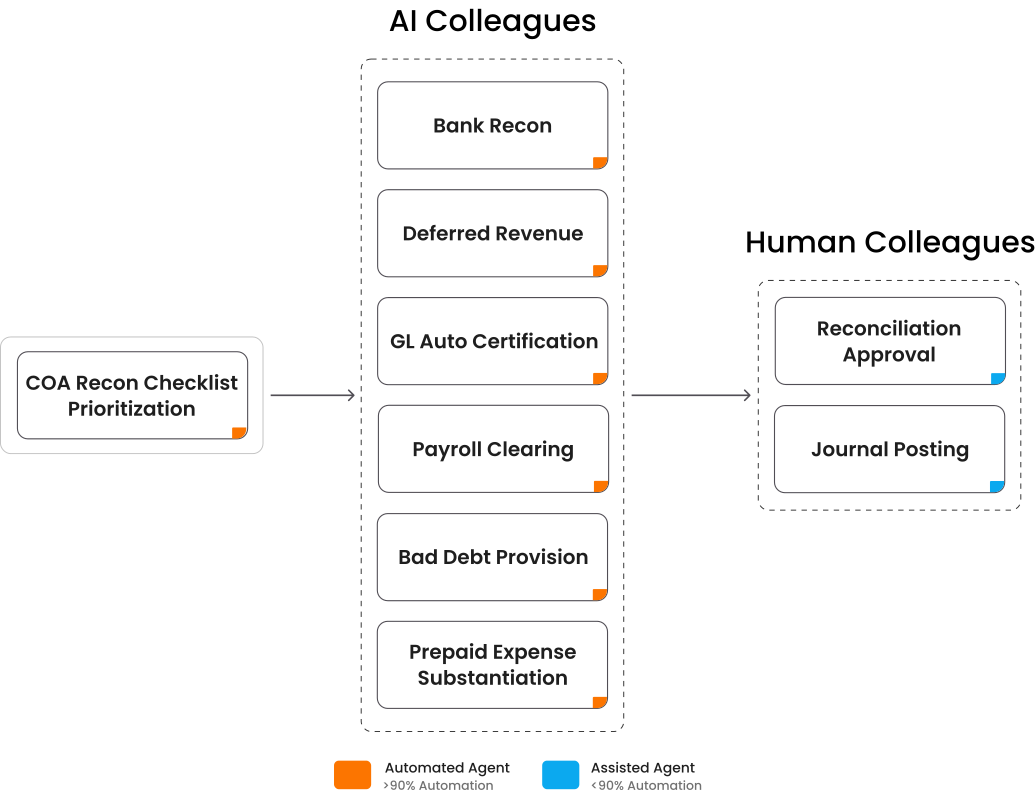
Bank reconciliation is one component of HighRadius's broader AI agent-led reconciliation capabilities. The R2R suite also supports Balance Sheet Reconciliation, which automates account certification, standardizes account formats, and provides real-time visibility across entities. Payroll Reconciliation matches payroll transactions with clearing accounts, flags unresolved items, and posts adjustments, while Intercompany Reconciliation syncs GL and intercompany data, identifies mismatches, and supports adjustment postings.
The suite also includes Credit Card Payment Reconciliation, which matches daily credit card transactions with bank statements and flags mismatches and duplicates. Deferred Revenue Reconciliation automates adjustment calculations, classification, and billing-schedule-driven journals, while Automated Journal Entry creates, validates, and posts journal entries using historical and policy-based logic. Together, these capabilities extend reconciliation automation across the broader R2R process.
Beyond reconciliation, HighRadius brings together the broader Record to Report function on a single platform, including financial close management, anomaly management, intercompany accounting, financial consolidation, and reporting. This connected approach allows finance teams to identify discrepancies earlier, coordinate close activities, streamline intercompany processes, and maintain a consistent view of financial data across the R2R cycle.
Take a deep dive into HighRadius’ R2R solutions
Getting granular visibility and control into your accounting process is just a click away.
Request a Demo
Account Reconciliation
 Achieve up to 90% transaction auto-match with out-of-the-box m
Financial Close Management
Reduce days to close by 30% with a detailed checklist for month-end close
Anomaly Management
Resolve 80% of anomalies with auto-suggested actions.
FAQs on Best Bank Reconciliation Tools
1. What is the best bank reconciliation tool?
The best bank reconciliation software automates transaction matching, exception management, and journal posting to expedite the financial close process. Tools like HighRadius are leading solutions that utilize AI to ensure accuracy, provide real-time visibility, and ensure audit readiness across multiple entities.
2. Can bank reconciliation tools integrate with ERP systems?
Yes. Most modern bank reconciliation tools integrate seamlessly with ERP systems, such as SAP, Oracle, and NetSuite. This enables finance teams to access real-time transaction data, automate matching, and post reconciled entries directly within their accounting workflows—eliminating the need for manual uploads and data silos.
3. What types of companies benefit the most from bank reconciliation software?
Companies managing high transaction volumes, multiple bank accounts, or global entities benefit most from bank reconciliation software. It’s especially valuable for enterprises in retail, manufacturing, and financial services that need faster close cycles, stronger internal controls, and accurate cash visibility.
4. Can AI do a bank reconciliation?
Yes. AI-powered bank reconciliation software uses intelligent agents to automatically match transactions, flag anomalies, and even post journal entries. These AI agents learn from past reconciliations to improve accuracy over time, helping finance teams achieve faster and more reliable financial closes.
5. What are some account reconciliation tools for multi-entity companies?
Multi-entity organizations should look for account reconciliation software that centralizes data across entities, automates intercompany eliminations, and supports multi-currency reporting. HighRadius offers AI-driven reconciliation with real-time visibility and automated workflows, helping finance teams manage complex close processes efficiently across subsidiaries and global operations.
6. What are some alternatives to Excel for month-end account reconciliation?
Alternatives to Excel for month-end account reconciliation include cloud-based bank reconciliation tools, such as HighRadius. These platforms automate data matching, exception handling, and approvals, providing audit trails, version control, and faster closes compared to manual spreadsheet processes.
7. How do bank reconciliation tools improve accounting accuracy?
Bank reconciliation tools improve accuracy by automatically matching transactions, flagging exceptions early, and centralizing all bank and ledger data. This reduces manual errors, speeds up approvals, and provides an audit-ready record for period-end close.
8. How does bank reconciliation automation reduce month-end workload?
Bank reconciliation automation removes manual data entry, automates matching rules, and resolves exceptions faster through AI-driven workflows. By eliminating spreadsheet-heavy tasks, finance teams spend less time on routine reconciliation and more time reviewing insights, speeding up the month-end close with higher accuracy.
9. Is bank reconciliation automation secure for enterprise finance teams?
Yes. Modern bank reconciliation automation platforms use encrypted bank connections, role-based access controls, and audit trails to ensure data security. Enterprise tools like HighRadius maintain compliance with SOC, GDPR, and internal control requirements while automating reconciliations across global entities.
10. Why do companies need bank reconciliation tools?
Companies use bank reconciliation software to eliminate manual matching, reduce errors, streamline month-end close, improve accuracy, and maintain strong audit trails. It also saves significant time by automating repetitive tasks so teams can focus on analysis.
11. Which features should I look for in bank reconciliation tools?
Key features include AI matching, automated exceptions, bank data ingestion, ERP connectivity, dashboards, and approval workflows that support faster and more accurate reconciliation. Look for solutions that scale with your transaction volume and easily adapt to multi-entity or multi-bank environments.