Nimisha specializes in Order-to-Cash (O2C) transformation, crafting strategic narratives at the intersection of B2B SaaS and FinTech. With over four years of experience, she brings deep expertise in electronic invoicing, receivables automation, and digital payments, translating complex autonomous finance capabilities into actionable insights for modern finance leaders. When she’s not analyzing trends in enterprise finance, Nimisha enjoys reading and traveling. Her approach to writing is rooted in clarity, precision, and a strong understanding of real-world financial challenges.
Last updated: 14 July, 2026
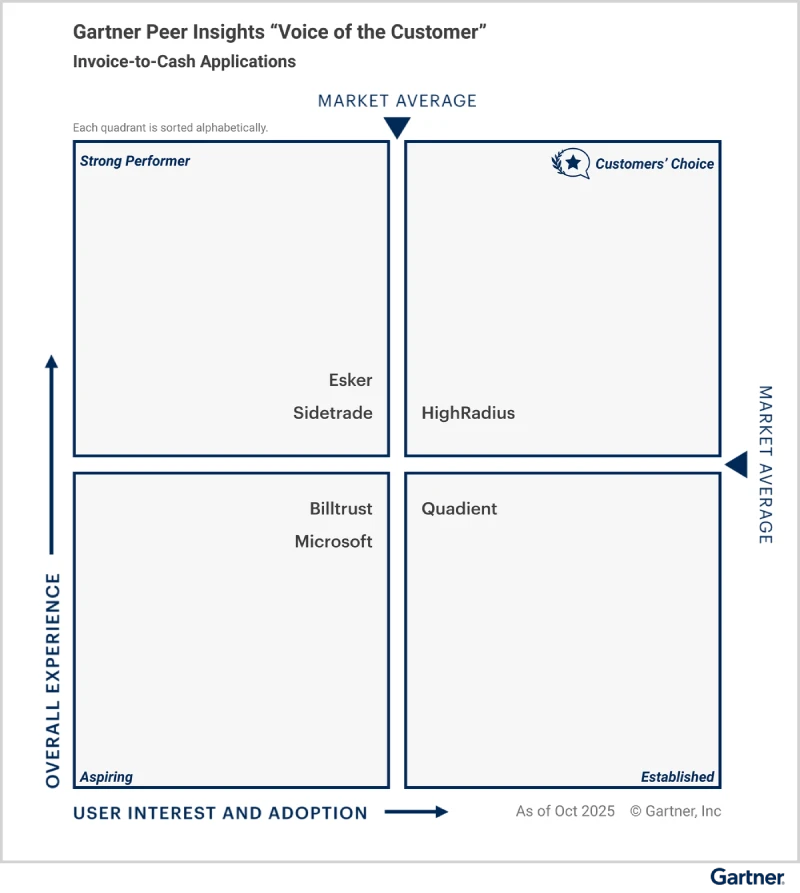
Gartner Magic Quadrant Names HighRadius a Leader in Invoice-to-Cash — 3 Years Running
For CFOs and Accounts Receivable leaders, invoicing is not just an administrative task but a direct driver of cash flow performance. Yet many enterprises still rely on static, generic invoice formats that create ambiguity, increase disputes, and slow down approvals. Standard invoices often lack the personal touch necessary for effective communication with clients and may not capture the attention or engagement needed for prompt payment.
Customized invoices address this gap by tailoring invoice structure, branding, payment terms, and customer information to improve clarity and reduce confusion. When supported by automation, customized invoicing becomes a scalable strategy that enhances billing accuracy, strengthens compliance, and accelerates collections.
In this guide, we explore what customized invoices are, why they matter for enterprise finance teams, and how automation enables sustainable impact.
Table of Contents
What is a Customized Invoice?
Key Components of a Customized Invoice
Why Should Companies Use Customized Invoices?
What is a Customized Invoice Template?
What is Custom Invoice Automation?
How HighRadius Can Help?
What is a Customized Invoice?
A customized invoice is a billing document tailored to a company’s branding, customer requirements, and payment terms. It includes personalized elements such as logos, layout, customer-specific details, clear line items, and defined payment instructions to improve clarity, reduce disputes, and accelerate payment processing.
Key Components of a Customized Invoice
The key components of a customized invoice typically include:
Business Information: This includes the business name, address, phone number, email address, and website. Including this information helps establish trust and credibility between the business and its clients
Invoice Number: Each invoice should have a unique identifier to differentiate it from others. This helps both the business and the customer stay organized
Customer Information: This includes the customer’s name, address, email, and phone number. Including this information is essential for maintaining accurate records and facilitating communication
Description of Products or Services: An itemized description of each product, task, or service included in the invoice should be provided to help customers understand what they are being billed for
Price and Quantity: The quantity of each product multiplied by its price should be clearly indicated on the invoice. This provides transparency and clarity regarding the cost of each item or service
Payment Terms: Clear payment terms, such as the due date and accepted payment methods, should be included to avoid any misunderstandings and ensure timely payments
Branding Elements: Customized invoices often include branding elements such as the company’s logo, color scheme, and font to create a professional and consistent representation of the business
Personalized Messages: Some businesses choose to include personalized messages or thank-you notes to make their customers feel valued and appreciated, enhancing the overall customer experience
By tailoring these key elements to a business’s unique needs, a cohesive and branded invoicing experience can be created, leaving a positive impression on customers and contributing to improved customer experiences.
Example of Customized Invoices
Customized invoices are a powerful tool for businesses to showcase their brand identity and professionalism. Let’s take a look at an example of how a customized invoice can elevate your business.
The customized invoice includes the retailer’s required PO reference, contract pricing terms, tax jurisdiction details, agreed payment terms, and preferred remittance format. Branding remains consistent, but the structure aligns precisely with the customer’s approval workflow.
This level of customization reduces approval delays, minimizes disputes, and ensures faster payment processing.
Why Should Companies Use Customized Invoices?
Customized invoices go beyond formatting. They directly impact cash flow performance, customer experience, and operational efficiency.
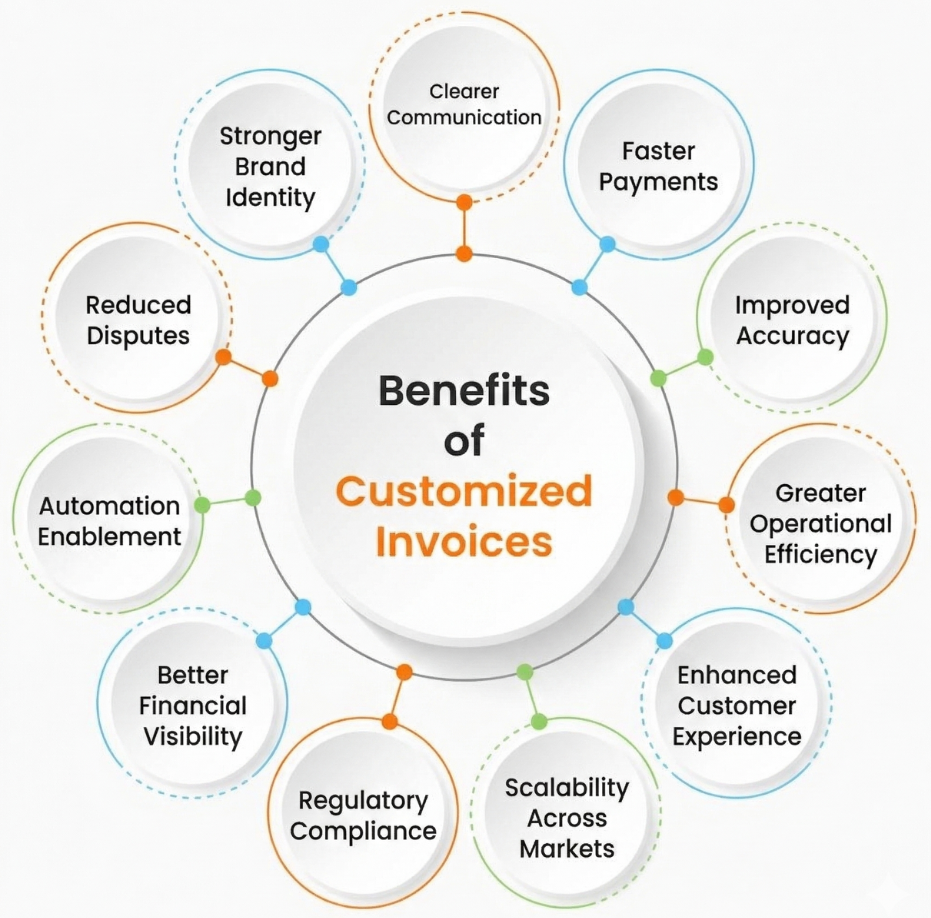
Stronger Brand Identity – Consistent logos, formatting, and design reinforce professionalism and build customer trust.
Clearer Communication – Structured layouts and customer-specific details reduce ambiguity and approval delays.
Faster Payments – Clear payment terms, due dates, and remittance instructions accelerate collections.
Reduced Disputes – Accurate PO references, pricing breakdowns, and contract alignment minimize billing discrepancies.
Improved Accuracy – Standardized templates reduce manual errors in calculations, taxes, and discounts.
Automation Enablement – Customized templates integrate easily with AR and ERP systems for automated generation and delivery.
Better Financial Visibility – Enables tracking of invoice status, outstanding balances, and receivables performance in real time.
Regulatory Compliance – Supports adherence to tax, accounting, and industry-specific invoicing requirements.
Scalability Across Markets – Adapts to multiple currencies, geographies, and customer-specific formatting needs.
Enhanced Customer Experience – Professional, clear invoices improve trust and strengthen long-term business relationships.
What is a Customized Invoice Template?
A customized invoice template is a standardized, pre-approved invoice structure designed to ensure consistency, accuracy, and compliance across all billing transactions. It serves as the foundation for generating customized invoices at scale.
Unlike a one-off invoice design, a template enables organizations to:
Maintain consistent branding and formatting
Standardize required legal and tax fields
Incorporate customer-specific data dynamically
Integrate with ERP and accounts receivable systems
In enterprise environments, invoice templates are often embedded within e-invoicing platforms or AR automation platforms. This ensures invoices are generated automatically with predefined logic, reducing manual intervention while preserving flexibility for customer-specific requirements.
What is Custom Invoice Automation?
Custom invoice automation is the use of software to automatically generate, personalize, and deliver invoices using predefined templates, customer data, and business rules. It eliminates manual data entry by pulling information directly from ERP, billing, or CRM systems, ensuring accuracy, consistency, and compliance at scale.
Automating customized invoices enables organizations to:
Reduce manual errors in pricing, tax calculations, and payment terms
Accelerate invoice generation and delivery cycles
Improve billing accuracy through rule-based validation
Minimize disputes by aligning invoices with contract and PO data
Enable automated reminders for overdue payments
Gain real-time visibility into invoice status and receivables
Scale invoicing operations across entities, currencies, and geographies
Free AR teams to focus on collections and exception handling
Generate customized invoices automatically using predefined templates and customer-specific rules
Integrate directly with ERP systems to eliminate manual data entry
Deliver invoices digitally through Electronic Invoice Presentment and Payment (EIPP)
Offer embedded B2B payment options to accelerate collections
Provide customers with real-time access to invoice status and payment history
Automate reminders, dispute workflows, and follow-ups
Track receivables performance through centralized dashboards
By combining customized invoice generation with EIPP and integrated B2B payments, HighRadius helps enterprises reduce billing errors, minimize disputes, and accelerate cash flow – all within a single, automated workflow. Enhanced transparency also helps improve customer experience and strengthen payment reliability.
Organizations can move from manual invoice processing to a scalable, data-driven receivables strategy that improves operational efficiency and working capital performance.
Learn more about HighRadius’ EIPP Solution
Reduce DSO and connect buyers and suppliers globally with seamless invoicing & payments.
Cut support calls by 50% as buyers self-serve invoices and payments online.
Email Invoice Delivery
Get paid faster with automated invoices and real-time delivery tracking.
e-Adoption Campaign Management
Drive portal adoption effortlessly with targeted campaigns and real-time insights.
Frequently Asked Questions (FAQs)
1. What are some different types of invoices?
Here are some different types of invoices:
Proforma Invoice
Sales Invoice
Overdue Invoice
Consolidated Invoice
Retainer Invoice
Timesheet Invoice
Interim Invoice
Final Invoice
Here are some different types of invoices:
Proforma Invoice
Sales Invoice
Overdue Invoice
Consolidated Invoice
Retainer Invoice
Timesheet Invoice
Interim Invoice
Final Invoice
2. What is the purpose of a custom invoice?
The purpose of a custom invoice is to align billing documents with company branding, customer requirements, and agreed payment terms. Customization improves clarity, reduces disputes, supports compliance, and helps accelerate payment approvals.
The purpose of a custom invoice is to align billing documents with company branding, customer requirements, and agreed payment terms. Customization improves clarity, reduces disputes, supports compliance, and helps accelerate payment approvals.
3. What is the difference between a customs invoice and a commercial invoice?
A customs invoice is used for international shipping and customs clearance, detailing goods, value, origin, and duties. A commercial invoice is used for billing customers and includes itemized charges, taxes, and payment terms for payment processing.
A customs invoice is used for international shipping and customs clearance, detailing goods, value, origin, and duties. A commercial invoice is used for billing customers and includes itemized charges, taxes, and payment terms for payment processing.
4. Why is customizing an invoice design important?
Customizing an invoice design ensures clarity, professionalism, and consistency with brand identity. Structured layouts, clear payment instructions, and customer-specific details reduce billing errors, prevent disputes, and improve the likelihood of on-time payments.
Customizing an invoice design ensures clarity, professionalism, and consistency with brand identity. Structured layouts, clear payment instructions, and customer-specific details reduce billing errors, prevent disputes, and improve the likelihood of on-time payments.
5. How does digital invoice delivery improve payment speed?
Digital invoice delivery reduces mailing delays, enables instant receipt confirmation, and allows customers to access invoices through secure portals. When combined with online payment options, it shortens approval cycles and accelerates collections.
Digital invoice delivery reduces mailing delays, enables instant receipt confirmation, and allows customers to access invoices through secure portals. When combined with online payment options, it shortens approval cycles and accelerates collections.
6. What is Electronic Invoice Presentment and Payment (EIPP)?
Electronic Invoice Presentment and Payment (EIPP) is a digital solution that allows businesses to deliver invoices online and enable customers to view, dispute, and pay them electronically through a secure portal.
Electronic Invoice Presentment and Payment (EIPP) is a digital solution that allows businesses to deliver invoices online and enable customers to view, dispute, and pay them electronically through a secure portal.
7. Can customized invoices support online B2B payments?
Yes. Customized invoices can include embedded payment links, payment instructions, and portal access that enable customers to pay digitally via ACH, cards, or other B2B payment methods, improving convenience and reducing processing time.
Yes. Customized invoices can include embedded payment links, payment instructions, and portal access that enable customers to pay digitally via ACH, cards, or other B2B payment methods, improving convenience and reducing processing time.
8. How do customized invoices reduce payment disputes?
Customized invoices clearly reference contract terms, purchase order numbers, tax details, and itemized charges. This alignment with customer requirements reduces discrepancies, back-and-forth communication, and approval delays.
Customized invoices clearly reference contract terms, purchase order numbers, tax details, and itemized charges. This alignment with customer requirements reduces discrepancies, back-and-forth communication, and approval delays.
HighRadius Named an IDC MarketScape Leader for the Second Time in a Row For AR Automation Software for Large and Midsized Businesses
HighRadius stands out as an IDC MarketScape Leader for AR Automation Software, serving both large and midsized businesses. The IDC report highlights HighRadius’ integration of machine learning across its AR products, enhancing payment matching, credit management, and cash forecasting capabilities.
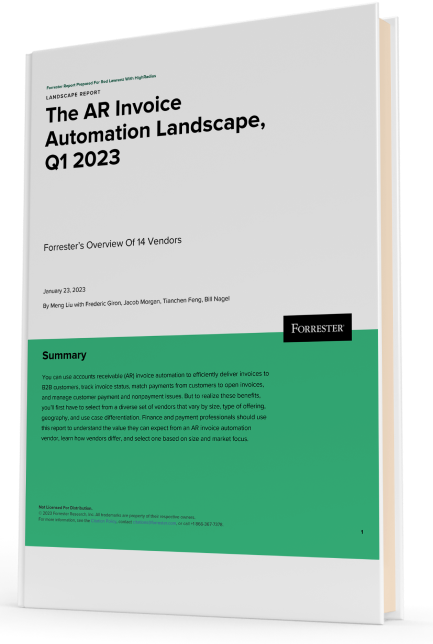
Forrester Recognizes HighRadius in The AR Invoice Automation Landscape Report, Q1 2023
Forrester acknowledges HighRadius’ significant contribution to the industry, particularly for large enterprises in North America and EMEA, reinforcing its position as the sole vendor that comprehensively meets the complex needs of this segment.