Download the CFO-trusted playbook on how to Automate the Accounts Payable Process
Download Free GuideEvery Growing Finance Team Reaches the Same Breaking Point
Invoices arrive through Emails, Supplier Portals, PDFs, Paper mail, and EDI channels. Accounts Payable teams manually enter Invoice Data, Validate Purchase Orders, Route Approvals, Resolve Exceptions and process Payments. As Invoice volumes grow, these manual tasks become a bottleneck.
The result is familiar:
- Invoice Approvals take days instead of hours.
- Duplicate Invoices slip through.
- Early Payment Discounts are missed.
- Suppliers Spend more time following up on Payment Status.
- Finance teams struggle to Close the books on time.
The Good news is that AI-powered Invoice Automation can eliminate most of these Manual activities while Improving Accuracy, Compliance and Visibility.
- AI-powered Invoice Automation streamlines Invoice Processing by Automating Capture, Extraction, Validation, Matching, Approvals and Payment preparation across all ERP systems.
- Automated Invoice Processing reduces Manual work, Accelerates Cycles, Improves Accuracy and Compliance, Strengthens supplier relationships and Enables AP teams to focus on Exceptions.
- The right Invoice Automation Software enables Automation with Intelligent Processing, Touchless Workflows, Automated Matching, ERP Integration, Duplicate detection, Visibility and Analytics.
Table of Contents
- Every Growing Finance Team Reaches the Same Breaking Point
- What Is Accounts Payable Invoice Automation?
- Why Traditional OCR Is No Longer Enough
- How AI Automates Invoice Processing
- Benefits of Automating AP Invoice Processing
- Common Challenges Businesses Face
- How to Choose the Right AP Invoice Automation Software
- AP Automation across 200+ Organization
- The Future of AP Is Autonomous
What Is Accounts Payable Invoice Automation?
Accounts payable (AP) Invoice Automation is the use of Artificial Intelligence, Machine Learning and workflow Automation to Capture, Validate, Approve and process Supplier Invoices with minimal Human intervention.
Instead of manually entering Invoice Information into an ERP, an Intelligent Automation platform can:
- Capture Invoices from multiple channels
- Extract Invoice data using AI
- Match Invoices against Purchase Orders and Receipts
- Route Invoices to the Correct Approvers
- Detect duplicates and anomalies
- Sync approved invoices with your ERP
- Prepare invoices for payment
The objective is simple: Enable Touchless Invoice Processing for the majority of Invoices while allowing AP professionals to focus only on Exceptions.
Why Traditional OCR Is No Longer Enough
Many Organizations still rely on Optical Character Recognition (OCR) to digitize Invoices. While OCR converts scanned documents into Machine-Readable text, it often requires templates and struggles with different Invoice formats.
| Traditional OCR | AI-Powered Invoice Automation |
| Reads text | Understands Invoice content |
| Template-based | Learns new Invoice formats Automatically |
| Manual validation | Intelligent validation |
| Limited Exception handling | AI-driven Exception management |
| Basic Data capture | End-to-end Invoice Processing |
This allows Finance Teams to Automate a much larger percentage of Invoices without constant rule updates.
How AI Automates Invoice Processing
The benefits of AP Invoice Automation extend beyond simply reducing Manual Data Entry. By Automating repetitive tasks across the Invoice Processing workflow, Organizations can Improve Processing speed, reduce Costs, strengthen Accuracy and Compliance, and enable AP teams to focus on higher-value activities.
A modern AP Automation Solution typically follows these steps:
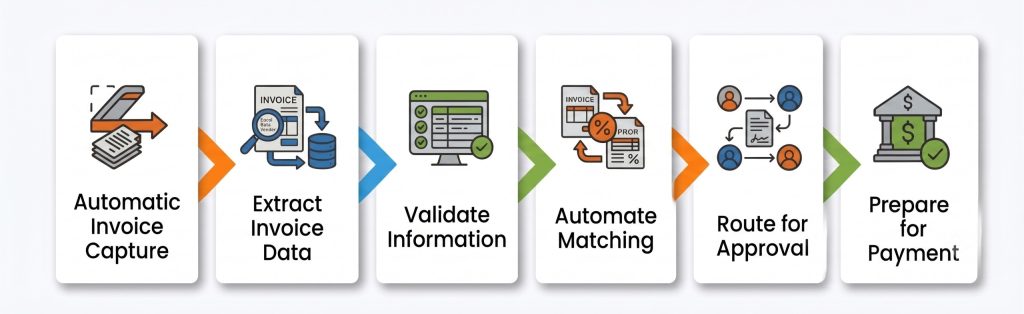
1. Capture Invoices Automatically
AI-powered Invoice Automation brings Invoices from Multiple Channels such as Email Inboxes, Supplier Portals, PDFs, EDI, Scanned Documents & Mobile Uploads into a Centralized Processing workflow. This eliminates the need for AP teams to manually Sort & Monitor different inboxes, portals and document sources to Identify and Organize Incoming Invoices.
By Automating Invoice Capture at the start of the process, Finance teams can reduce Manual effort, Improve Invoice visibility and ensure Invoices enter the AP workflow quickly without unnecessary delays or manual sorting.
2. Extract Invoice Data
AI Identifies key fields such as Supplier name, Invoice number, Invoice Date, Purchase Order, Line Items, Taxes, Payment Terms and Total Amount. AI-powered Data Extraction Eliminates the need for AP professionals to Manually enter Invoice Information into ERP systems. The technology can identify relevant Invoice fields and prepare the Information for subsequent Validation and Processing.
This helps Finance teams process Invoices more Efficiently, even when Suppliers use different Invoice formats and layouts. Over time, AI can improve the Consistency of Data Extraction and reduce the manual effort required to process Invoices.
3. Validate Information
The Platform Validates Invoice details against ERP Master Data, Purchase Order, Goods Receipts, Supplier Records and Business Rules. Automated Validation helps ensure that Invoice Information is Accurate and consistent with the Organization's existing and Supplier Records.
By flagging potential issues early, AP teams can focus on Resolving Exceptions rather than Manually reviewing every Invoice. This helps Organizations maintain greater Accuracy while strengthening controls across the Invoice Processing Process.
4. Automate Matching
Invoices can be Automatically matched using 2-Way Matching, 3-Way Matching & Custom Business Rules. Automated Invoice Matching compares Invoice Information against relevant Purchase Orders and goods receipts to Identify discrepancies. This allows Invoices that meet predefined matching criteria to move through the workflow without unnecessary Manual Intervention.
When Mismatches or other Exceptions are identified, the Invoice can be routed for Human Review. This Exception-based approach allows AP Professionals to focus their Attention on Invoices that require Investigation while routine Transactions continue to be Processed Automatically.
5. Route for Approval
Invoices are Automatically routed based on the Department, Cost Center, Amount Thresholds, Business Unit and the Approval Hierarchy. Configurable approval Workflows Ensure that Invoices are Automatically directed to the Appropriate Approvers based on predefined Organizational rules. This reduces the need for AP teams to manually Identify approvers or follow up on Pending Approvals.
By providing notifications and Enabling approvals across Devices, Automation can help reduce approval delays and Improve workflow Visibility. Finance teams can also Identify where Invoices are waiting for Action and address bottlenecks more Efficiently.
6. Prepare for Payment
Once approved, Invoices are Synchronized with the ERP and become Available for Payment According to company policies. ERP Integration helps ensure that Approved Invoice Information flows into downstream Financial Processes without requiring AP teams to Manually re-enter Data. This creates a more connected workflow from Invoice Processing through Payment Preparation.
By Automating this final step, Organizations can reduce manual touchpoints, improve Data Consistency, and ensure approved invoices are available for payment according to established company policies and payment processes.
Benefits of Automating AP Invoice Processing
Organizations that Automate Invoice Processing commonly achieve improvements in several areas.
Faster Processing
AI reduces Invoice Cycle times from days to hours by Eliminating Manual Data Entry and Routing. By Automating repetitive Processing and Approval tasks, AP teams can move Invoices through the workflow faster, reduce Approval Delays and Minimize Invoice Backlogs. This helps Finance teams maintain a more Efficient and predictable Invoice Processing cycle.
Lower Processing Costs
Automation significantly reduces the Cost per Invoice by minimizing repetitive manual work. By Reducing the time AP Professionals spend on Data entry, Validation and routine Processing tasks, Organizations can handle growing Invoice volumes more Efficiently without proportionally Increasing Manual effort or Processing Costs.
Improved Accuracy
Machine Learning helps Reduce Data Entry Errors, duplicate Invoices and Payment mistakes. Automated Data extraction, Validation and Invoice Matching can Identify Potential discrepancies earlier in the Process, helping AP teams reduce Costly errors and Improve the Accuracy and Consistency of Invoice Information before Invoices are Approved and Paid.
Better Compliance
Automated Audit trails, approval workflows, and policy enforcement improve regulatory compliance and internal controls. By standardizing invoice processing and maintaining visibility into workflow activities, organizations can ensure that established policies are consistently followed while making it easier for finance teams to monitor invoice activity and support audit requirements.
Stronger Supplier Relationships
Suppliers benefit from faster approvals, improved payment visibility, and fewer disputes. A more efficient invoice processing workflow can reduce delays and minimize the need for suppliers to repeatedly follow up with AP teams. This creates a more transparent payment experience while helping organizations build stronger and more reliable supplier relationships.
Greater Team Productivity
AP Professionals Spend less time Entering Data and more Time managing exceptions, Supplier Relationships and strategic Initiatives. By Automating repetitive Invoice Processing activities, Finance teams can redirect their time toward higher-value responsibilities that require human judgment, helping AP professionals contribute more strategically to the broader Finance Function.
Common Challenges Businesses Face
Even after implementing automation, organizations may encounter challenges such as:
- Multiple ERP systems: Managing invoice processing across multiple ERP systems with different data structures and workflows can make integration and data synchronization more complex.
- Global invoice formats: Invoices may vary across countries, languages, currencies, and layouts, making standardized processing more difficult.
- High exception rates: Missing information, data discrepancies, and invoice mismatches can increase manual intervention and limit the benefits of automation.
- Supplier onboarding: Bringing suppliers into an automated invoice processing workflow can be challenging when they use different submission methods and invoice formats.
- Complex approval hierarchies: Multiple business units, departments, cost centers, and approval levels can make it difficult to route invoices to the right approvers efficiently.
- Tax and compliance requirements: Different regional tax regulations and compliance requirements can add complexity to invoice processing and require strong controls.
Selecting an AI-native solution with strong ERP integrations and configurable workflows can help address these complexities.
How to Choose the Right AP Invoice Automation Software
Choosing the right AP invoice automation software requires looking beyond basic invoice processing and considering the capabilities that support the entire invoice lifecycle. The right solution should help organizations automate routine tasks, reduce manual intervention, and improve visibility across the AP process.
When evaluating solutions, look for capabilities such as:
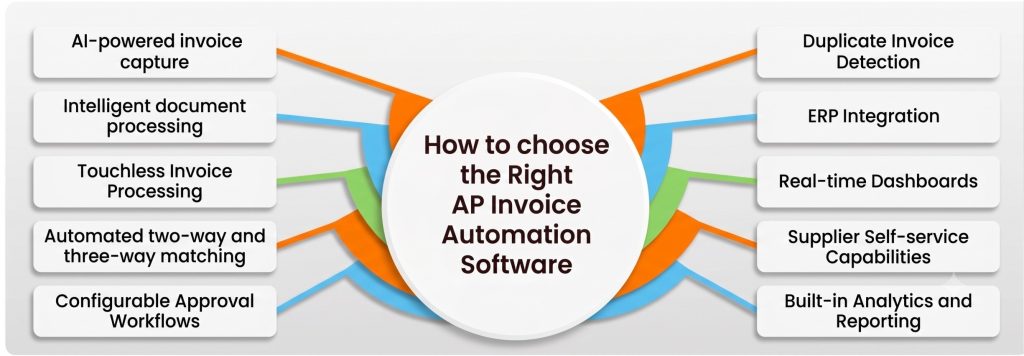
AI-powered invoice capture: The solution should be able to capture invoices from multiple channels and formats with minimal manual intervention. AI-powered invoice capture helps AP teams reduce manual data entry and ensure invoices are brought into the processing workflow quickly and accurately.
Intelligent document processing: Look for intelligent document processing capabilities that can extract relevant information from invoices, even when suppliers use different formats and layouts. This allows finance teams to process a wider range of invoices without relying heavily on manual data entry or constant template updates.
Touchless Invoice Processing: The right platform should enable routine invoices to move through the process with minimal human intervention. By automating repetitive tasks, AP teams can focus their time on invoices that require investigation, approval, or exception handling.
Automated two-way and three-way matching: Automated matching should compare invoice information against purchase orders and, where applicable, goods receipts. This helps identify discrepancies earlier while allowing invoices that meet predefined criteria to move through the workflow without unnecessary manual review.
Configurable Approval Workflows: Invoice approval processes should be flexible enough to support different departments, cost centers, business units, amount thresholds, and approval hierarchies. Configurable workflows help ensure that invoices are automatically routed to the right approvers without relying on manual follow-ups.
Duplicate Invoice Detection: Duplicate invoices can lead to unnecessary payment errors and financial losses. Automated duplicate detection helps identify potential duplicate invoices before they move further through the process, strengthening financial controls and reducing the risk of duplicate payments.
ERP Integration: AP invoice automation software should integrate seamlessly with the organization's existing ERP environment. Strong ERP integration allows invoice data, approvals, and payment-related information to flow between systems without requiring AP teams to manually re-enter information.
Real-time Dashboards: Real-time dashboards provide finance teams with greater visibility into invoice processing activity. Teams can monitor invoice status, identify approval bottlenecks, and understand where invoices may be delayed, helping them take action before backlogs grow.
Supplier Self-service Capabilities: Supplier self-service capabilities can improve communication and reduce the volume of routine inquiries handled by AP teams. When suppliers have better access to relevant invoice or payment information, they can spend less time following up with finance teams about invoice status.
Built-in Analytics and Reporting: Analytics and reporting capabilities help finance leaders understand how the AP process is performing. By monitoring metrics such as processing activity, invoice status, and workflow bottlenecks, teams can identify opportunities to improve efficiency and strengthen the overall invoice processing workflow.
A scalable platform should support both current invoice volumes and future business growth.
AP Automation across 200+ Organization




The Future of AP Is Autonomous
Invoice Automation has evolved beyond Digitizing paper Documents. Today's AI-powered platforms Automate the entire Invoice lifecycle-from Receipt and Validation to Approval and Payment-helping Finance teams Improve Efficiency, Reduce Costs and strengthen Supplier Relationships.
As Finance Organizations continue their Journey toward Autonomous Finance, Intelligent AP Automation will play a foundational role in Enabling Faster, more Accurate and Scalable Financial Operations.
Frequently Asked Questions (FAQs)
1. How can I automate Accounts Payable Invoice Processing?
By Implementing AI-Powered AP Automation Software that Captures Invoices, Extracts Data, validates Information, Routes Approvals and Integrates with your ERP.
2. What is Touchless Invoice Processing?
Touchless Invoice Processing is the Automated handling of Invoices from receipt through Approval without Manual Intervention, except for Exceptions.
3. Does AI replace OCR?
AI builds upon OCR by understanding Invoice Context, learning new document formats, Validating Information and Automating Decision-Making.
4. Can Invoice Automation Integrate with ERP systems?
Yes. Modern AP Automation platforms Integrate with leading ERP systems such as SAP, Oracle, NetSuite, and Microsoft Dynamics.
5. How long does Implementation take?
Implementation timelines vary based on Business Complexity, ERP Integrations and process Standardization, but Cloud-based Solutions typically Deploy faster than Traditional on-premises systems.