Learn How To Reduce 70% of Manual Invoice Tasks with Our Free Datasheet
Download Free DatasheetInvoice processing is a critical part of accounts payable (AP), ensuring supplier invoices are received, verified, approved, paid, and recorded accurately. An efficient invoice processing process helps businesses maintain healthy cash flow, strengthen supplier relationships, and stay compliant with financial policies.
As invoice volumes grow, manual processing becomes difficult to manage. Finance teams often spend valuable time entering data, matching invoices with purchase orders, resolving discrepancies, and tracking approvals leading to delays, errors, and limited visibility.
Modern invoice management software combines standardized workflows with AI-powered automation to streamline these tasks. In this guide, you’ll learn what invoice processing is, how invoice processing works, the key invoice processing steps, common challenges, best practices, and how AI improves efficiency and accuracy across the accounts payable process.
- Invoice processing is a structured workflow that ensures supplier invoices are verified, approved, paid, and recorded accurately while maintaining compliance and financial control.
- An efficient invoice processing process relies on standardized steps, including invoice capture, validation, matching, approvals, payment, and recordkeeping, to minimize errors and payment delays.
- As invoice volumes grow, AI-powered automation helps streamline invoice processing by improving accuracy, accelerating approvals, and giving finance teams greater visibility across the entire workflow.
What Is Invoice Processing?
Invoice processing is the process of receiving, validating, approving, paying, and recording supplier invoices within the accounts payable (AP) function. It ensures invoices are accurate, comply with company policies, and are paid according to agreed payment terms.
The invoice processing process begins when a supplier submits an invoice and ends when the payment is recorded in the general ledger. During this process, finance teams verify invoice details, match invoices with purchase orders (POs) and goods receipt notes (GRNs), resolve discrepancies, obtain approvals, and schedule payments.
Effective invoice processing helps businesses ensure timely supplier payments, improve cash flow visibility, prevent duplicate and fraudulent invoices, maintain compliance, and keep accurate financial records. As invoice volumes increase, many organizations adopt AI-powered invoice processing to automate repetitive tasks, improve accuracy, and gain greater visibility across the entire invoice lifecycle.
Resolve 30% of AP Exceptions Faster
Schedule a demo to see how HighRadius AI automates approvals, accelerates invoice processing, and gives AP teams real-time visibility
How Does Invoice Processing Work?
Invoice processing follows a structured workflow that verifies every supplier invoice before payment. The process begins when an invoice is received and ends when the payment is recorded in the accounting system. Along the way, finance teams validate invoice details, match supporting documents, resolve discrepancies, obtain approvals, and maintain records for compliance and auditing.
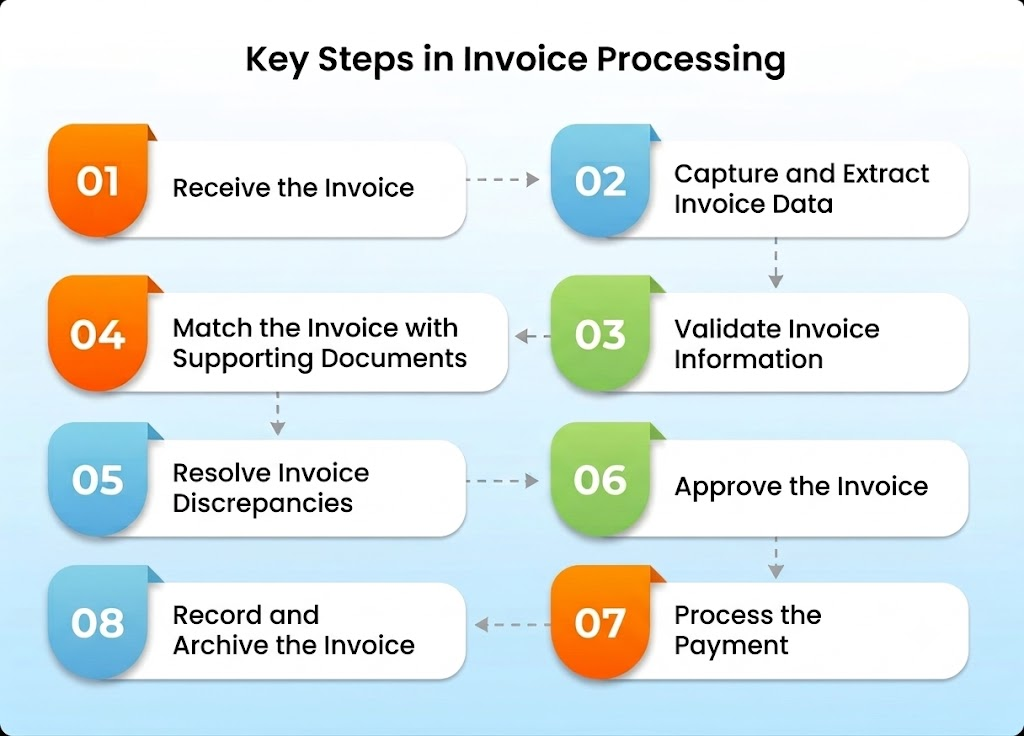
Although workflows vary between organizations, most businesses follow these eight invoice processing steps:
- Receive the invoice
- Capture and extract invoice data
- Validate invoice information
- Match the invoice with supporting documents
- Resolve discrepancies
- Route the invoice for approval
- Process the payment
- Record and archive the invoice
Modern organizations increasingly use AI and automation to streamline these steps, reducing manual effort while improving processing speed, accuracy, and visibility.
Key Steps In Invoice Processing Workflow
Invoice processing software follows a standardized workflow that ensures every supplier invoice is verified, approved, and paid accurately. While the exact process may vary depending on business requirements, the following steps form the foundation of an efficient accounts payable invoice processing workflow.
Step 1: Receive the Invoice
The invoice processing process begins when a supplier submits an invoice. Invoices may be received through multiple channels, including email, supplier portals, electronic data interchange (EDI), or traditional paper documents.
The first priority is ensuring every invoice is captured and stored in a centralized location to prevent missing or duplicate invoices.
Best Practice: Consolidate invoices from all channels into a single repository for better visibility and tracking.
Step 2: Capture and Extract Invoice Data
Once an invoice is received, key information such as the invoice number, supplier name, invoice date, payment terms, tax details, and invoice amount is extracted and entered into the accounting system.
Traditionally, this information was entered manually. Today, many organizations use AI-powered Intelligent Document Processing (IDP) and OCR to automatically extract both header and line-item data, improving speed and accuracy.
Step 3: Validate Invoice Information
Before processing can continue, the invoice details must be validated to ensure they are complete and accurate.
Finance teams verify information such as:
- Supplier details
- Invoice totals
- Tax calculations
- Payment terms
- Duplicate invoices
- Required supporting documents
Early validation helps reduce errors, prevent duplicate payments, and ensure compliance with internal policies.
Step 4: Match the Invoice with Supporting Documents
Invoice matching verifies that the invoice accurately reflects the goods or services ordered and received. Depending on the purchase type, businesses perform two-way or three-way matching by comparing the invoice with the purchase order (PO) and, when applicable, the goods receipt note (GRN).
Any discrepancies in quantities, pricing, or invoice values are flagged for review before the invoice moves to the approval stage.
Step 5: Resolve Invoice Discrepancies
If mismatches are identified during validation or matching, the invoice is placed on hold until the issue is resolved.
Common discrepancies include:
- Incorrect pricing
- Quantity mismatches
- Missing purchase orders
- Duplicate invoices
- Incorrect tax calculations
Resolving these issues before approval helps prevent payment errors and ensures accurate financial records.
Step 6: Approve the Invoice
Once verified, the invoice is routed to the appropriate stakeholders for approval. Approval requirements typically depend on factors such as invoice value, department, cost center, or company policies.
Efficient approval workflows help reduce payment delays while ensuring proper financial controls are maintained.
Step 7: Process the Payment
After approval, payment is scheduled according to the agreed payment terms. Businesses may pay suppliers using ACH transfers, wire transfers, checks, virtual cards, or other electronic payment methods.
Timely payments help organizations avoid late payment penalties, capture early payment discounts, and strengthen supplier relationships.
Step 8: Record and Archive the Invoice
The final step is recording the transaction in the general ledger and securely archiving all supporting documents, including invoices, purchase orders, payment confirmations, and approval records.
Proper recordkeeping supports financial reporting, simplifies audits, and helps organizations meet regulatory and compliance requirements.
PO vs. Non-PO Invoice Processing
Not all invoices follow the same approval process. Depending on how a purchase is made, invoices are generally classified as Purchase Order (PO) invoices or Non-Purchase Order (Non-PO) invoices. Understanding the difference helps finance teams apply the right validation, approval, and payment workflow.
PO Invoice Processing
A PO invoice is linked to an approved purchase order created before goods or services are procured. During invoice processing, the invoice is matched against the purchase order and, where applicable, the goods receipt note (GRN) to verify that the supplier has delivered the correct items at the agreed price.
PO invoice processing is commonly used for:
- Inventory purchases
- Raw materials
- Office equipment
- Manufacturing supplies
Because purchase details are approved in advance, PO invoices generally require fewer manual checks and can be processed more efficiently.
Non-PO Invoice Processing
A Non-PO invoice is submitted without a corresponding purchase order. Since there is no predefined purchasing document to validate against, finance teams must verify the invoice manually, assign the appropriate General Ledger (GL) code, and obtain additional approvals before payment.
Non-PO invoice processing is commonly used for:
- Utility bills
- Rent and lease payments
- Professional services
- Marketing expenses
- Travel and entertainment expenses
Since these invoices rely more heavily on policy-based approvals, they typically require greater oversight to ensure accuracy and compliance.
PO vs. Non-PO Invoice Processing
| PO Invoice | Non-PO Invoice |
| Linked to an approved purchase order | No purchase order is created |
| Requires invoice matching | Requires policy and approval checks |
| Lower risk of payment errors | Higher manual review effort |
| Faster processing | Typically longer approval cycles |
| Common for inventory and goods | Common for indirect and service-based expenses |
2-Way vs. 3-Way Invoice Matching
Invoice matching is one of the most important steps in the invoice processing process. It ensures that businesses only pay for goods or services that were ordered and, when applicable, successfully received. Depending on the type of purchase, organizations typically use 2-way matching or 3-way matching.
What Is 2-Way Matching?
In 2-way matching, the invoice is compared with the purchase order (PO) to verify that key details such as quantities, pricing, and payment terms—match the original purchase agreement.
This method is commonly used when receiving confirmation is not required, such as for recurring services or subscription-based purchases.
Documents compared:
- Invoice
- Purchase Order (PO)
Best suited for:
- Consulting services
- Software subscriptions
- Maintenance contracts
- Recurring vendor invoices
What Is 3-Way Matching?
In 3-way matching, the invoice is validated against both the purchase order (PO) and the goods receipt note (GRN). This additional verification confirms that the goods were actually received before payment is approved.
Because it provides an extra layer of control, 3-way matching helps prevent overpayments, duplicate payments, and fraudulent invoices.
Documents compared:
- Invoice
- Purchase Order (PO)
- Goods Receipt Note (GRN)
Best suited for:
- Inventory purchases
- Manufacturing materials
- Office equipment
- Physical goods
2-Way vs. 3-Way Matching
| 2-Way Matching | 3-Way Matching |
| Compares Invoice + PO | Compares Invoice + PO + GRN |
| Verifies pricing and quantities | Verifies pricing, quantities, and receipt of goods |
| Faster process with fewer checks | Higher control and reduced payment risk |
| Common for services | Common for physical goods |
Types of Invoice Processing Methods
Businesses usually process invoices using one of two methods: automated invoice processing or manual invoice processing. Each method has its own workflow, benefits, and challenges, which we will explore below in detail.
1. Manual invoice processing
Manual invoice processing is a traditional approach where every step of the workflow relies on human effort. Invoices are typically received as paper documents, email attachments, or faxes and must be physically sorted and tracked.
Data from the invoices is manually entered into accounting systems, a labor-intensive process prone to errors like typos, missed fields, or duplicate entries. Verification is conducted by cross-referencing invoice details with purchase orders (POs) and goods receipt notes (GRNs). Any discrepancies require manual investigation and communication with vendors, often leading to delays.
Approval workflows involve routing paper copies or email attachments to approvers, which can be time-consuming and inefficient. Payments are also processed manually, requiring additional checks to ensure accuracy.
While manual processing may work for businesses with minimal invoice volumes, it becomes increasingly challenging to scale. The method is time-consuming, error-prone, and often results in higher costs due to inefficiencies and the need for extensive human resources.
2. Automated invoice processing
Automated invoice processing utilizes advanced technologies like Optical Character Recognition (OCR), machine learning, and Enterprise Resource Planning (ERP) systems to streamline the entire workflow.
Invoices can be received through multiple channels, including physical mail, email, electronic data interchange (EDI), or vendor portals, and are instantly digitized and logged into the system.
Data extraction tools automatically capture details like invoice numbers, vendor names, amounts, and payment terms. The system validates this data against predefined business rules, ensuring alignment with purchase orders (POs) and goods receipt notes (GRNs).
Discrepancies, if any, are flagged for review, reducing the risk of duplicate payments or fraud. Approval workflows are automated, notifying relevant personnel and routing invoices seamlessly. Once approved, payments are scheduled and processed automatically through methods like ACH transfers or wire transfers.
The result is a highly efficient process that saves time, improves accuracy, and ensures compliance with financial policies. Automation is particularly advantageous for businesses handling large volumes of invoices, offering scalability and cost-effectiveness.
Comparison: Automated vs. Manual Invoice Processing
| Aspect | Automated Invoice Processing | Manual Invoice Processing |
| Receiving invoices | Centralized and digitized through OCR and EDI systems. | Paper or email-based with manual organization. |
| Data entry | Automatically extracted and entered into systems. | Requires manual input, prone to errors. |
| Verification | Automatically validates against POs and GRNs with predefined rules. | Manual cross-referencing of documents. |
| Approval workflow | Seamlessly automated, with real-time notifications to approvers. | Delayed due to manual routing and follow-ups. |
| Payment processing | Automatically scheduled and processed. | Manual payment processing requiring repetitive checks. |
| Scalability | Effortlessly handles large invoice volumes. | Difficult to scale for high-volume processing. |
| Error rates | Minimal due to automation. | Higher error rates from manual data entry and checks. |
| Cost-efficiency | Reduces processing costs by up to 80%. | Higher costs due to labor and inefficiencies. |
Why Should Businesses Automate Invoice Processing?
For B2B organizations, where invoice volumes are high and accuracy is critical, automating invoice payment processing is a necessity. Let’s understand why automating invoice processing is necessary.
1. Eliminate manual errors
When invoices are handled manually, mistakes can happen, like paying the same bill twice or entering the wrong information. These errors can harm trust with vendors and damage relationships, which might disrupt the supply chain and reduce profits.
2. Save time and improve productivity
Processing invoices the traditional way is often slow. It may require several approvals, causing delays in operations. This means accounting teams can’t focus on important projects, which can hold back innovation and make it harder for the company to respond to market changes.
3. Lower operational costs
Sticking with manual processing comes with high expenses, averaging about $10 for each invoice. This inefficiency cuts into profits and takes away funds that could be used for growth or improving customer service.
4. Get real-time insights and control
Without automation, companies can’t track invoices in real-time, which might lead to cash flow problems and missed payments. Not being able to quickly fix errors can result in late fees and strain relationships with vendors.
5. Build stronger vendor relationships
Using manual processes can hurt vendor trust due to mistakes and payment delays. This can create tension in partnerships and could disrupt services, putting the company at a disadvantage compared to competitors.
How Does AI Improve Invoice Processing ?
Artificial intelligence enhances invoice processing by automating repetitive tasks, improving data accuracy, and helping finance teams resolve exceptions faster. Rather than replacing the invoice processing workflow, AI strengthens each stage of the process from invoice capture to payment by reducing manual intervention and enabling faster, more informed decisions.
Here’s how AI improves invoice processing:
1. Intelligent Invoice Capture
AI automatically captures invoices received through email, supplier portals, electronic data interchange (EDI), scanned documents, and PDFs, consolidating them into a centralized workflow. This reduces the risk of missing invoices while eliminating manual document collection.
2. Template-Free Data Extraction
Unlike traditional OCR, AI uses Intelligent Document Processing (IDP) to understand invoice layouts and extract header and line-item data without relying on predefined templates. This improves accuracy across invoices with different formats and structures.
3. Intelligent Validation
AI validates extracted invoice data against business rules, supplier records, tax requirements, and payment terms. It can identify duplicate invoices, missing information, and inconsistent values before invoices move to the approval stage.
4. Automated Invoice Matching
AI automatically performs two-way or three-way matching by comparing invoice data with purchase orders (POs) and goods receipt notes (GRNs). It verifies quantities, pricing, invoice values, and predefined tolerance limits, while flagging only genuine discrepancies for review. This reduces manual verification and accelerates invoice approvals.
5. AI-Assisted GL Coding
AI recommends General Ledger (GL) codes based on historical transactions, supplier information, and business rules, helping finance teams maintain consistent financial reporting while reducing manual coding effort.
6. Smarter Approval Workflows
AI routes invoices to the appropriate approvers based on predefined rules such as invoice value, department, or cost center. Automated reminders and workflow tracking help reduce approval delays and improve process visibility.
7. Predictive Exception Handling
By learning from historical invoice data, AI can identify recurring exception patterns, prioritize high-risk invoices, and help finance teams resolve issues faster. Instead of reviewing every invoice, AP teams can focus on invoices that genuinely require attention.
8. Real-Time Analytics and Continuous Learning
AI provides real-time insights into invoice processing performance, including cycle times, exception rates, approval bottlenecks, and payment trends. As it processes more invoices, machine learning continuously improves extraction accuracy and workflow efficiency.
Common Invoice Processing Challenges
As businesses grow, inefficiencies in invoice processing can lead to issues like missing documents, data inaccuracies, and routing delays. These inefficiencies inflate costs, disrupt workflows, and weaken vendor relationships. HighRadius accounts payable automation offers technology-driven solutions to address these challenges and optimize your processes.
| Challenge | Problem | Solution | How HighRadius AP Automation Software helps |
| Missing Documents | Missing invoices or supporting documents result from disparate systems that fail to maintain a unified record of files and attachments. | Centralize all invoices into a single repository.Use cloud-based platforms for real-time access and secure storage. | AI-based invoice capture ensures 100% data capture from various formats and channels, storing and organizing invoices automatically in a centralized AP Inbox. |
| Inaccurate Data | Manual data entry and inconsistent formats cause invoice errors, such as incorrect client details or miscalculations, leading to delays. | Leverage OCR and machine learning for automated data capture and validation.Automate checks against POs and GRNs for accuracy. | Automated invoice processing eliminates manual entry, validates invoices against rules, and flags anomalies like duplicates or incorrect pricing. |
| Invoice Status | Unknown Lack of visibility into processing workflows causes bottlenecks, late payments, and vendor relationship issues. | Use workflow automation tools for end-to-end visibility.Implement dashboards to track approvals and pending payments. | Reporting & analytics provides 360° AP process visibility via customizable dashboards. Automated alerts ensure timely actions on overdue tasks, preventing workflow disruptions. |
| Routing Errors | Manually routing invoices increases delays, misplaced approvals, and higher administrative costs. | Automate routing with AI tools to assign invoices to appropriate approvers. Configure escalations for unapproved invoices. | The Approval Workflows feature automates routing based on role-based thresholds, ensuring invoices reach the correct approvers. |
Best Practices to Improve Invoice Processing
An efficient invoice processing process combines standardized workflows with the right technology and internal controls. The following best practices help improve accuracy, reduce delays, and create a more scalable accounts payable operation.
1. Evaluate your current process
Start by assessing your existing invoice processing workflow. Map out every step, from invoice receipt to payment, and identify inefficiencies or bottlenecks. Collect key performance metrics such as:
- Average processing time per invoice
- Error rates in data entry or approvals
- Percentage of late payments
Consult team members involved in the workflow to gather insights into their challenges. Compare your process with industry best practices to pinpoint gaps. For example, are you leveraging automation? Are your approval workflows optimized? A thorough evaluation lays the groundwork for targeted improvements.
2. Standardize invoice formats
A standardized invoice format ensures clarity and reduces errors, making the process smoother for both businesses and clients. A professional invoice should include:
- Company logo and contact details
- Unique invoice number and issue date
- Client details and payment terms
- Itemized list of services or products
- Applicable taxes and total amount due
Standardization helps avoid confusion, speeds up processing, and reinforces brand consistency. Automation tools can simplify this by applying predefined templates across all invoices.
3. Opt for electronic invoicing
Electronic invoicing, or e-invoicing, digitizes the entire invoicing process, eliminating the need for physical paperwork. Benefits include:
- Faster delivery: E-invoices reach clients instantly via email or invoicing platforms.
- Improved tracking: Digital systems provide real-time updates on invoice statuses, including when they are viewed.
- Data accuracy: Automated data entry and reconciliation reduce errors compared to manual methods.
4. Set clear payment terms
Transparent payment terms foster trust and ensure timely payments. Key elements of effective payment terms include:
- Due dates: Specify whether payments are due upon receipt, within 30 days, or another timeframe.
- Accepted payment methods: Include options like bank transfers, credit cards, or online platforms.
- Incentives for early payments: Offer discounts for payments made within a specified period, e.g., 2% off for payments within 10 days.
- Late payment penalties: Clearly state consequences for delayed payments, such as interest charges or late fees.
5. Maintain accurate records
Accurate record-keeping is fundamental for efficient invoice processing. This involves organizing all invoices and related data, including:
- Invoice numbers and issue dates
- Client details and payment terms
- Payment statuses and amounts due
Regular audits of your records can help identify inconsistencies or discrepancies. Use reliable software for data management and create backups to safeguard against data loss.
6. Seek client feedback
Engage with your clients to identify areas for improvement in your invoicing process. Use surveys, direct communication, or feedback forms to ask questions such as:
- Was the invoice format clear and detailed?
- Were the payment terms easy to understand?
- Were there any delays or issues in receiving the invoice?
Implementing client suggestions not only enhances efficiency but also strengthens business relationships.
7. Stay updated on best practices
Keep abreast of the latest trends and technologies in invoice processing. Join industry forums, attend webinars, and network with peers to learn about emerging tools and strategies. Staying informed helps you maintain a competitive edge and adapt to evolving business needs.
8. Implement automation tools
Automation is a game-changer for invoice payment processing. Tools like accounts payable automation software streamline tasks, reduce manual effort, and ensure accuracy. Automation can handle:
- Data extraction from invoices using OCR and machine learning.
- Automatic validation of invoice details against purchase orders (POs).
- Seamless approval workflows by routing invoices to the correct approvers.
- Real-time tracking of invoice statuses and payment progress.
For example, AP automation can instantly flag discrepancies, send reminders for overdue payments, and generate reports. Integrating automation tools with ERP systems further enhances consistency and data accuracy.
How HighRadius Can Help?
HighRadius streamlines invoice processing by addressing common inefficiencies through advanced automation and AI-driven solutions. Here are the benefits that enhance the invoice processing workflow:
1. AI Invoice capture
With HighRadius, you can enjoy 100% accurate invoice data capture, eliminating the hassle of manual entry. This means you’ll save valuable time and resources, while also ensuring that no invoices are overlooked, leading to smoother cash flow management and timely payments.
2. Invoice matching & policy checks
Automatic invoice matching means that you can trust your invoices are verified against purchase orders and goods receipt notes in real time. This reduces costly delays and errors, ensuring that your financial processes are compliant and efficient, which ultimately enhances your bottom line.
3. Exception resolution & approval workflows
Fast and efficient resolution of discrepancies ensures that your payment cycles remain uninterrupted. With streamlined approval processes, you can experience faster decision-making and turnaround times, allowing your team to focus on strategic initiatives instead of getting bogged down by exceptions.
4. Automated invoice processing
Enjoy comprehensive automation that minimizes manual intervention at every step of the invoice lifecycle. This leads to quicker processing times, reduced human errors, and an overall increase in operational efficiency, enabling your team to allocate their time to high-value tasks.
5. AI-powered AP inbox
The centralized AI-powered AP inbox simplifies invoice-related communications, improving vendor relationships and responsiveness. By intelligently managing inquiries and classifying emails, you can ensure that all invoices are organized and processed without delays, fostering trust and collaboration with your suppliers.
6. Reporting & analytics
Gain real-time visibility into your invoice processing lifecycle with customizable dashboards. This insight allows you to quickly identify and address bottlenecks, optimize workflows, and make informed decisions that enhance overall process efficiency and drive continuous improvement in your accounts payable operations.

Frequently Asked Questions (FAQs)
1. 1. What is invoice processing?
1. 1. What is invoice processing?
Invoice processing is the end-to-end process of receiving, validating, approving, paying, and recording supplier invoices. It ensures invoices are accurate, compliant, and paid according to agreed payment terms.
2. What are the key invoice processing steps?
2. What are the key invoice processing steps?
The three main steps in invoice processing are:
-
- receiving the invoice (via mail, email, or software)
-
- verifying it (matching it with purchase orders and delivery receipts), and
-
- payment approval (routing it through workflows before processing payments).
These steps ensure a smooth invoice payment processing workflow.
3. What is the difference between PO and Non-PO invoice processing?
3. What is the difference between PO and Non-PO invoice processing?
PO invoice processing is based on an approved purchase order and typically involves invoice matching before payment. Non-PO invoice processing does not have a purchase order and usually requires additional validation, GL coding, and approvals.
4. How many invoices can be processed in a day?
4. How many invoices can be processed in a day?
The number of invoices processed varies based on the method used. Manually, a single AP clerk can handle 20-30 invoices daily. Automated systems can process hundreds or even thousands of invoices daily, depending on the software’s efficiency and the invoice processing steps involved.
5. How to reduce invoice processing time?
5. How to reduce invoice processing time?
You can reduce invoice processing time by automating the invoice payment processing workflow, using tools with OCR for data capture, implementing centralized systems, and streamlining approval processes. These steps optimize how to process invoices efficiently and quickly.
6. How does AI improve invoice processing?
6. How does AI improve invoice processing?
AI improves invoice processing by automating invoice capture, template-free data extraction, intelligent validation, invoice matching, approval workflows, GL coding, exception handling, and analytics, helping finance teams reduce manual effort and improve processing accuracy.
7. When should a business automate invoice processing?
7. When should a business automate invoice processing?
Businesses should consider automation when invoice volumes increase, manual errors become frequent, approvals are delayed, or greater visibility and scalability are needed within accounts payable operations.