OCR, or Optical Character Recognition, is a powerful technology in accounts payable that automates the extraction of crucial data from various invoice formats such as scanned paper documents, PDFs, or image files. By converting this unstructured image text into code, it makes structured, machine-readable data that can be used for data processing. OCR eliminates the need for manual data entry. This modern technology integrated with AI accelerates the entire AP invoice approval workflow and also significantly reduces human errors, leading to faster, more accurate processing with seamless accounts payable cycle.
Below, there’s the breakdown of the benefits of using OCR for invoice processing, how accurate and reliable OCR data extraction is, and tips for integrating OCR into your daily business operations.
Optical Character Recognition (OCR) is a technology that extracts text from images, PDFs, and other static files, converting it into code for data processing. Given that up to 90% of business data is in unstructured formats, OCR is crucial in making this information accessible and usable.
OCR allows businesses to convert non-editable documents, such as scanned invoices, PDF files, or images, into searchable, editable data when applied to invoice processing. For example, when you scan a paper invoice from a vendor, it’s typically saved as an image file on your system. You must manually enter the invoice details without OCR into your AP software. With OCR, the software automatically reads the contents of the scanned invoice. It converts it into text that can be edited and processed by your AP system, drastically reducing manual intervention.
Invoice OCR is an AP system that helps in capturing information from invoices and other financial documents and converting them into a digital format. It scans invoices of any format and automatically pulls important details like invoice numbers, vendor names, and payment amounts.
OCR Captures the Data. HighRadius Does the Rest
See how HighRadius auto-codes, validates, and routes invoices with zero manual review.
Without OCR, handling invoices would require manually entering each piece of data into an enterprise resource planning (ERP) system and cross-checking it against purchase orders and other documents to ensure accuracy. While manual entry might be feasible for a small number of invoices, it becomes overwhelming and error-prone when dealing with large volumes, increasing the risk of mistakes, delays, and fraud. To boost the efficiency of your accounts payable (AP) department and reduce reliance on manual data entry, Optical Character Recognition (OCR) technology is critical to automating complex workflows like invoice processing.
Without OCR, your team must manually scan each invoice to extract essential details, such as:
After capturing these details, they still need to verify each invoice by cross-referencing it with purchase orders (two-way matching), purchase orders and receipts (three-way matching), and sometimes quality inspection reports (four-way matching) to ensure accuracy and legitimacy. This process consumes valuable time and resources, increasing as your business expands and works with more vendors.
Accounts payable OCR software is a digital tool that automatically reads and extracts key information from invoices, such as vendor name, invoice number, date, and amount, using OCR and AI. By converting scanned or emailed invoices into structured, machine-readable data it eliminates manual data entry, reduces processing errors, and accelerates the invoice approval and payment cycle.
With HighRadius Accounts Payable OCR software, finance teams go beyond basic data capture. The solution combines advanced OCR technology with AI-driven validation to accurately extract header and line-level data, even from complex or non-standard invoice formats. It seamlessly integrates with leading ERPs to enable straight-through invoice processing, real-time exception handling, and touchless approvals. As a result, AP departments experience faster invoice turnaround, fewer mismatches, and more reliable financial data across their procure-to-pay cycle.

OCR invoice processing streamlines your AP operations through essential steps that enable your system to read and interpret text from scanned invoices accurately. Here’s a breakdown of how it works:
The first step in automating invoice processing with OCR is converting the invoice into a digital format. If your vendor provides the invoice via email, you can directly upload it. However, for those still dealing with physical invoices, you’ll need to scan or upload them to create a digital version.
Before the OCR software begins, the image may undergo enhancements to improve clarity. Adjustments like tweaking brightness, sharpening edges, and removing imperfections ensure the document is clear and ready for precise text recognition.
Once the image is optimized, the OCR technology analyzes each pixel to identify characters—numbers, letters, or symbols. The system may even reference a font database to increase this recognition process’s accuracy.
After identifying the characters, the OCR software assembles them into coherent words and sentences, matching the original document’s content. This extracted data is transferred into the appropriate fields within your AP system and is ready for processing.
The extracted data undergoes a final review to ensure accuracy. Your AP team may check the OCR output for errors or omissions before the invoice is approved. Given OCR’s high accuracy, these checks should be minimal but essential for maintaining data integrity.
OCR invoice processing can be tailored to fit various needs, with different methods offering distinct advantages:
This method uses predefined templates to extract data from invoices with consistent formats, making it ideal for vendors who use standard layouts.
Machine learning algorithms enhance the system’s adaptability, allowing it to recognize and extract data from various invoice formats without relying on templates.
Cloud-based OCR offers flexibility and scalability, making it accessible from anywhere and easy to integrate into existing workflows.
For businesses focused on compliance and data security, on-premise OCR solutions provide enhanced control over data management.
While traditional OCR invoice processing helps capture and digitize data, AI-powered OCR takes it further by combining automation, machine learning, and integration capabilities. These OCR core capabilities allow AP teams to handle multiple invoices, increase processing accuracy, and speed up invoice approvals. Below are the key capabilities that make AI-powered OCR a strategic advantage for modern AP teams.
AI-powered OCR can capture invoices across formats, PDFs, scanned images, emails, and even handwritten documents, without relying on rigid templates. This flexibility ensures consistent accuracy whether suppliers send invoices in structured or unstructured formats, making it easier for AP teams to standardize processes and reduce manual work.
Unlike traditional OCR, which may misread varying invoice layouts, AI-powered OCR applies machine learning to adapt over time. It learns from corrections and exceptions, improving accuracy with every invoice processed. This reduces errors, strengthens compliance, and ensures financial data is captured correctly without repeated manual reviews.
With AI-powered OCR core capabilities, invoices are not only captured but also routed instantly into approval workflows. Businesses can configure real-time approvals based on location-specific compliance needs or geo-targeted teams, reducing turnaround times. This enables global organizations to process invoices quickly while meeting local approval policies.
AI-powered OCR goes beyond simple data extraction by automating invoice coding with GL accounts, cost centers, and tax categories. These geo-targeted coding rules adapt to country-specific accounting standards, helping multinational businesses stay compliant while reducing the workload for finance teams. This ensures every invoice is accurate and audit-ready.
A key OCR core capability is integration. AI-powered OCR connects directly with major ERP and AP automation solutions, ensuring that invoice data flows smoothly into existing financial systems. Geo-targeted integration options allow businesses to standardize AP processes across regions, creating unified visibility and scalability for global operations.
OCR in Automated invoice processing enhances AP analysts’ efficiency by automating invoice data entry, ensuring zero manual errors, and saving costs. It ultimately improves accuracy in accounts payable and ensures timely payments.
If manual invoice processing is still in practice in your organization, try adopting HighRadius’ AI-powered Accounts Payable automation software could be beneficial.
OCR technology drastically reduces manual data entry, allowing your team to focus on strategic tasks like financial analysis or vendor negotiations.
Even experienced AP professionals can make costly errors. OCR minimizes the risk of issues like duplicate payments, transposed values, overpayments, lost invoices, late fees, or missed discounts.
Manual systems are limited by human resources, which can slow down invoice processing as your business grows. OCR can quickly process large invoices, ensuring on-time payments and improving vendor relationships.
By automating invoice processing, OCR reduces the need for additional headcount and allows your company to scale without adding labor costs. Additionally, timely payments help you avoid late fees and take advantage of early payment discounts.
OCR captures invoice data with high accuracy, reducing discrepancies and ensuring that your financial records are precise, which is crucial for maintaining visibility into cash flow and overall economic health.
OCR ensures accurate record-keeping, which is essential for compliance with financial regulations and tax laws
OCR invoice processing has revolutionized accounts payable, automating tedious manual tasks. Even a digital invoice offers limited efficiency without OCR, as AP teams would still need to enter data into their systems manually. While OCR dramatically simplifies this process by extracting data from PDFs and reducing manual data entry, it’s not without its limitations.
Here are some of the other challenges one might encounter in OCR Invoice Processing:
Despite the high accuracy rates of OCR technology, it could be more flawless. About one in every ten characters might be misinterpreted, leading to significant errors, especially when processing hundreds of invoices each month.
Additionally, OCR sometimes needs help capturing all line items, making it easier to trust the process with human oversight fully. To ensure compliance and accuracy, particularly before audits, your team must review and correct these errors, which can be time-consuming. Thus, while OCR can reduce manual work, it doesn’t eliminate it.
OCR technology is designed to “learn” and adapt over time, improving accuracy as it processes similar documents. However, a business’s variety of invoices can limit this benefit.
Frequent changes in vendor formats or one-off project invoices can hinder the OCR system’s ability to develop consistent accuracy. As a result, the full potential of OCR’s machine-learning capabilities may not be realized in a dynamic AP environment.
To successfully implement OCR in your AP workflow, follow these steps:
Follow these best practices to maximize the benefits of OCR in your business:
Identify the specific documents or processes where OCR will add the most value. Focus on areas with high manual data entry, repetitive tasks, or where accuracy is critical, such as invoice processing. Set measurable goals like reducing processing time, improving data accuracy, or achieving specific cost savings.
Evaluate your document volume, accuracy requirements, and budget to select the best OCR solution. Consider features like pre-trained templates, machine learning capabilities, language support, and integration options. Test different software options with your specific documents to assess their Performance.
Ensure that documents are scanned or captured in high resolution (300 DPI or higher) with good contrast and minimal noise. Standardize document formats (e.g., PDF/A) to facilitate easier processing by the OCR software.
If your documents have consistent layouts, create templates in the OCR software to define where data should be extracted. For machine learning-based OCR, provide a training set of labeled documents to teach the system to recognize different fonts, layouts, and data types. Implement validation rules to check for errors and inconsistencies in extracted data.
Set up a quality assurance process where humans can review and validate extracted data. Feedback from these reviews can continually be used to improve the OCR system’s accuracy.
Ensure the OCR software can export extracted data to your accounting software, databases, or document management systems. Integrate OCR with your workflow automation tools to streamline processes like invoice approval, data entry, and document archiving.
In today’s fast-paced business environment, efficient invoice processing is crucial for maintaining healthy cash flow and vendor relationships. One of the key technologies driving efficiency in accounts payable (AP) is Optical Character Recognition (OCR). However, not all OCR solutions are created equal. HighRadius stands out in the market by offering advanced OCR capabilities that integrate seamlessly into AP workflows, significantly enhancing the accuracy, speed, and compliance of invoice processing.
HighRadius’ invoice processing and invoice matching capabilities are designed to minimize the effort required for invoice management by automating key tasks and ensuring compliance with industry standards. Here’s how HighRadius can transform your AP process:
HighRadius performs comprehensive validation checks on every invoice to ensure data accuracy before it enters your financial system. The software automatically highlights any validation failures as exceptions, bringing them to the AP processor’s attention at the invoice level. This proactive approach prevents errors from slipping through and ensures that only accurate, validated data moves forward in the process.
One of the most time-consuming tasks in invoice processing is matching invoice details against purchase orders and receipts. HighRadius automates this process by performing three-way and two-way matching, comparing the invoice data with the purchase order and receipt details. Any discrepancies are flagged as exceptions, allowing the AP team to quickly address potential issues and ensure that only accurate, legitimate invoices are processed.
Duplicate invoices can lead to overpayments and financial discrepancies. HighRadius’ sophisticated algorithms identify potential duplicate invoices submitted by suppliers, flagging these anomalies for the AP processor. This feature helps prevent duplicate payments and ensures that your financial records remain accurate and consistent.
Compliance with country-specific e-invoicing regulations is a critical concern for global businesses. HighRadius’ solution ensures that all invoices are checked against relevant legislative guidelines before they are submitted for approval. This not only reduces the risk of non-compliance but also streamlines the approval process by ensuring that invoices are compliant from the outset.
OCR for invoice processing uses optical character recognition to read invoice content from a PDF, scanned image, or paper invoice and turn it into usable invoice data. In AP, this helps teams extract details like the invoice number, invoice date, line item data, and totals without manual data entry, so invoice processing becomes faster and more accurate. OCR invoice processing is most effective when it is part of a broader AP workflow with validation and exception handling.
OCR invoice processing works by capturing the invoice, reading the text, extracting the data, and sending that information into the accounts payable workflow for review and posting. A strong AP OCR software flow usually includes invoice capture, preprocessing, data extraction, validation, and integration with accounting software or ERP systems. That is why OCR in invoice processing is not just about reading text it is about helping AP teams process invoices with fewer delays and less manual effort.
A good OCR software can extract core invoice data such as vendor name, invoice number, invoice date, due date, invoice amount, tax fields, and line item details. In stronger AP use cases, OCR also helps capture purchase order references, payment terms, and other data fields that support matching and approval. The more structured the invoice formats and the better the validation, the more reliable the data extraction becomes.
The biggest benefit of OCR invoice processing is that it reduces manual data entry and helps AP teams process invoices faster with fewer errors. It also supports better invoice management, quicker approvals, lower processing cost, and more consistent handling of high invoice volume. For many AP teams, the real value is not only speed, but also the ability to automate invoice processing while keeping control over exceptions.
OCR accuracy depends on the quality of the PDF, the invoice layout, and whether the software includes validation or AI-based checks. Simple, clean invoice formats are usually easier to read, while paper invoice scans, low-resolution files, handwritten notes, and unusual invoice layouts can reduce accuracy. That is why modern AP teams usually choose OCR invoice processing software that combines OCR technology with rules and review steps instead of relying on OCR alone.
Implementing OCR starts with deciding where invoice capture happens, what invoice formats you will accept, and which data fields need to be extracted. From there, AP teams should map the accounts payable workflow, define approval rules, connect the OCR software to accounting software, and test how exceptions will be handled. The best implementations are simple for users, but strong behind the scenes, so the AP team can automate invoice processing without losing visibility or control.
OCR software is the technology that reads text from a document, while OCR invoice processing software is built specifically to handle invoice workflows in accounts payable. That means it does more than just extract data from invoices. It helps validate invoice data, support invoice management, and move information into the AP process for approval and posting. For teams choosing OCR software, this difference matters because invoice processing requires accuracy, workflow logic, and exception handling, not just text recognition.
The best OCR for invoice processing is the one that fits your invoice volume, invoice layouts, and AP workflow, while also reducing manual invoice processing. Look for software that can extract data from invoices, handle PDF and scanned files, support validation, integrate with accounting software, and scale as invoice volume grows. If your AP team wants to automate invoice processing in a way that is both efficient and reliable, choose OCR software that combines OCR technology with AI and workflow automation.

Positioned highest for delivering comprehensive automation across collections, credit, deductions, disputes, and multi-ERP integration - enabling standardized, scalable I2C transformation.
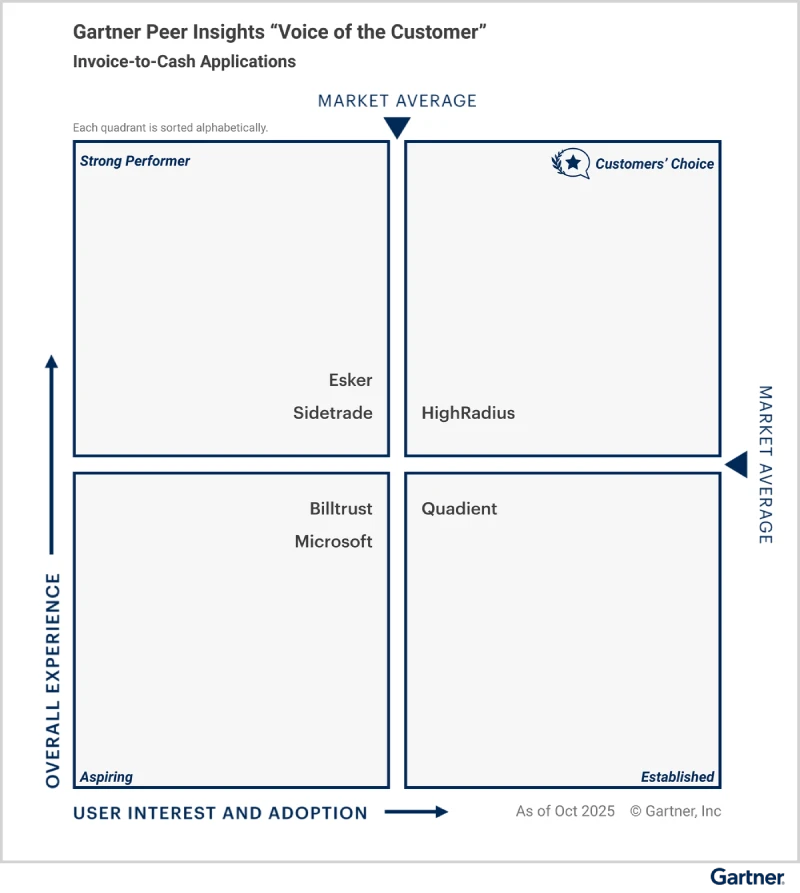
Explore why HighRadius has been a Digital World Class Vendor for order-to-cash automation software – two years in a row.

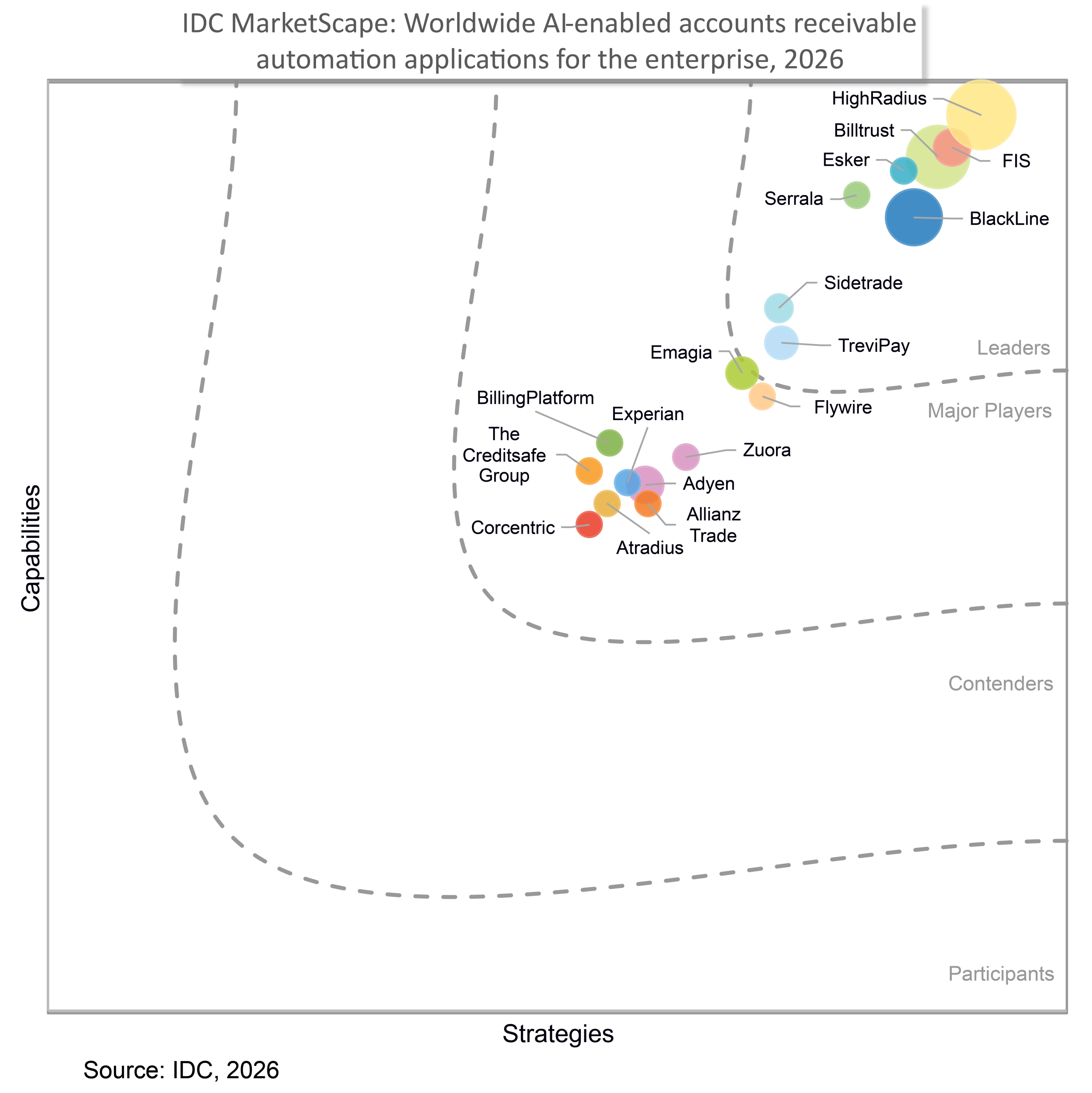
Recognized as a Leader in 2026 Vendor Assessment for unifying credit, collections, cash application, deductions, e-invoicing, and payments on one AI platform to advance enterprise-wide invoice-to-cash transformation.
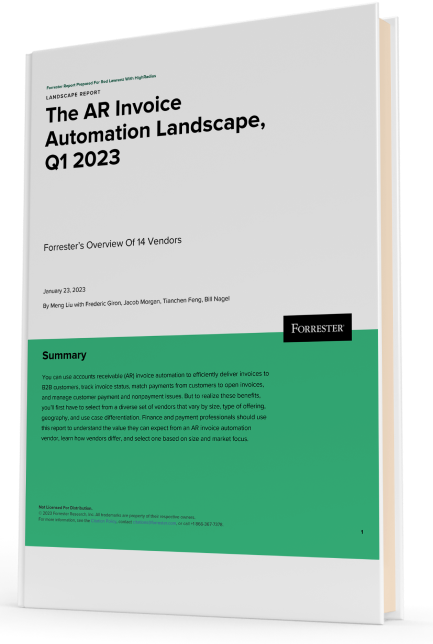
Forrester acknowledges HighRadius’ significant contribution to the industry, particularly for large enterprises in North America and EMEA, reinforcing its position as the sole vendor that comprehensively meets the complex needs of this segment.
Customers globally
Implementations
Transactions annually
Patents/ Pending
Continents
Explore our products through self-guided interactive demos
Visit the Demo CenterPlease fill in the details below
Please fill in the details below

We have seen financial services costs decline by $2.5M while the volume, quality, and productivity increase.

Colleen Zdrojewski
Trusted By 1300+ Global Businesses


