See How Leading AP Teams Accelerate Invoice Processing
Download NowAccounts payable can be automated and still be inefficient. An invoice may be captured automatically but sit for days waiting for approval. A three-way match may flag exceptions, but resolving them can still require emails, spreadsheets, and manual follow-ups. These delays create bottlenecks that increase invoice processing time and make it harder to maintain consistent controls.
That is why AP process optimization is not simply about automating more tasks. It starts with identifying where work slows down, measuring the impact, and finding the root cause. A bottleneck may come from an unnecessary approval step, poor invoice data, frequent matching exceptions or excessive manual intervention.
- More automation isn’t always the answer. Find where invoices are getting stuck first.
- Recurring exceptions signal root-cause issues. Track patterns to fix the source, not the symptom.
- Measure before you optimize. Use cycle time, exceptions, and manual touches to prioritize bottlenecks.
The goal is to remove that friction at its source. In this guide, we’ll break down where accounts payable bottlenecks occur, the metrics that reveal them, how to diagnose their root causes, and how automation can eliminate them.
What Is AP Process Optimization?
AP process optimization is the practice of improving each stage of the accounts payable workflow to reduce unnecessary manual work, delays, errors while maintaining financial controls.
An optimized AP process does more than move invoices faster. It ensures that invoices move through the right workflow with minimal friction, from receipt and data capture to validation, matching, approval, posting, and payment. For example, automating invoice capture can reduce manual data entry, but it will not solve a bottleneck caused by slow approvals or recurring three-way match exceptions.
Common Accounts Payable Bottlenecks and What Causes Them
Accounts payable bottlenecks can occur at any point between receiving an invoice and completing payment. The challenge is that a delay at one stage often creates additional work downstream.
The first step in AP process optimization is therefore to identify where invoices are getting stuck and what is causing the delay.
1. Manual Invoice Data Entry
When invoice information has to be manually entered or corrected, processing slows down and AP teams spend time on repetitive data-entry tasks. Multiple invoice formats, email-based submissions, and incomplete information can make the problem worse.
2. Invoice Matching Delays
Invoices that require manual PO, receipt, or line-item verification can quickly become a source of backlog. Mismatched quantities, prices, or missing purchase order information can send invoices into exception workflows.
3. Approval Bottlenecks
An invoice can be fully captured and matched but still remain unprocessed while waiting for approval. Delays become more likely when invoices pass through multiple approvers or when ownership is unclear.
4. High Exception Volumes
Exceptions require AP teams to investigate, communicate with suppliers or internal stakeholders, correct information, and restart parts of the workflow. When exceptions are frequent, they can consume a significant share of AP capacity.
5. Manual Invoice Coding
Non-PO invoices often require AP teams to determine accounting information before an invoice can move forward. Repetitive coding work can slow processing and introduce inconsistencies.
6. ERP Posting Delays
Even after an invoice has been validated and approved, manual entry into the ERP can create another processing queue. Re-entering data between systems also increases the opportunity for errors.
7. Payment and Reconciliation Delays
The final stages of AP can also create issues when payment information is fragmented or reconciliation depends heavily on manual work. These delays can make it harder for teams to maintain payment visibility and resolve supplier inquiries quickly.
How to Identify AP Process Delays Using Accounts Payable Metrics
Knowing the common AP process delays is only the starting point. To optimize the process, AP teams need to identify which issues are actually affecting their operation.
The most effective approach is to map the AP workflow, measure performance at each stage, and look for patterns that indicate where invoices are waiting, requiring repeated intervention, or falling into exceptions.
1. Map the End-to-End AP Workflow
Start by documenting how an invoice moves from receipt to payment:
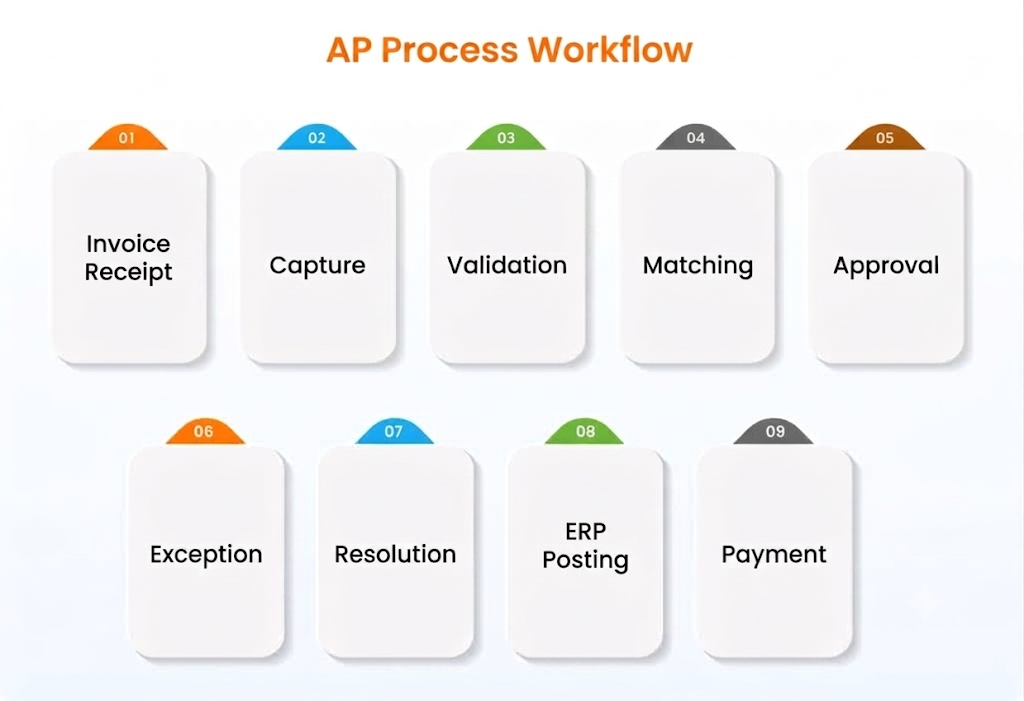
For each stage, identify:
- Who is responsible?
- How long does the invoice typically spend there?
- How many manual touches are required?
- What causes the invoice to move backward or into an exception queue?
This helps distinguish a genuine process bottleneck from a problem that occurs only occasionally.
2. Measure Invoice Processing Cycle Time
Total invoice processing time tells you how long an invoice takes to move through AP, but it does not tell you where the delay occurs.
Break cycle time down by stage for example, capture time, approval time, exception resolution time, and posting time. If invoices spend most of their processing time waiting for approval rather than being processed, the approval workflow is a stronger optimization target than invoice capture.
3. Track Invoice Aging and Backlogs
Invoice aging can reveal where work is accumulating. Segment aging data by: Workflow stages, Invoice type, Supplier, Business Unit and Exception type.
A growing number of invoices sitting in one stage can indicate a capacity, workflow, or ownership issue that needs attention.
4. Measure Exception Rates
A high exception rate can indicate that upstream processes are not providing the information needed for straight-through processing.
Track the percentage of invoices requiring manual intervention, most frequent exception types, average time to resolve an exception to measure the exception rate.
5. Track Approval Cycle Time
Approval delays can be difficult to identify when only overall invoice cycle time is measured.
Look at:
- Average approval time
- Invoices pending by approver
- Percentage of invoices requiring follow-up
This helps determine whether the issue is approval complexity, routing, ownership, or capacity.
6. Measure Manual Touches and Touchless Processing
An invoice that passes through several manual steps requires more AP effort than one that moves through the workflow with minimal intervention.
Measure:
- Manual touches per invoice
- Percentage of invoices processed without manual intervention
- Manual data-entry volume
A high number of manual touches can indicate opportunities for process standardization, integration, or automation.
AP Metrics That Help Reveal Bottlenecks
| Metric | What it reveals |
| Invoice processing cycle time | Where invoices spend excessive time in the workflow |
| Invoice aging | Where invoices are accumulating or remaining unresolved |
| Exception rate | How frequently invoices require manual intervention |
| Approval cycle time | Whether approvals are slowing invoice processing |
| Touchless processing rate | How much of the workflow runs without manual intervention |
| Manual touches per invoice | The amount of repetitive AP effort required |
| Cost per invoice | The operational cost of processing invoices |
How to Diagnose the Root Cause of an AP Bottleneck
A process delay is not always caused by the step where an invoice gets stuck. The visible delay is often a symptom of an upstream issue. A high exception rate may look like a matching problem when the real cause is inaccurate PO data or missing receipt information.
Look Beyond Where the Invoice Stops
Start with the point where the delay is visible, then trace the invoice backward. If invoices are spending days in exception queues, determine which exception types occur most often and what triggers them. If approvals are slow, examine whether invoices are being routed to the right approver and whether the workflow contains unnecessary approval steps
Identify the Source of Rework
Repeated corrections are a strong indicator of an underlying process problem. If AP teams repeatedly re-enter invoice data, correct coding, resolve the same matching exceptions, measure how often that work occurs and where it originates.
For example, recurring PO mismatches may require changes to purchasing or receiving processes rather than simply giving AP more tools to resolve exceptions.
Determine Whether the Fix Is Process, Data, or Technology
Once the cause is established, determine what intervention that addresses it. An unnecessary approval step requires workflow redesign; inaccurate supplier or PO information requires better data quality; repetitive invoice entry or matching work may be suitable for automation.
The objective is not to automate the bottleneck by default. It is to remove the underlying cause of the delay with the most appropriate intervention.
How to Eliminate Accounts Payable Bottlenecks
Once the root cause is clear, the solution should target the specific source of the delay, not simply add another layer of automation. The right approach depends on whether the bottleneck comes from an inefficient workflow, poor data, repetitive manual work, or disconnected systems.
Simplify the AP Workflow
Review every approval, validation, and routing step in the invoice workflow. Remove steps that do not add control or business value, and standardize routing rules so invoices reach the right person without unnecessary delays.
Reduce Manual Invoice Processing
If AP teams spend significant time entering invoice data, validating fields, or performing repetitive checks, automate those activities. Automated data capture and validation can move invoices into the workflow faster while reducing manual effort.
Shorten Approval Delays
Use defined approval rules and automated routing to prevent invoices from sitting in queues. Approval workflows should make ownership clear and surface invoices that require attention rather than relying on manual follow-ups.
Automate Repetitive Exception Handling
Not every exception requires the same level of human involvement. Standardize how common exceptions are categorized, routed, and resolved, while directing exceptions that require judgment to the appropriate AP employee.
Connect AP With the ERP
Manual movement of invoice information between AP tools and ERP systems creates another point of delay and rework. Integrating the workflow with the ERP can reduce duplicate data entry and allow approved invoices to move into posting without unnecessary manual intervention.
Monitor After the Change
Optimization does not end when a bottleneck is removed. Recheck the metrics that exposed the problem such as cycle time, exception rate, approval time, and manual touches to confirm that the change actually improved the process and did not shift the bottleneck elsewhere.
When Should You Automate Your AP Process?
When manual processing is no longer keeping pace with invoice volume or the level of control the business requires, that is where ap automation software becomes relevant. The strongest signal is not simply that AP has repetitive tasks, it is that those tasks are creating measurable operational constraints.
Your Invoice Volume Keeps Growing
If invoice volumes increase while AP headcount grows at the same rate, the process is difficult to scale. A growing backlog, longer processing times, or declining invoices processed per FTE can indicate that manual processing has become a capacity constraint.
AP Teams Spend Too Much Time on Routine Work
If employees spend a significant portion of their time entering invoice data, matching invoices, routing approvals, posting invoices, or responding to status requests, automation can remove repetitive work from the workflow.
Exceptions and Manual Touches Are Consuming Capacity
A high volume of recurring exceptions, rework, and follow-ups can indicate that AP employees are spending too much time moving invoices through the process instead of handling work that requires judgment. Automation can help identify, route, and resolve predictable processing activities while keeping complex exceptions with the right people.
Processing Delays Are Affecting Business Outcomes
When invoices consistently miss internal processing targets, approval deadlines, or payment schedules, the issue has moved beyond AP productivity. Persistent delays are a signal to examine whether automation can reduce waiting time and manual dependencies across the workflow.
Your AP Process Has Become Difficult to Control at Scale
Multiple entities, ERPs, invoice channels, approval structures, and supplier requirements can make manual coordination increasingly difficult. If maintaining consistent processing rules and visibility requires extensive spreadsheets, emails, or manual tracking, automation can provide a more standardized workflow.
Your Invoice Volume Keeps Growing
If invoice volumes increase while AP headcount grows at the same rate, the process is difficult to scale. A growing backlog, longer processing times, or declining invoices processed per FTE can indicate that manual processing has become a capacity constraint.
AP Teams Spend Too Much Time on Routine Work
If employees spend a significant portion of their time entering invoice data, matching invoices, routing approvals, posting invoices, or responding to status requests, automation can remove repetitive work from the workflow.
Exceptions and Manual Touches Are Consuming Capacity
A high volume of recurring exceptions, rework, and follow-ups can indicate that AP employees are spending too much time moving invoices through the process instead of handling work that requires judgment. Automation can help identify, route, and resolve predictable processing activities while keeping complex exceptions with the right people.
Processing Delays Are Affecting Business Outcomes
When invoices consistently miss internal processing targets, approval deadlines, or payment schedules, the issue has moved beyond AP productivity. Persistent delays are a signal to examine whether automation can reduce waiting time and manual dependencies across the workflow.
Your AP Process Has Become Difficult to Control at Scale
Multiple entities, ERPs, invoice channels, approval structures, and supplier requirements can make manual coordination increasingly difficult. If maintaining consistent processing rules and visibility requires extensive spreadsheets, emails, or manual tracking, automation can provide a more standardized workflow.
How HighRadius Helps Optimize Accounts Payable Processes?
HighRadius helps AP teams address bottlenecks across key stages of the accounts payable workflow by reducing repetitive manual work and supporting routine processing with Agentic AI. Instead of automating every step, teams can apply the relevant capabilities to the parts of the process where manual effort, delays, or recurring exceptions are creating friction.
Key capabilities include:
Email Invoice Capture
Captures invoice data from incoming invoices, reducing manual data entry and helping invoices enter the AP workflow faster.
3-Way AP Matching
Automates 3-way matching against purchase orders and receipts, helping reduce manual matching effort and directing exceptions for review.
AP Email Inbox
Classifies incoming supplier emails, supports routine responses, and creates tasks from supplier requests, reducing manual inbox management and follow-ups.
ERP Invoice Posting
Helps move validated invoices into the ERP, reducing manual re-entry and preventing posting from becoming another bottleneck in the AP workflow.
Together, these capabilities can help AP teams reduce manual intervention across the invoice lifecycle and focus on exceptions, controls, and decisions that require human judgment. For AP process optimization, the relevant capabilities can be applied based on where the process is losing time, accumulating work, or requiring excessive manual effort.
Frequently Asked Questions
1. What is AP process optimization?
AP process optimization is the practice of improving the accounts payable workflow to reduce unnecessary manual work, delays, rework, and processing costs while maintaining appropriate financial controls.
2. What are the most common AP bottlenecks?
Common AP bottlenecks include manual invoice data entry, invoice matching exceptions, approval delays, manual coding, ERP posting delays, and high volumes of exception handling or reconciliation work.
3. How do you identify bottlenecks in an AP process?
Start by mapping the end-to-end invoice workflow and measuring performance at each stage. Metrics such as invoice cycle time, invoice aging, exception rate, approval cycle time, manual touches, and touchless processing rate can help identify where invoices are spending excessive time or requiring repeated intervention.
4. How can AP bottlenecks be eliminated?
The solution depends on the root cause. Process redesign can remove unnecessary steps, standardization can reduce variation, better data can prevent recurring exceptions, system integration can reduce manual handoffs, and automation can handle repetitive activities that follow defined rules.
5. When should a company automate its AP process?
AP automation becomes relevant when growing invoice volumes, repetitive manual work, recurring exceptions, processing delays, or increasing process complexity create measurable constraints on AP capacity and efficiency. The decision should be based on the specific bottleneck and the expected improvement.
6. Which AP metrics should be monitored after process optimization?
Organizations can monitor invoice processing cycle time, exception rate, exception resolution time, approval cycle time, first-pass match rate, manual touches per invoice, touchless processing rate, cost per invoice, and invoices processed per FTE. Tracking these metrics over time helps determine whether process changes are delivering sustained improvements.