Transform your accounts payable invoicing process with AI-driven automation and ERP integration.
Download DatasheetThe average cost to process a single invoice manually is approximately $15, with error rates often ranging between 3% and 4%. If your AP team processes 5,000 invoices a month, you are losing nearly $1 million annually due to operational inefficiency, not to mention the burnout your team faces from endless data entry.
The solution isn't to hire more people; it's to fix the input.
Accounts payable invoice automation software is the technology that eliminates manual keying. Unlike broader payment tools, this specific software category focuses on the first mile of finance: Capturing the invoice, reading the data (OCR), and matching it to your Purchase Orders (PO) without human intervention.
This guide will help you understand the technology, spot the essential features, and choose the right tool to achieve touchless invoice processing.
Invoice Automation vs. AP Automation
Many buyers use these terms interchangeably, but they refer to different parts of the finance stack. Knowing the difference ensures you buy the right tool.
- AP Invoice Automation : This is the "Input" engine. It covers invoice receipt, data extraction (OCR), validation, and ERP posting. Its goal is clean data.
- AP Automation: This is the "Output" engine. It typically focuses on supplier management, payment execution (Checks/ACH/Wire), and reconciliation.
If your primary pain point is "My team spends all day typing data into the ERP," you need invoice automation.
Which AP Automation Software Is Right for Your Business?
Use our free checklist to evaluate vendors and select the solution that best aligns with your goals.
Get the Free ChecklistHow Accounts Payable Invoice Automation Software Works
Modern invoice automation software replaces the manual stare and compare method with an automated workflow.
- Multi-Channel Capture: Invoices arrive via email, vendor portals, EDI, or paper scan. The software aggregates them into a single digital queue.
- Invoice Scanning and Capture with Advanced OCR: Instead of a human reading the PDF, AI scans the document. It extracts header data (Vendor Name, Invoice Date) and line-item data (Quantity, Unit Price, Description).
- Automated 3-Way Matching: The system compares the extracted invoice data against the purchase order and the Goods Receipt (GR) in your ERP.
- Straight-Through Processing (STP):
- Match: If the data matches (within your tolerance, e.g., <$1 variance), the invoice is posted to the ERP automatically for payment.
- Exception: If a mismatch occurs, the system routes it to a human for review.
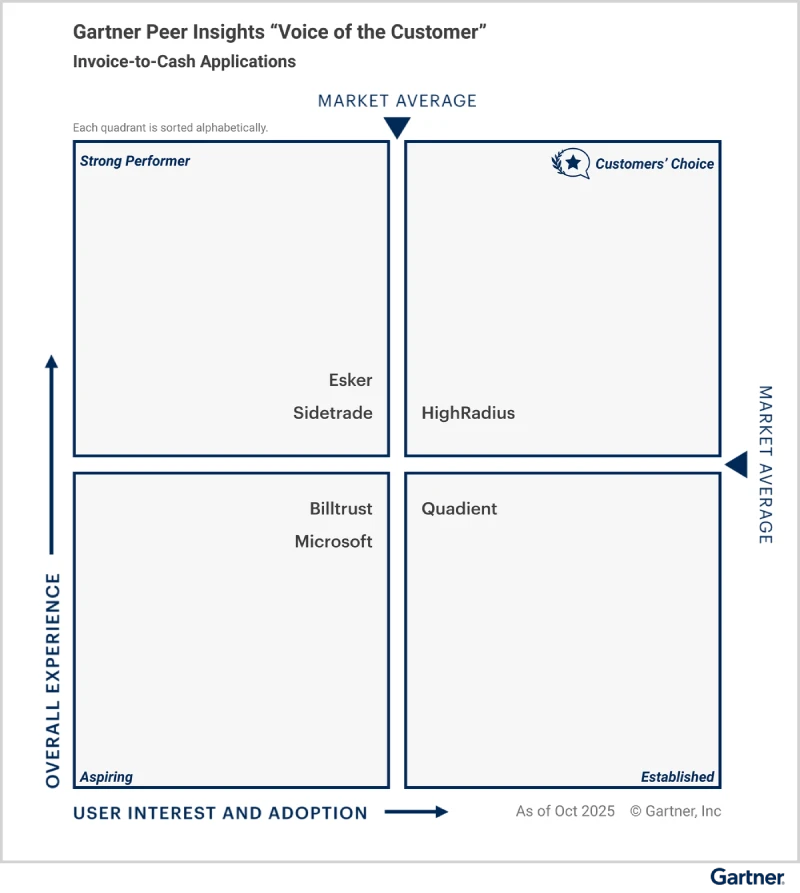
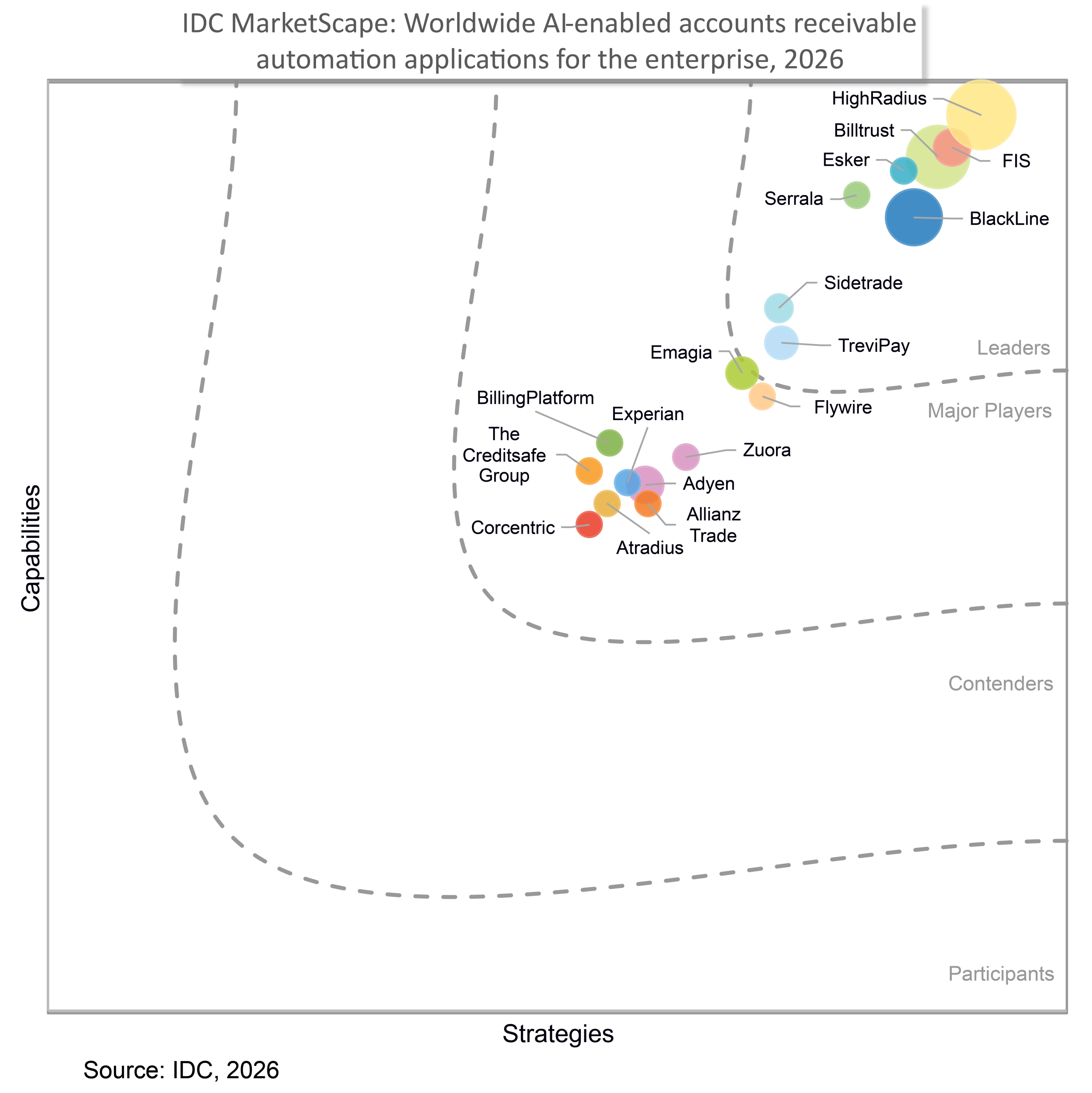
As you understand how to evaluate vendors and what features to look for, third-party analyst research can help validate product capabilities beyond feature checklists. See why HighRadius was recognized as a Challenger in the 2026 Gartner® Magic Quadrant™ for Accounts Payable Applications and compare leading AP platforms to make a more informed decision.
5 Must-Have Invoice Automation Software Features
When evaluating vendors, just OCR is not enough. You need specific capabilities to handle enterprise complexity.
1. Template-Free AI OCR
Legacy OCR tools required you to draw zones on every vendor's invoice so the computer knew where to look. If a vendor moved their logo by even an inch, the system would break.
The Standard: Look for AI-driven solutions (like HighRadius) that read invoices like a human does, understanding context without pre-built templates.
2. Line-Item Extraction
Many basic tools only capture the header (Total Amount). This is insufficient for manufacturing or retail.
The Standard: Your software must extract granular line items to catch price variances (e.g., "Why is the Widget listed at $10.50 when the PO said $10.00?").
3. Smart Coding for Non-PO Invoices
Not every invoice has a PO (e.g., Utility bills, Legal fees).
The Standard: The software should use historical data to suggest GL codes. For example, if it sees an invoice from "FedEx," it should automatically suggest coding it to Shipping Expense - 6040.
4. Bi-Directional ERP Integration
A flat file upload at the end of the day is outdated.
The Standard: The tool must sync with your ERP (SAP, Oracle, NetSuite, Microsoft Dynamics) in real-time. This ensures that when an invoice is posted, your budget is updated immediately.
5. Configurable Approval Workflows
The Standard: The system should automatically route invoices based on logic.
- Invoice < $1,000: Auto-approve.
- Invoice > $10,000: Route to CFO.
- Marketing Expense: Route to CMO.
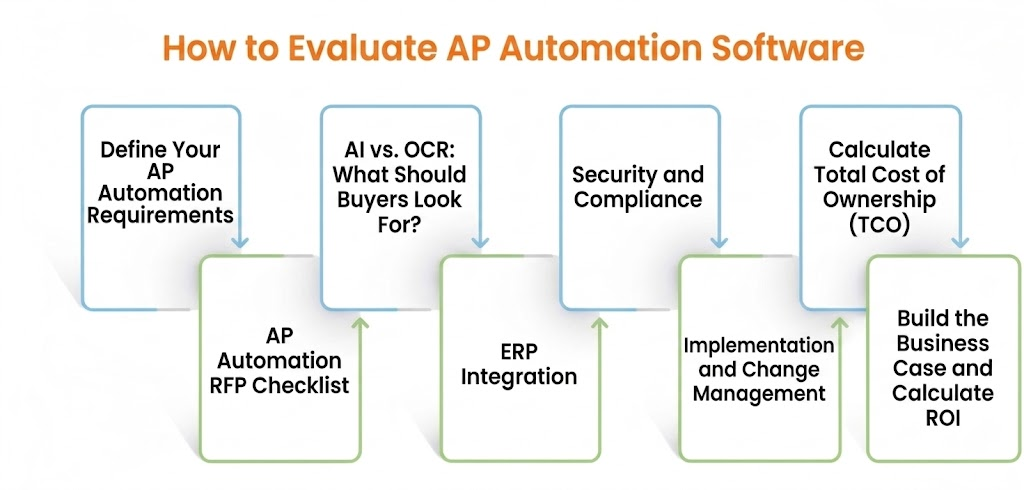
How to Evaluate AP Automation Software: A Buyer’s Checklist ?
Choosing the right AP automation software requires looking beyond features. Use this checklist to compare solutions based on AI capabilities, integrations, security, implementation, cost, and ROI.
1. Define Your AP Automation Requirements
Before comparing vendors, identify what your AP team actually needs to automate. Start by looking at your current invoice volume, invoice formats, PO and non-PO workflows, approval processes, ERP environment, exception rates, and geographic requirements.
Then separate requirements into must-have, should-have, and future-state capabilities. This gives your team a consistent framework for evaluating vendors and prevents you from choosing software based on features you may never use.
| Requirement | Questions to consider |
|---|---|
| Invoice processing | How many invoices do you process? Which formats and languages? |
| Matching | Do you need 2-way or 3-way matching? |
| Workflows | How complex are your approval rules? |
| ERP | Which ERP systems and instances need integration? |
| Exceptions | How much manual intervention is required today? |
| Scale | Will invoice volumes or entities grow? |
Key takeaway: Define your AP requirements first, then evaluate vendors against them.
2. AP Automation RFP Checklist
Your RFP should evaluate more than invoice capture. A good AP automation solution should support the entire invoice lifecycle, from receipt and data extraction to matching, approvals, exception handling, and ERP posting.
Instead of creating a lengthy RFP checklist in the article, group your evaluation criteria into these categories:
- Invoice automation: Capture, extraction, validation, PO matching, duplicate detection, and exception handling.
- Workflow: Configurable approvals, routing, escalations, delegation, and mobile approvals.
- AI capabilities: Template-free extraction, intelligent matching, coding, anomaly detection, and continuous learning.
- Integrations: ERP, procurement, payment, tax, and other financial systems.
- Enterprise readiness: Security, compliance, scalability, reporting, implementation, support, and pricing.
You can then provide a downloadable AP Automation RFP Checklist for readers who need a detailed evaluation framework.
3. AI vs. OCR: What Should Buyers Look For?
Not every solution marketed as "AI-powered" provides the same level of automation.
Traditional OCR primarily converts text from an invoice into digital data. Modern AI-powered invoice processing goes further by using document understanding to interpret invoice context, extract complex data, identify relationships, and support decisions such as matching, coding, and exception handling.
| Capability | Traditional OCR | AI-powered processing |
|---|---|---|
| Text extraction | ✓ | ✓ |
| Template-free processing | Limited | ✓ |
| Line-item extraction | Limited | ✓ |
| Intelligent matching | Rule-based | ✓ |
| Automated coding | Limited | ✓ |
| Exception handling | Rule-based | AI-assisted |
| Continuous learning | Limited | ✓ |
When evaluating vendors, don't stop at the phrase "AI-powered." Ask how much of the invoice lifecycle the AI actually automates and what percentage of invoices still require human intervention.
4. ERP Integration
AP automation should work as an extension of your existing financial environment—not create another disconnected system.
Evaluate how the platform exchanges vendor data, POs, receipts, invoice information, coding, approvals, and posting data with your ERP. Also check whether it supports your specific ERP version, multiple ERP instances, and the integration method your IT team prefers.
For enterprises, pay particular attention to scalability. A solution that works for one ERP instance may not be sufficient if your organization operates multiple entities or financial systems.
Look for: Native ERP integrations, APIs, two-way data synchronization, integration monitoring, error handling, and support for multiple ERP instances.
5. Security and Compliance
AP automation platforms handle sensitive financial and supplier information, making security a critical part of vendor selection.
Look beyond certifications and understand how the vendor protects your data throughout its lifecycle. Evaluate data encryption, role-based access, SSO/MFA, audit trails, data residency, retention policies, disaster recovery, and third-party access.
Your security team should also verify relevant certifications such as SOC 2 or ISO 27001 and understand the vendor's incident response and business continuity processes.
Key takeaway: Security shouldn't be a procurement checkbox. It should be part of your initial vendor evaluation criteria.
6. Implementation and Change Management
The value of AP automation depends heavily on how successfully the solution is implemented.
Before selecting a vendor, understand what implementation will involve—from ERP integration and workflow configuration to testing, training, supplier onboarding, and go-live support.
Ask vendors to clearly define:
- Expected implementation timeline
- Customer resources required
- Integration responsibilities
- Training and onboarding support
- Post-go-live support
A vendor with strong software but a complex implementation model may ultimately deliver less value than a solution that can be deployed and adopted efficiently.
7. Calculate Total Cost of Ownership (TCO)
Don't compare AP automation vendors based solely on subscription prices. Calculate the total cost of ownership over the expected contract period.
Consider software fees alongside implementation, integrations, support, transaction or invoice-based charges, internal IT resources, and additional modules.
Simple TCO framework
TCO = Software + Implementation + Integration + Ongoing Costs + Internal Resources
Use the same assumptions for every vendor so you can make an informed decision.
Key takeaway: The lowest license price doesn't necessarily mean the lowest overall cost.
8. Build the Business Case and Calculate ROI
The business case for AP automation should go beyond reducing manual data entry. Evaluate how automation can improve processing costs, productivity, cycle times, early-payment discounts, error rates, supplier experience, and working capital.
| Area | What to measure |
|---|---|
| Processing cost | Cost per invoice |
| Productivity | Invoices processed per AP employee |
| Cycle time | Average invoice processing time |
| Discounts | Early-payment discounts captured |
| Errors | Duplicate or incorrect payments |
| Supplier experience | Invoice-related inquiries |
| Working capital | Payment timing and visibility |
Automation can also strengthen audit readiness by maintaining digital records of invoice activity, approvals, and changes, making it easier to retrieve documentation when needed. By reducing repetitive data entry and manual follow-ups, it allows AP teams to spend more time on higher-value activities. Faster invoice processing can also help businesses capture more eligible early-payment discounts and avoid late-payment costs.
To estimate the financial impact, compare your current AP costs with the expected costs after automation:
ROI = (Total Benefits − Total Investment) ÷ Total Investment × 100
For a realistic business case, use your own invoice volumes, processing costs, labor requirements, discount opportunities, and exception rates rather than relying solely on generic industry benchmarks.
Questions to Ask AP Automation Vendors
Before making a final decision, use vendor demos to validate how the platform performs against your actual AP scenarios.
Rather than asking dozens of generic questions, focus on the areas that can materially affect your decision:
Automation:
How much of the invoice lifecycle can be automated without human intervention?
AI:
How does the platform handle new invoice formats, exceptions, matching, and coding?
Integration:
How will it connect with our ERP and other financial systems?
Security:
How is financial data protected, and which certifications does the platform hold?
Implementation:
What will our team need to provide, and how long will deployment take?
Commercials:
What is included in the price, and what additional costs should we expect?
Proof:
Can you demonstrate the platform using our invoices and real AP scenarios?
How HighRadius Helps Organizations Achieve Straight-Through Invoice Automation
HighRadius Accounts Payable Invoice Automation Software helps mid-market and enterprise finance teams automate invoice capture, coding, matching, and approvals while reducing manual effort and processing delays. The platform's AI-driven capabilities have also been recognized through
Gartner magic quadrant for AP in 2026.
Leveraging agentic AI, the platform automates the entire input lifecycle, encompassing capture, validation, coding, matching, and approval. This approach enables finance teams to achieve up to 90% straight-through invoice automation and a 2X reduction in invoice cycle times. By transforming AP from a manual bottleneck into a scalable operation, enterprises report 40% higher analyst productivity and significant reductions in exceptions.
Key Capabilities Driving Automation
- AI-Powered Invoice Capture: Extracts data from emails, PDFs, and scanned invoices across all formats (including multi-page and multi-invoice files) with minimal manual intervention, achieving 95%+ accuracy.
- Template-Agnostic Data Extraction: Unlike legacy OCR tools, HighRadius processes invoices of any layout without requiring manual template setup. This is critical for enabling touchless AP automation at enterprise-scale volumes.
- PO and Non-PO Invoice Processing: Accelerates straight-through processing by offering intelligent 3-way matching for PO invoices and auto-coding 80% of non-PO invoices using historical behavioral data.
- Automated Approval Workflows: Rule-based, multi-level routing standardizes approvals across business units and locations, ensuring compliance and reducing invoice cycle times by half.
- ERP & System Integrations: Connects seamlessly with 50+ ERP systems (including SAP, Oracle, NetSuite, and Microsoft Dynamics), ensuring real-time posting, reporting, and enterprise-wide visibility.
- Compliance & Audit Readiness: Maintains full digital audit trails for every invoice and approval action, ensuring strict adherence to regulatory requirements and internal AP policies.
FAQs on Accounts Payable Invoice Automation Software
1. What is the difference between OCR and AI-driven invoice processing?
Traditional OCR (Optical Character Recognition) relies on templates. You must manually instruct the software on where to locate the date and amount for every vendor layout. If a vendor moves their logo an inch, the template breaks. AI-driven processing, on the other hand, reads invoices in a manner similar to how humans do. It uses context (e.g., identifying the total by its position at the bottom right) rather than rigid rules. This allows it to handle thousands of different vendor layouts without any setup or templates.
2. What is a touchless invoice processing rate, and what should I expect?
Touchless invoice processing refers to the percentage of invoices that go from receipt to ERP posting without a human ever having to click a button.
- Average Rate: Most companies start around 20-30%.
- Good Automation Rate: 60-70%.
- Best-in-Class: Top-tier software (like HighRadius) can achieve 90%+ touchless rates by automatically solving simple matches (e.g., matching a $100 invoice to a $100 PO) and only flagging complex exceptions for humans.
3. How does automation handle non-PO invoices?
Non-PO invoices (such as utility bills or legal fees) don't have a corresponding Purchase Order. Good automation software handles this using smart coding. It remembers how you coded the last invoice from that specific vendor (e.g., "AT&T" always goes to GL Code 6020-Utilities) and auto-fills it for you. It then routes the invoice to the correct department head for approval based on the amount.
4. Can AP invoice automation software read handwritten invoices?
Yes, but accuracy varies. Modern AI tools utilize Intelligent Character Recognition (ICR) to decipher handwriting with an accuracy of approximately 80-90%. However, for the best results, we recommend encouraging vendors to switch to digital formats (PDF or e-invoice), which offer 100% data accuracy.
5. Does invoice automation integrate with my existing ERP system?
Yes. The best tools offer bi-directional integration.
- Pull: The software pulls Vendor Master Data and PO details from your ERP to validate the incoming invoice.
- Push: Once matched, the software pushes the "Ready to Pay" data back into your ERP to create the payment record. Compatible with: SAP, Oracle, NetSuite, Microsoft Dynamics 365, and more.
6. How long does an AP invoice automation software implementation take?
Unlike a full ERP overhaul, which can take years, implementing invoice automation software is typically a plug-and-play solution.
- SMB Tools: 2-4 weeks.
- Enterprise AI Tools: 3-4 months (depending on the complexity of your custom workflows and ERP integration).