Reduce AP exceptions by 30% with the SMART Accounts Payable Goals Checklist
Download Free ChecklistA growing business should not need a growing AP workload just to keep up with invoices. Yet that is exactly what happens when invoice volumes increase faster than the AP team’s capacity. More invoices mean more data entry, approval follow-ups, matching, and more exceptions for the same finance team to manage.
APQC’s latest benchmark puts the median cost of processing an AP invoice at $6. For a business processing 10,000 invoices a year, that’s about $60,000 in processing costs even before factoring in late payments, duplicate invoices, or missed discounts.
For mid-market businesses, the challenge is not simply processing more invoices. It is handling more suppliers, business units, approval rules and exceptions without adding the same amount of AP resources.
This guide explains how mid-market businesses can approach invoice processing automation, which AP tasks to automate first, where AI can reduce manual effort and exceptions, how to build the business case, and what to evaluate when choosing an automation solution.
- More invoices don’t have to mean more AP work. Automate repetitive tasks to scale with a lean team.
- Not every invoice needs manual review. Let AI handle routine invoices and route exceptions to your team.
- Measure before you automate. Track cost per invoice, cycle time, and touchless rate to find your biggest gaps.
What Sets Mid-Market AP Teams Apart
Mid-market AP teams operate in a situation where invoice volumes are too high for manual processes, but teams and resources are often too lean for complex solutions. As businesses grow, AP has to manage more suppliers, invoices, entities, and approval requirements without a matching increase in headcount.
The challenge is not just processing more invoices. It is keeping the process fast, controlled, and visible as complexity grows. A single invoice may move through email, spreadsheets, procurement systems, and the ERP before it is finally approved and posted. Non-PO invoices, mismatched data, delayed approvals, and supplier follow-ups can add even more work.
For mid-market businesses, the goal should be simple: automate repetitive work without disrupting the systems and processes that already work. The right approach focuses on the areas creating the most workload today while building an AP automation that can handle tomorrow’s growth.
7 Invoice Processing Challenges Mid-Market AP Teams Face
For a mid-market AP team, invoice processing problems rarely come from one issue. As invoice volumes and business complexity grow, small manual tasks can turn into daily bottlenecks. The biggest challenges are:
1. Growing Invoice Volumes, Lean AP Teams
An increase in invoice volume rarely equates to an increase in staff, leaving teams struggling to balance manual tasks like data entry, verification, approval tracking, and supplier communications.
2. Invoices Coming Through Multiple Channels
Invoices may arrive through email, PDFs, supplier portals, scans, or e-invoicing networks. Managing these separately makes it harder to maintain a consistent process and can cause invoices to be missed.
3. Manual Data Entry and Errors
AP teams may still enter invoice numbers, amounts, tax details, and other information into accounting or ERP systems manually. Repetitive entry takes time and increases the risk of errors and rework.
4. Slow PO and Receipt Matching
Comparing invoices with purchase orders and goods receipts manually becomes time-consuming as invoice volumes increase. Price or quantity differences can also delay otherwise straightforward invoices.
5. Approval Bottlenecks
An invoice can be ready for payment but remain stuck in an approver’s inbox. Following up manually takes AP time and can lead to delayed payments and supplier complaints.
6. Complex Exceptions and Non-PO Invoices
Not every invoice follows a standard process. Missing POs, incorrect prices, duplicate invoices, missing information, and non-PO invoices often require AP to investigate and decide what happens next.
7. Limited Visibility Into AP Performance
When invoice information is spread across emails, spreadsheets, and systems, finance leaders may struggle to see where invoices are stuck, how long they take to process, or how much work the AP team spends on exceptions.
How Invoice Processing Automation Works for Mid-Market Businesses
For mid-market businesses, invoice automation should not mean replacing the entire AP process. It should connect the tasks that consume the most team time and automate them wherever possible while keeping people involved when judgment is needed.
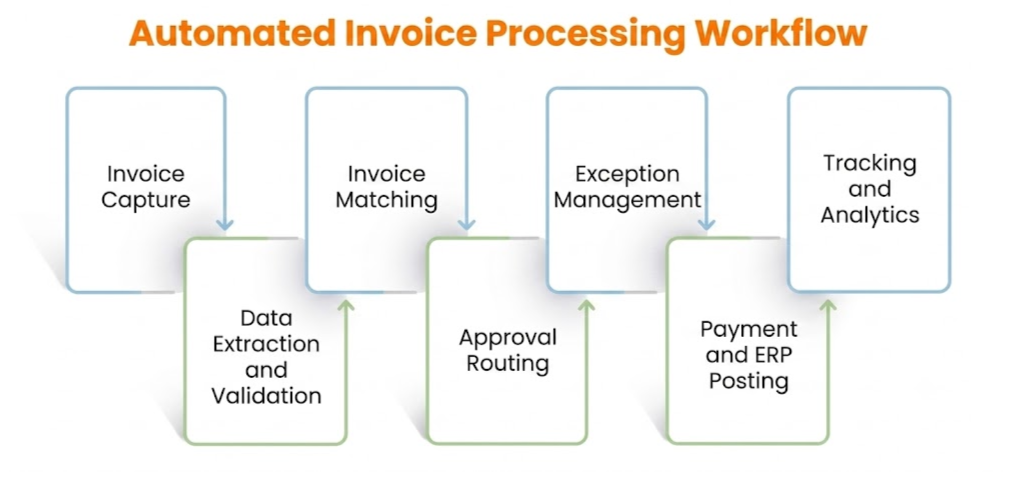
A typical automated workflow looks like this:
1. Capture Invoices From Every Channel
Invoices are collected from email, PDFs, supplier portals, e-invoicing networks, and other sources into one workflow. This removes the need for AP teams to monitor multiple inboxes and systems.
2. Extract Invoice Data
AI extracts information such as supplier name, invoice number, dates, amounts, taxes, payment terms, and line-item details. This reduces manual data entry, even when suppliers use different invoice formats.
3. Validate Before Processing
The system checks invoice and supplier information against business rules and available ERP or purchasing data. Incorrect or incomplete invoices can be flagged before they move further.
4. Match Invoices With POs and Receipts
For PO-based invoices, the system can perform 2-way matching between the invoice and purchase order or three-way matching between the invoice, PO, and goods receipt. Price, quantity, and other differences can be identified automatically.
5. Route Approvals Automatically
Invoices are sent to the right approver based on rules such as business unit, department, invoice value, or purchase type. Automated reminders help prevent invoices from sitting in inboxes.
6. Identify and Route Exceptions
Invoices with mismatches, missing information, duplicate indicators, or policy issues are separated from invoices that can continue automatically. AI can help classify the issue and route it to the right person.
7. Post Approved Invoices to the ERP
Once an invoice is approved, the relevant information can be sent to the ERP through an integration. This reduces re-entry and keeps accounting records aligned with the AP workflow.
8. Tracking
Dashboards give AP and finance leaders visibility into invoice status, processing time, exceptions, and approval bottlenecks. This helps teams identify where manual work is still slowing the process.
Reduce Invoice Delays by Half
Discover how HighRadius AI achieves 90% straight-through processing and slashes FTE effort by almost half for enterprise AP teams
Request a DemoHow AI-Powered Invoice Processing Creates Business Value for Mid-Market AP
For mid-market AP teams, the value of AI is not simply processing invoices faster. It is handling the different formats, non-PO invoices, matching issues, coding decisions, and exceptions that consume AP time while giving finance leaders a clearer way to measure the return from automation.
Extract Data From Different Invoice Formats
Suppliers rarely use the same invoice layout. AI can extract supplier details, invoice numbers, amounts, taxes, payment terms, and line-item data across different formats without requiring AP teams to enter the information manually.
Match Invoices With Greater Accuracy
AI can compare invoice, purchase order, and goods receipt data to identify matches and flag differences in price, quantity, or other fields. This lets AP teams focus on invoices that actually need review.
Handle Non-PO Invoices
Non-PO invoices require more judgment because there is no purchase order to match against. AI can use invoice details, historical transactions, and business rules to assist with coding, validation, and approval routing.
Identify Duplicates and Unusual Transactions
AI can identify invoices that appear similar based on supplier, amount, invoice number, date, or other transaction patterns. It can also flag unusual transactions for review before payment.
Reduce Exception Investigation
AI can classify exceptions, provide relevant invoice context, and suggest the next action instead of leaving AP teams to investigate every issue manually. This helps reduce the time spent resolving routine exceptions.
Improve With AP Decisions
When AP teams repeatedly correct coding, matching, or classification decisions, AI can use those patterns to improve future recommendations. This allows automation to become more effective as invoice volumes grow.
Build the Business Case Around Measurable Outcomes
Before investing in automation, mid-market businesses should establish a baseline for their current AP process:
- Annual invoice volume: How many invoices does the team process?
- Cost per invoice: What does it currently cost to process each invoice?
- Cycle time: How long does an invoice take from receipt to posting?
- Touchless rate: What percentage requires no manual intervention?
- Exception rate: How many invoices require AP intervention?
- Approval time: How long do invoices wait for approval?
- Invoices per AP FTE: How much volume can each team member handle?
A simple starting point is:
Annual invoice volume × cost per invoice = annual invoice processing cost
For example, at a $6 median processing cost per invoice, processing 10,000 invoices a year represents approximately $60,000 in processing costs. The actual cost will vary based on the team, systems, invoice complexity, and workflow.
The business case should then measure where automation creates value not just through labor savings, but through higher touchless processing, faster approvals, shorter exception resolution times, fewer manual errors, and greater AP capacity.
How to Choose Invoice Processing Automation Software for a Mid-Market Business
Mid-market businesses need invoice processing software that solves today’s AP workload without creating a complex implementation project. Instead of choosing a platform based on the number of features, focus on how well it fits your existing ERP, invoice volume, workflows, and growth plans.
1. AI Invoice Processing
Choose software that can extract invoice data, handle different formats, support line-item extraction, and reduce manual data entry.
2. ERP Integration
Make sure it connects with your existing ERP and accounting systems. Look for reliable data synchronization for suppliers, POs, receipts, invoices, coding, and posting.
3. PO and Non-PO Invoice Support
The software should handle both PO and non-PO invoices, including matching, coding, validation, and approval workflows.
4. Exception Management
Look for AI-powered exception handling that can identify, categorize, and route mismatches, missing information, duplicates, and other issues to the right person.
5. Flexible Approval Workflows
Choose workflows that can adapt to different entities, departments, invoice values, and approval policies without requiring constant manual intervention.
6. Scalability Without Complexity
The solution should support increasing invoice volumes and suppliers without requiring a major increase in AP headcount, IT resources, or administrative effort.
7. Measurable ROI
Evaluate the software using metrics such as cost per invoice, touchless processing rate, cycle time, exception resolution time, and invoices processed per AP FTE.
Common Implementation Challenges for Mid-Market AP Teams
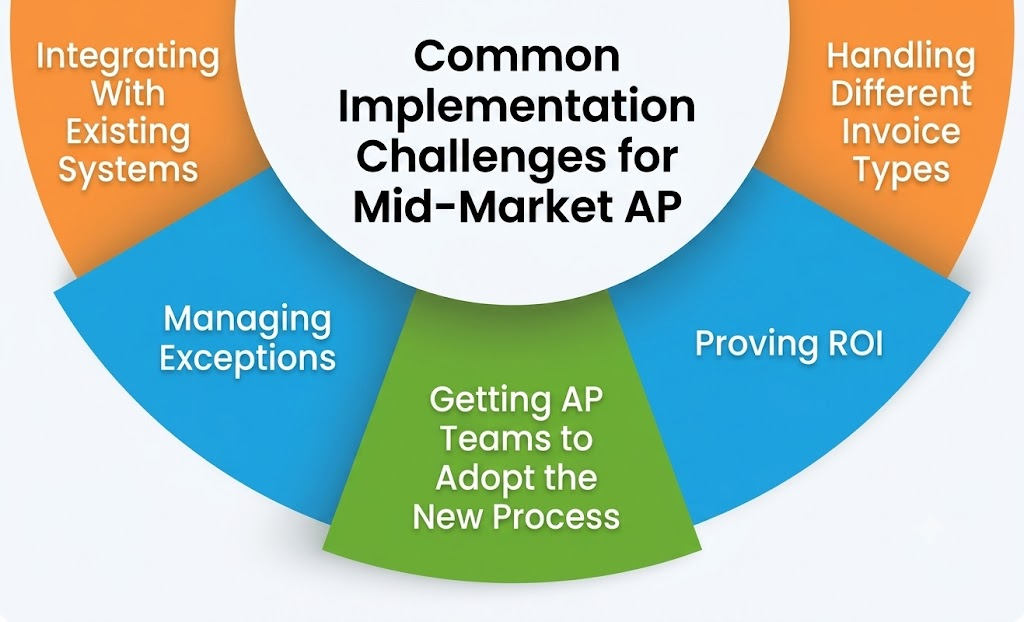
Invoice automation can deliver value quickly, but mid-market businesses need to plan for the practical challenges that come with changing an existing AP process. The goal is to automate without creating new bottlenecks.
Integrating With Existing Systems
Connecting invoice automation with an ERP, accounting, procurement, or payment system can be challenging when data and workflows are not standardized. Map the required data flows before implementation and prioritize the integrations that AP uses most.
Handling Different Invoice Types
Suppliers may send different formats, while PO and non-PO invoices follow different workflows. Test the solution with real invoices across your most common suppliers and invoice types before expanding automation.
Managing Exceptions
Not every invoice can be processed automatically. Price mismatches, missing POs, incorrect data, and approval issues still require human judgment. Define exception categories and ownership upfront so invoices do not simply move from one queue to another.
Getting AP Teams to Adopt the New Process
Teams used to email, spreadsheets, and manual checks may be reluctant to change. Start with high-volume repetitive tasks, provide role-specific training, and measure adoption as workflows are rolled out.
Proving ROI
Without a baseline, it is difficult to show whether automation improved AP performance. Measure cost per invoice, cycle time, touchless rate, exception resolution time, and invoices processed per AP FTE before and after implementation.
How HighRadius Helps Mid-Market Businesses Scale Invoice Processing
For mid-market businesses, scaling AP is not about adding more people every time invoice volumes increase. It is about automating the repetitive work while keeping finance teams in control of exceptions and approvals.
HighRadius helps mid-market AP teams automate the invoice workflow from capture and data extraction through matching, coding, approvals, exception handling, and ERP posting. Its AP platform supports 95% invoice data capture, 90% PO invoice auto-matching, and 100% non-PO invoice auto-coding, according to HighRadius.
The platform can:
- Capture invoices automatically from email, EDI, supplier portals, PDFs, and scanned documents, including header and line-item data.
- Match invoices against POs and goods receipts using 2-way and 3-way matching, with configurable tolerance rules for discrepancies.
- Automate non-PO invoice coding using historical patterns, invoice data, and business rules.
- Route approvals and exceptions based on business rules, thresholds, entities, or other workflow requirements.
- Post approved invoices to the ERP through real-time or batch integrations and sync posting and payment status back to AP.
For mid-market teams, this means more invoice volume can move through the same AP operation without adding the same amount of manual work. HighRadius also positions its Agentic AI capabilities to handle routine invoice tasks and exceptions while keeping human teams involved where judgment is required.
Frequently Asked Questions (FAQs)
1. What is invoice processing automation?
Invoice processing automation uses software to automate repetitive invoice tasks such as data capture, validation, matching, coding, approvals, exception handling, and ERP posting. For mid-market businesses, it helps AP teams handle growing invoice volumes without proportionally increasing manual workload.
2. Why should a mid-market business automate invoice processing?
Mid-market businesses often have growing invoice volumes but lean AP teams. Automation can reduce repetitive data entry, speed up approvals, improve invoice visibility, and help teams process more invoices without adding equivalent administrative workload.
3. Can invoice automation handle both PO and non-PO invoices?
Yes. Modern invoice automation can match PO invoices against purchase orders and receipts while using rules, historical data, or AI to support coding and approval workflows for non-PO invoices.
4. How does AI improve invoice processing?
AI can extract data from different invoice formats, identify duplicates and unusual transactions, assist with invoice matching and coding, and classify exceptions. This allows AP teams to spend less time reviewing routine invoices and more time handling issues that require human judgment.
5. Can invoice processing automation work with an existing ERP?
Yes. Many invoice automation platforms integrate with existing ERP and accounting systems rather than requiring businesses to replace them. The key is to evaluate how the solution handles invoice data, supplier information, POs, receipts, accounting data, posting, and status synchronization.
6. How should a mid-market business measure invoice automation ROI?
Start with a baseline for cost per invoice, invoice cycle time, touchless processing rate, exception rate, approval time, and invoices processed per AP FTE. Compare these metrics before and after automation to measure operational and financial impact.
7. How long does invoice automation implementation take?
Implementation time depends on invoice volume, ERP integration, workflow complexity, supplier requirements, and the level of customization required. A phased approach can help mid-market businesses automate high-priority workflows first and expand over time.
8. Does invoice automation eliminate the need for AP employees?
No. The goal is to reduce repetitive processing, not eliminate human judgment. Automation can handle routine invoices and tasks while AP teams focus on exceptions, approvals, controls, supplier issues, and higher-value work.
9. When should a mid-market business automate invoice processing?
Consider automation when invoice volumes are increasing, AP teams spend significant time on manual entry or follow-ups, approval delays are common, exceptions are difficult to manage, or the business needs to scale without proportionally increasing AP workload.
10. What should a mid-market business look for in invoice processing software?
Prioritize AI-powered data extraction, PO and non-PO invoice support, ERP integration, exception management, flexible approval workflows, security and controls, scalability, and measurable ROI. The best solution should fit the existing finance environment while solving the areas creating the most AP pressure.