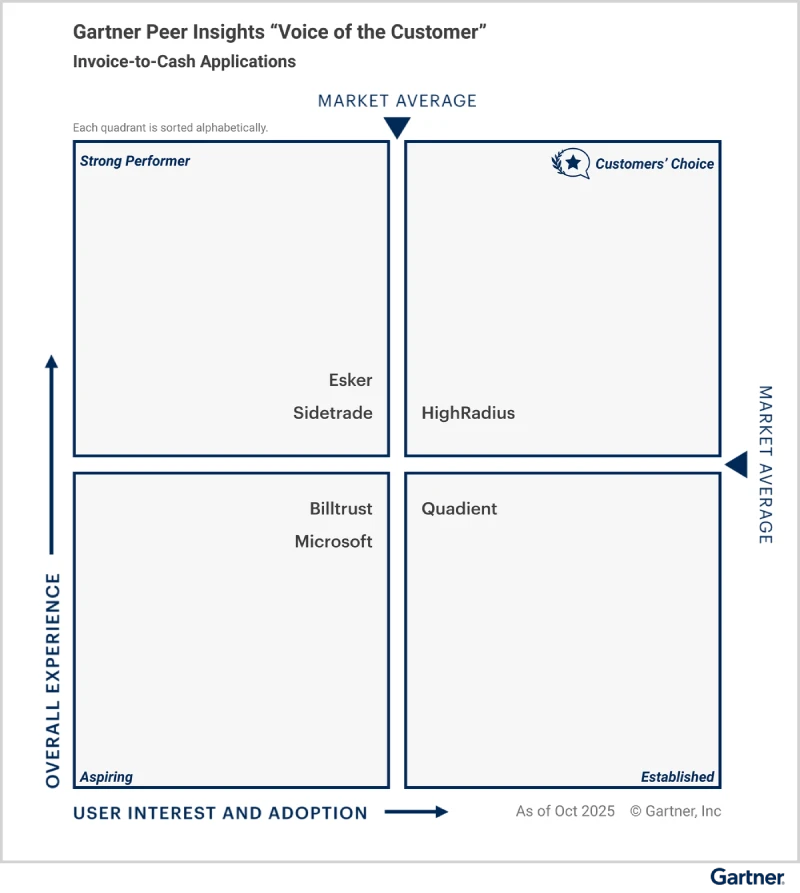
See How Leading AP Teams Accelerate Invoice Processing
Download NowManually processing invoices may have worked in the past, but today's finance teams need far more than faster data entry. They need systems that can understand documents, extract information accurately, identify discrepancies, and make intelligent decisions in real time.
On average, it takes 20+ days to process a single invoice manually, and nearly 1 in 5 contains errors due to manual data entry. These inefficiencies don’t just slow down operations; they result in delayed payments, compliance risks, and unnecessary strain on vendor relationships.
This is where AI invoice processing is transforming accounts payable.
Whether you're processing hundreds or hundreds of thousands of invoices every month, AI-powered invoice processing enables finance teams to work faster, improve data accuracy, reduce processing costs, and make better business decisions through real-time visibility and intelligent automation.
In this guide, you'll learn what AI invoice processing is, how AI-powered invoice processing works step by step, the technologies behind intelligent invoice processing, the benefits it delivers, and how to evaluate the right AI invoice processing software for your business.
- Manual invoice processing can cost up to $10 per invoice. Automating repetitive tasks helps reduce processing costs while improving efficiency.
- A standardized invoice processing workflow reduces errors before they become payment issues. Validation, matching, approvals, and audit trails help strengthen financial control.
- AI-powered invoice processing lets AP teams process more invoices with greater accuracy. Intelligent automation speeds approvals, reduces exceptions, and improves visibility.
What Is Invoice Processing?
Invoice processing is the workflow through which businesses receive, verify, approve, and pay supplier invoices. It ensures every invoice is accurate, properly authorized, and recorded before payment is released.
A typical invoice processing workflow includes:
- Invoice Capture
- Data Extraction
- Invoice Validation
- PO & Receipt Matching
- GL Coding
- Approval Workflow
- Payment Processing
- Reporting & Analytics
While traditional invoice processing relies heavily on manual intervention, AI invoice processing automates each step using intelligent document understanding, machine learning, and workflow automation to improve speed, accuracy, and compliance.
What Is AI Invoice Processing Software?
AI invoice processing software uses artificial intelligence to automate and optimize the complete invoice processing lifecycle from invoice capture and document understanding to validation, intelligent matching, approval routing, and payment readiness.
Unlike traditional OCR solutions that depend on predefined templates, Modern AI-powered invoice processing goes beyond automation by making intelligent decisions throughout the workflow. This enables finance teams to process high invoice volumes faster while reducing manual effort, minimizing exceptions, and improving payment accuracy.
How AI Invoice Processing Works: Step-by-Step Guide
Modern AI invoice processing software replaces fragmented, manual invoice handling with an intelligent, automated workflow. From the moment an invoice enters the organization until it is ready for payment, AI helps finance teams process invoices faster, improve data quality, reduce exceptions, and maintain complete visibility across the accounts payable process.
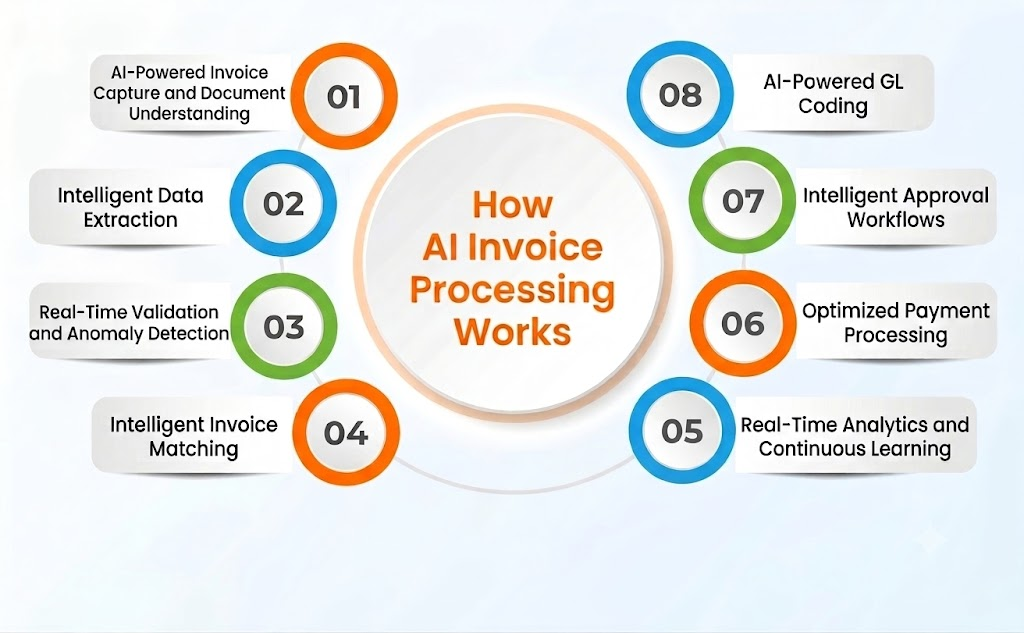
1. AI-Powered Invoice Capture and Document Understanding
The invoice processing journey begins with capturing invoices from multiple sources, including emails, PDFs, scanned documents, supplier portals, EDI transactions, and images. Instead of manually collecting invoices from different channels, AI invoice processing software automatically centralizes them into a single platform.
Using intelligent document understanding, AI identifies invoice documents regardless of their format or layout, eliminating the need for predefined templates. This ensures every invoice enters the workflow quickly, accurately, and without manual intervention.
2. Intelligent Data Extraction
Once invoices are captured, AI uses Intelligent Document Processing (IDP), OCR, machine learning, and NLP to extract key invoice data automatically. It captures both header fields such as invoice number, vendor name, due date, and total amount and detailed line-item information like descriptions, quantities, taxes, and pricing.
Unlike traditional OCR, AI-powered invoice processing understands document context, enabling template-free extraction across different invoice formats while continuously improving accuracy through machine learning.
3. Real-Time Validation and Anomaly Detection
After data extraction, AI instantly validates invoice information against purchase orders, vendor master records, business rules, and tax requirements. It automatically detects duplicate invoices, missing fields, pricing discrepancies, tax inconsistencies, and unusual invoice patterns before they move to the next stage.
By identifying exceptions early, AI invoice automation reduces manual reviews, improves compliance, and minimizes payment risks.
4. Intelligent Invoice Matching
Next, AI automatically performs two-way or three-way matching by comparing invoice data with purchase orders (POs) and goods receipt notes (GRNs). It verifies quantities, pricing, invoice values, and predefined tolerance limits, automatically flagging discrepancies such as quantity or price mismatches for review. Instead of manually comparing records across multiple systems line by line, AP team only need to review genuine exceptions, significantly accelerating approvals, reducing processing time, and improving invoice accuracy.
5. AI-Powered GL Coding
Once validated, AI automatically recommends General Ledger (GL) codes, cost centers, and expense categories using historical transactions and predefined accounting rules. It continuously learns from previous coding decisions to improve accuracy and consistency, reducing manual effort and minimizing coding errors.
6. Intelligent Approval Workflows
AI routes invoices to the appropriate approvers based on invoice value, department, business rules, and approval hierarchy. It also prioritizes urgent invoices, sends automated reminders, and predicts approval bottlenecks to keep workflows moving efficiently.
7. Optimized Payment Processing
Once approved, the invoice is scheduled for payment. AI ensures payments are made on time by considering payment terms, early payment discounts, and cash flow needs, minimizing late fees and maximizing savings. Without automation, finance teams had to manually track due dates, enter payment details, and schedule disbursements, leaving room for missed deadlines and lost discount opportunities.
8. Real-Time Analytics and Continuous Learning
Finally, AI delivers real-time analytics on invoice processing speed, bottlenecks, exception rates, and approval delays. These insights help finance leaders continuously improve workflows, manage cash flow more effectively, and make data-driven decisions. Manual reporting, on the other hand, required exporting data from multiple systems and compiling spreadsheets, often resulting in outdated, siloed, or incomplete reporting.
Manual vs. AI-Led Invoice Processing: A Quick Comparison
| Process Step | Manual Process | AI-Led Invoice Processing |
| Invoice Capture | Collected manually via mail, email, or fax | Captured automatically from multiple digital sources |
| Data Entry | Manual input of invoice fields into ERP systems | AI extracts key data using NLP and deep learning |
| Validation | Cross-checks done manually against records | Real-time validation against rules and databases |
| Invoice Matching | Manually matched with POs and receipts | Automated 2-way or 3-way matching with discrepancy alerts |
| Categorization & GL Coding | Coded manually, often inconsistently | AI recommends codes based on rules and historical data |
| Approvals | Routed via emails or printed documents | Rule-based routing with automated reminders |
| Payment Scheduling | Tracked using calendars and manual inputs | AI schedules timely payments, optimizing cash flow |
| Reporting | Built manually in spreadsheets, often outdated | Real-time analytics with actionable insights |
Benefits of AI-led Invoice Processing Software for Accounts Payable Teams

Beyond streamlining the accounts payable workflow, AI invoice processing delivers tangible improvements across the entire accounts payable function. From faster approvals to reduced errors, AI empowers finance teams to operate with greater speed, accuracy, and control. Here’s how AI-powered invoice processing transforms accounts payable:
1. Efficient invoice processing
document verification, and follow-ups. AI-powered invoice processing automates invoice capture, extraction, validation, and routing, significantly reducing processing time and helping invoices move through the workflow faster.
2. AP cost savings
AI-driven invoice processing automation streamlines the accounts payable workflow by removing the need for manual invoice processing. As a result, businesses can achieve substantial cost savings associated with labor and significantly reduce the risk of errors that can have costly implications.
3. Enhanced Invoice data accuracy
AI-based invoice processing uses machine learning algorithms to accurately extract data from various invoice formats. This technology eliminates errors common in manual processing by validating information against purchase orders and contracts. Additionally, AI learns from historical payment trends to improve its ability to detect discrepancies, flag duplicates, and identify potential fraud.
4. Scalable Invoice Processing
AI-powered invoice processing can handle large volumes of invoices without increasing operational costs or requiring additional manpower. This makes AI an excellent solution for growing businesses that need to manage thousands of vendor transactions. Larger organizations can process higher volumes of invoices with greater ease and accuracy.
5. Improved compliance
AI systems ensure adherence to company policies and regulatory compliance by maintaining accurate records and audit trails. Automated compliance checks help businesses avoid fines and legal complications.
Technologies Behind AI-Based Invoice Processing Software
Modern AI invoice processing software relies on a combination of advanced technologies that enhance efficiency, accuracy, and automation. These technologies work together to minimize manual effort, streamline approvals, and ensure seamless financial operations. Below are the key AI technologies that power modern invoice automation in AP:
1. Machine learning invoice processing
Machine learning models continuously learn from historical invoice data to improve accuracy and decision-making within processing workflows. These models can identify trends, detect anomalies, and adapt to new invoice formats over time, making them ideal for dynamic, high-volume environments.
2. Natural language processing (NLP)
NLP enables AI to interpret and understand invoice text, regardless of structure or terminology. By identifying context and meaning, NLP helps accurately extract relevant data and classify information, even from invoices with varied layouts and languages.
3. Optical character recognition (OCR)
OCR technology converts scanned or image-based invoices into machine-readable text. When combined with AI, modern OCR solutions achieve high accuracy, even with handwritten or low-resolution documents, enabling reliable data extraction and faster processing.
4. Robotic process automation (RPA)
RPA handles rule-based, repetitive tasks such as data entry, validation, and system updates. In invoice processing, RPA reduces manual workload, minimizes errors, and accelerates routine operations, allowing finance teams to focus on more strategic activities.
5. AI invoice data capture
AI-powered data capture enhances the precision and speed of invoice processing by intelligently extracting key fields such as invoice number, date, line items, and totals. This reduces the need for manual intervention and improves overall workflow efficiency.
6. Agentic AI
Agentic AI goes beyond data extraction by making intelligent decisions throughout the invoice processing workflow. It can identify exceptions, recommend actions, automate approvals, and continuously optimize workflows while keeping finance teams in control of critical decisions.
How to Implement AI Invoice Processing Software for Accounts Payable Workflow
Implementing invoice processing software for your accounts payable workflow requires a strategic, phased approach to ensure smooth implementation, high accuracy, and long-term efficiency. Below are the key steps to effectively deploy AI in your accounts payable operations:
1. Assess your current invoice processing system
Start by evaluating your existing invoice processing workflow. Identify inefficiencies, delays, and error-prone tasks that could benefit from automation. Conduct a thorough audit to pinpoint manual bottlenecks and establish a clear baseline for improvement. This analysis will help determine where AI can deliver the greatest impact.
2. Select the right AI-driven invoice processing solution
Choose a robust AI-powered invoice processing software that aligns with your current accounts payable infrastructure. Look for platforms that offer seamless ERP integration, scalability, real-time processing, and built-in compliance features. The right tool should adapt to varying invoice formats and support intelligent data capture and validation.
3. Train AI models using historical invoice data
To improve accuracy and adaptability, train the AI system with a wide range of past invoice data. This allows the model to recognize different invoice layouts, detect common errors, and improve field-level extraction accuracy. The more diverse and complete the training data, the smarter and more reliable the AI becomes.
4. Automate invoice matching
Integrate AI-driven invoice matching to automatically match invoices with corresponding purchase orders and goods receipts. This not only accelerates the approval process but also helps prevent errors and reduce the risk of duplicate or fraudulent payments. Intelligent matching improves accuracy and streamlines exception handling.
5. Monitor performance and optimize continuously
After deployment, regularly track key performance indicators such as processing time, exception rates, and data accuracy. Use these insights to fine-tune automation rules and retrain AI models as invoice formats and business needs evolve. Continuous optimization ensures your AI Invoice Processing Software remains reliable and aligned with your goals.
How to Evaluate AI-Powered Invoice Processing Software?
Selecting the right AI invoice processing software with AI capabilities, require a structured approach to ensure it meets your organization’s efficiency, accuracy, and scalability needs. Consider the following key areas during evaluation:
1. Data Extraction Accuracy
Evaluate how well the software extracts data from invoices of varied formats, languages, and structures. Check if it can handle unstructured or handwritten invoices, and assess its ability to correctly identify line items, totals, and tax details. Accuracy metrics, error rates, and past performance reports are critical indicators.
2. Exception Handling and Automation
Assess the software’s ability to automatically detect and resolve exceptions without heavy manual intervention. This includes mismatched purchase orders, missing approvals, or incorrect amounts. Look for AI capabilities like Agentic AI that can reason through anomalies and adapt workflows dynamically.
3. Integration with Existing Systems
Ensure the solution can seamlessly integrate with your ERP, accounting, and procurement systems. Smooth integration reduces manual data entry, ensures real-time updates, and supports end-to-end automation across your AP workflow.
4. Scalability and Adaptability
Consider whether the software can scale with growing invoice volumes and evolving business needs. AI models should continuously learn from new data and adapt to new vendors, formats, or regulatory requirements without extensive reconfiguration.
5. User Experience and Collaboration Features
Examine the ease of use for finance teams and approvers. Look for features such as dashboards, automated notifications, and collaboration tools that allow teams to quickly resolve issues and approve invoices efficiently.
6. Reporting, Analytics, and Compliance
Check if the software provides actionable insights into invoice processing trends, cycle times, and errors. Compliance features for audit trails, tax regulations, and internal policies are also essential to ensure operational and regulatory standards are maintained.
7. Support and Vendor Reliability
Evaluate the vendor’s support services, implementation guidance, and track record in the market. Reliable support ensures smooth onboarding, faster troubleshooting, and continuous improvement of AI models over time.
How HighRadius AI Invoice Processing Software Simplifies Your Accounts Payable Workflow
HighRadius AI Invoice Processing Software helps finance teams automate the complete invoice processing lifecycle—from invoice capture to payment readiness. Powered by Agentic AI, the solution combines intelligent document processing, machine learning, and workflow automation to eliminate manual effort, improve accuracy, and accelerate invoice processing.
With HighRadius Accounts Payable Automation software for invoice processing, finance teams get complete visibility into invoice status, payment timelines, and cash flow through real-time dashboards. The system also helps ensure compliance with built-in validation checks and accurate GL coding. This not only improves accuracy but also lowers processing costs and builds stronger relationships with vendors by making sure payments are made on time. In short, HighRadius simplifies the entire invoice process, from capture to payment, so businesses can save time, reduce costs, and focus on what matters most.

FAQs: AI Powered Invoice Processing
1. What is AI invoice automation?
AI invoice automation refers to the use of artificial intelligence to streamline and automate the invoice processing workflow. This involves leveraging technologies such as machine learning, NLP, and robotic process automation (RPA) to minimize manual data entry, validate invoices, and facilitate automated approvals.
2. How does AI invoice processing work?
AI invoice processing captures invoices from multiple sources, extracts header and line-item data, validates information against business rules, performs two-way or three-way matching, recommends GL coding, routes invoices for approval, and provides real-time analytics throughout the invoice lifecycle
3. What are the benefits of using AI for invoice automation?
AI-driven invoice automation offers several advantages, including reduced processing time, lowering costs of administration and labor, improving accuracy by minimizing human errors, enhancing compliance to financial regulations and internal policies, along with better vendor relationships.
4. What is the difference between OCR and AI invoice processing?
Traditional OCR converts invoice images into machine-readable text but relies heavily on templates and manual validation. AI invoice processing combines OCR with Intelligent Document Processing, machine learning, and NLP to understand invoice content, automate validation, detect anomalies, and continuously improve processing accuracy.
5. How does AI ensure accuracy in invoice processing?
AI enhances invoice processing accuracy through multiple techniques that include machine learning algorithms, automated invoice matching, and real-time data validation. All of these techniques allow the AI to improve continuously and consistently, allowing it to be more accurate and efficient at processing invoices.
6. What should businesses look for in AI invoice processing software?
When evaluating AI invoice processing software, organizations should consider extraction accuracy, template-free processing, intelligent invoice matching, AI-driven exception handling, ERP integration, scalability, security, compliance, analytics, and vendor support.
7. How does HighRadius simplify AI invoice processing?
HighRadius uses Agentic AI to automate invoice capture, template-free data extraction, intelligent matching, AI-powered GL coding, approval workflows, and exception handling. Combined with real-time analytics and ERP integration, it helps finance teams process invoices faster, improve accuracy, reduce manual effort, and gain complete visibility across the invoice lifecycle.
8. Can AI invoice processing software integrate with existing ERP systems in Accounts Payable workflows?
Yes. Many AI invoice processing software solutions for accounts payable are designed to integrate seamlessly with most of ERP systems. This ensures that once invoices are approved and validated by AI-driven processes, data flows automatically into the ERP, eliminating manual upload, reducing duplication errors, and maintaining synchronized financial records.