See How Leading AP Teams Accelerate Invoice Processing
Download NowA non-PO invoice can contain all the information needed to process it and still leave AP with a difficult question: what should happen next?
A non-PO invoice can be scanned, its fields extracted, and its amount captured accurately. But without a purchase order to match it against, someone may still need to determine which cost center owns the expense, who should approve it, whether the amount is expected, and how the invoice should be coded in the ERP.
That is the difference between extracting invoice data and actually processing the invoice.
An extracted invoice can still be unprocessable. The missing piece is often business context, not data.
Non-PO decisions happen beyond the invoice. Contracts, history, policies, and ERP data can determine the next step.
Better automation goes beyond extraction. AI should validate, route, resolve, and process, not just read.
OCR plays an important role in closing the first part of that gap. It converts information from an invoice into usable data, reducing manual data entry and making invoice processing faster. But when an invoice requires business context, judgment, or action beyond what is written on the document, extraction alone may not be enough.
This is where Agentic AI adds another layer of automation. Instead of stopping after capturing invoice data, it can use information from the invoice and relevant business context to determine what the invoice relates to, what needs to happen next, and which action to take within defined controls.
The same challenge exists in Accounts Receivable, where complex billing situations can require more than simply creating or reading an invoice. Customer, transaction, contract, and exception information may all need to be considered before the right action can be taken.
So, what does it take to move from extracting information from a non-PO invoice to actually processing it?
Why Non-PO Invoices Are Still Difficult to Automate
A purchase order can tell what was ordered, who requested it and how much was expected. A non-PO invoice doesn't always come with that same context. That doesn't make every non-PO invoice difficult. The challenge comes when the information needed to process it is spread across different systems, documents, or people.
No purchase order to match against: A non-PO invoice doesn't have that reference point.AP may instead need to look at a contract, previous invoices, service records, or other business information to establish whether the charge is valid.
The invoice may not explain how it should be accounted for: An invoice might say “consulting services” or “maintenance charges,” but that description alone may not tell AP which GL account, cost center or entity should be charged. Someone familiar with the business may need to interpret the invoice and determine the appropriate accounting treatment.
Approval depends on more than the invoice amount: A $20,000 invoice doesn't automatically tell you who should approve it. The right approver may depend on the department, type of expense, contract, or internal approval policy. For AP teams, finding that path can become a manual exercise.
Exceptions often require investigation: Missing information, unusual amounts, duplicate charges, changes from previous invoices, or discrepancies with a contract can all stop an invoice from moving forward. At that point someone has to investigate the issue, gather the relevant information, decide what to do, and sometimes contact the supplier or another team.
What OCR Can and Cannot Do for Non-PO Invoices
Optical Character Recognition (OCR) has become an important part of invoice automation. It can turn information from paper or digital invoices into structured data, helping AP teams avoid manually entering details such as invoice numbers, vendor names, dates, amounts, tax information, and line items.
For straightforward invoices, that can remove a significant amount of repetitive work. But extracting information is only one part of the invoice processing journey.
OCR can capture what is on the invoice
When an invoice arrives, OCR can identify and extract the information that is visible on the document. That gives systems usable data instead of requiring someone to type it into the ERP.
For example, OCR can capture:
- Vendor name and invoice number
- Invoice and due dates
- Line-item descriptions
- Quantities and amounts
- Tax details
This is valuable because accurate data capture provides the foundation for automated processing.
But the invoice may not contain all the answers
Consider an invoice that simply lists:
“IT consulting services - $25,000”
The system may successfully extract the description and amount. But several questions remain:
- Which department should be charged?
- Which GL account should be used?
- Is $25,000 consistent with previous charges?
- Who needs to approve the invoice?
The answers may not be written on the invoice at all.
The gap is between extraction and decision-making
This is the important distinction.
OCR helps answer: “What information is on this invoice?”
Invoice processing also requires answering: “What does this information mean for the business, and what should happen next?”
That second question may require information from outside the invoice itself such as supplier history, contracts, accounting records, policies, or previous transactions.
OCR doesn't need to solve that problem. Its role is to make the invoice information accessible. The next challenge is using that information, along with the right business context, to make and carry out processing decisions.
That is where Agentic AI can take invoice automation beyond data extraction.
How Agentic AI Handles the Gaps Beyond OCR
The biggest difference with Agentic AI is not that it extracts more fields from an invoice. It is that it can use the information to help determine what should happen next.
Take the $25,000 consulting invoice from earlier. There is no PO, and the invoice description alone doesn't provide enough information to process it confidently.
An Agentic AI system can look at the invoice alongside relevant business information and work through the situation instead of treating the invoice as an isolated document.
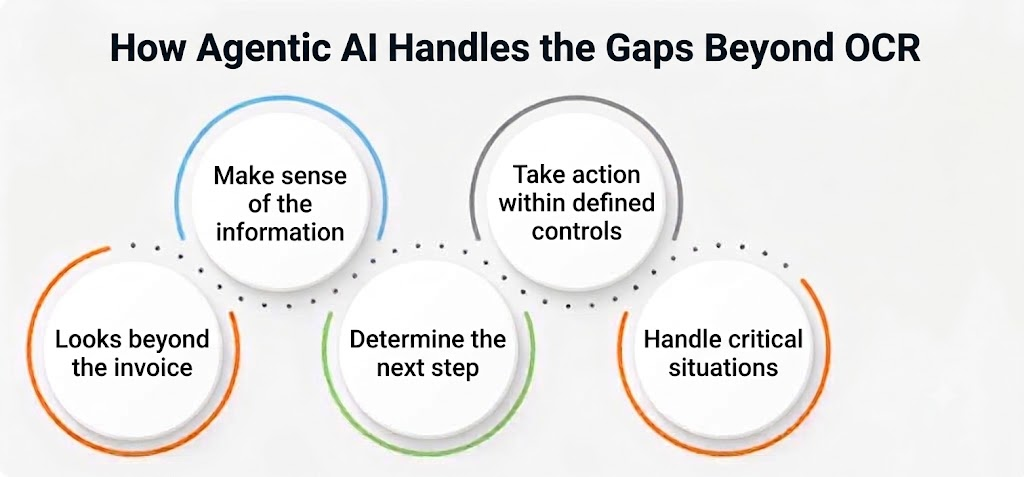
It looks beyond the invoice
The invoice itself may not contain everything needed to make a decision. Depending on the workflow, an AI agent can use information such as supplier records, contracts, previous invoices, accounting data, policies, and other relevant business information.
Can make sense of the information
The agent doesn't just collect information from different sources. It can use that information together to understand the context of the transaction.
For example, if previous invoices from the same supplier were charged to a particular cost center and the current invoice relates to the same service, that history can provide useful context for determining how the new invoice should be handled.
It can determine the next step
Once the invoice and its context have been evaluated, the agent can determine what needs to happen next.
Depending on the organization's rules and controls, that could mean:
- Proceeding with processing
- Assigning or recommending accounting information
- Sending the invoice to the appropriate approver
- Requesting missing information
- Flagging an unusual charge for review
This is an important difference from simply identifying an exception. The system can help move the invoice toward resolution rather than leaving the team to figure out what to do next.
Take action within defined controls
Agentic AI can be connected to the systems and workflows used by finance teams so that, where the appropriate permissions and controls are in place, it can carry out actions such as routing an invoice, creating a task, updating information, or moving the invoice to the next stage of processing.
Human approval can still remain part of the process wherever the organization requires it.
Handle situations that don't fit neatly into a rule
Non-PO invoices often become difficult when something is different from what the system has seen before. An invoice may have an unfamiliar description, an unexpected amount, missing information, or a new supplier. Instead of relying only on a fixed rule, an AI agent can evaluate the available context and determine whether the invoice can continue, needs more information, or should be reviewed by a person.
How Agentic AI Handles Non-PO Invoices in Accounts Payable
For AP teams, the challenge with a non-PO invoice often begins after the invoice has already been captured. Without a purchase order, the team may need to piece together information from different sources before the invoice can move forward.
Agentic AI can help take on that work across several points in the process.
1. Understanding what the invoice is for
A non-PO invoice may use descriptions that are too broad to determine its accounting treatment from the invoice alone.An AI agent can consider the invoice details alongside relevant supplier and business information to determine what the charge is likely related to and identify the appropriate accounting information.
2. Validating the invoice without a PO
Without a PO, AP teams need other ways to establish whether an invoice is valid.
An agent can compare the invoice with relevant information such as:
- Existing supplier records
- Contracts or agreements
- Previous invoices
- Service or transaction information
- Company policies
This can help identify whether the invoice is consistent with the available information or whether something needs further review.
3. Investigating exceptions instead of simply flagging them
Instead of stopping the process and leaving AP to investigate, an AI agent can gather relevant information, compare it with available records, and determine whether the issue can be resolved automatically or needs human attention.
For example, if a supplier's invoice is significantly higher than previous invoices, the agent can identify the change and surface the relevant information for review rather than treating every variance as the same type of exception.
4. Handling repetitive follow-up
Some non-PO invoices are delayed because AP needs information from suppliers or internal teams.
Where the workflow allows it, an AI agent can initiate follow-up actions, create tasks, or route requests to the appropriate person instead of requiring an AP specialist to manage every follow-up manually.
5. Keeping people involved where they matter
Not every invoice should be processed without human oversight.An invoice involving an unusual transaction, insufficient information, or a decision outside defined controls may still require a person's judgment.
Agentic AI can help by handling the routine work first and sending the right information to the right person when human review is needed.
How Agentic AI Handles Complex Invoices in Accounts Receivable
The challenges look different on the Accounts Receivable side. Here, the focus is not on processing a supplier invoice for payment. It is on creating, validating and resolving customer invoices while keeping billing information accurate.
Agentic AI can help connect that information and move the work forward.
1. Understanding the billing context
A customer invoice may include charges that depend on a contract, order, usage, service period, or agreed pricing. AI agents can look beyond the invoice and consider the relevant customer and transaction information to understand what the charge represents.
This can help identify issues before they become a customer query or delay the payment process.
2. Identifying billing discrepancies
Not every discrepancy is an error. A difference could come from a pricing change, a credit or another legitimate reason. Instead of simply flagging a difference, an AI agent can compare the relevant records and identify the information that explains the variance.
For example, if a customer questions why an invoice is higher than the previous month, the agent can examine the billing period, transaction details, applicable pricing, and previous invoices to determine what changed.
3. Supporting dispute resolution
Customer disputes can require AR teams to search across multiple systems before they can respond.An AI agent can gather the relevant information, summarize the issue, identify potential causes, and route the case to the appropriate team or workflow.
4. Handling customer-specific scenarios
Customers don't always follow the same billing arrangements. Different contracts may have different pricing, payment terms or requirements. Agentic AI can use the available customer and transaction context to handle these differences while still working within the organization's defined policies and controls.
5. Knowing when a person needs to step in
A complex dispute, an unclear contract term, or an issue requiring commercial judgment may need a person to review it.
The role of Agentic AI is to reduce the manual work around those cases, gathering information, identifying what changed, and preparing the issue for review so the AR team can focus on the decision itself.
OCR vs. AI vs. Agentic AI for Non-PO Invoice Processing
OCR and Agentic AI aren't necessarily competing technologies. They can work together, with each addressing a different part of the invoice processing automation journey.
The difference becomes clearer when you look at what happens after the invoice data has been captured.
| Capability | OCR | Agentic AI |
| Extract information from invoices | ✓ | ✓ |
| Understand invoice content | Limited | ✓ |
| Use business context | - | ✓ |
| Handle ambiguous information | Limited | ✓ |
| Identify the appropriate next step | - | ✓ |
| Execute workflow actions | - | ✓ |
| Investigate exceptions | - | ✓ |
| Escalate cases for human review | - | ✓ |
The difference is what happens after extraction
OCR helps capture the information: It turns the contents of an invoice into data that other systems can use.
AI can help interpret that information: It can identify patterns, understand relationships between pieces of information, and assist with decisions.
What to Look for in Agentic AI for Non-PO Invoice Processing
Not every solution that uses AI will handle non-PO invoices in the same way. If the goal is to reduce the manual work around complex invoices, it is worth looking beyond whether a platform can extract invoice data.
Understanding Business Context Beyond the Invoice
Non-PO invoices often need context that isn't included in the document itself. Look for a solution that can work with relevant information from sources such as supplier or customer records, contracts, previous transactions, policies, and financial systems.
Handling Invoices That Don't Follow Fixed Patterns
A useful system shouldn't depend entirely on a predefined template or rule for every scenario. It should be able to work with different invoice formats, descriptions, suppliers, customers, and business situations.
Making Intelligent Processing Decisions
Data extraction is only the starting point. The solution should be able to help determine things such as accounting treatment, validation requirements, approval paths, or the appropriate next step based on the available context.
Going Beyond Exception Detection
An exception that is simply sent to an AP or AR employee still creates manual work. Ask whether the system can investigate the issue, gather relevant information, identify a likely cause, and take the appropriate next step when the situation falls within its defined controls.
Keeping Humans in Control
A well-designed system should allow finance teams to define where human review is required, particularly for unusual transactions, low-confidence decisions, policy exceptions, or matters requiring business judgment.
Providing Visibility Into AI-Driven Decisions
Finance teams need more than an automated outcome. They need to be able to understand what information was considered, what action was taken, and when human intervention occurred.
Audit trails, permissions, approval controls, and clear records of AI-driven actions are therefore important when evaluating these solutions.
Integrating With Existing Finance Systems
Agentic AI doesn't operate in isolation. Non-PO invoice processing may require information from an ERP, contract management system, supplier or customer records, and other finance applications.
The ability to connect with those systems can determine how much of the process can actually be automated.
How HighRadius Helps Automate Non-PO Invoice Processing
For finance teams dealing with high volumes of invoices, the challenge isn't simply capturing invoice data. Non-PO invoices can require coding, validation, approvals, exception handling, and follow-up before they are ready to post.
HighRadius uses Agentic AI for AP to automate the work that happens beyond invoice capture. Its Email Invoice Capture Agent captures invoice data from incoming emails, while the 3-Way AP Matching Agent validates PO invoices and can automate up to 90% of PO invoice matches. For non-PO invoices, the workflow can support coding, validation, approval routing, and exception handling using available business context.
With integrations across 50+ ERPs and business systems, HighRadius helps AP teams reduce manual processing while keeping human review in place for exceptions and decisions that require judgment.
Beyond OCR: Moving From Invoice Capture to Invoice Processing
OCR has made invoice automation significantly more practical by turning information on invoices into usable data. But for complex non-PO invoices, capturing that information is only the beginning.
The difficult part often comes afterward: determining what the invoice relates to, validating it against the right business context, deciding how it should be handled, and moving it through the appropriate workflow.
That is where Agentic AI can extend invoice automation.
In Accounts Payable, it can help teams process non-PO invoices by using supplier, contract, accounting, and transaction information to support coding, validation, approvals, exception handling, and follow-up.
In Accounts Receivable, it can connect invoices with customer, contract, pricing, payment, and transaction information to help investigate billing discrepancies, support dispute resolution, and determine the appropriate next action.
For finance teams, the real measure of automation is therefore not how accurately a system extracts invoice fields. It is how much of the work that follows can be completed without requiring someone to manually figure out what happens next.
Frequently Asked Questions
1. What is non-PO invoice processing?
Non-PO invoice processing is the process of receiving, validating, coding, approving, and posting invoices that are not linked to a purchase order. Because there is no PO to use as a reference, processing may require additional business context such as contracts, supplier history, accounting information, or company policies.
2. How are non-PO invoices different from PO invoices?
PO invoices can typically be validated against information such as the purchase order, goods receipt, quantity, and agreed price. Non-PO invoices don’t have that same reference point, so AP may need to determine the validity, accounting treatment, and approval path using other business information.
3. Can OCR process non-PO invoices?
Yes. OCR can extract information from non-PO invoices, such as invoice numbers, supplier names, dates, amounts, taxes, and line items. However, extracting the information does not necessarily determine how the invoice should be coded, validated, approved, or handled. Those steps may require additional business context.
4. What is Agentic AI in invoice processing?
Agentic AI in invoice processing refers to AI systems that can use invoice information and relevant business context to determine what needs to happen next and take appropriate actions within defined workflows and controls. This can extend automation beyond invoice data extraction to validation, decision support, exception handling, routing, and workflow execution.
5. How does Agentic AI handle complex non-PO invoices?
Agentic AI can evaluate a non-PO invoice alongside relevant information such as contracts, supplier records, previous invoices, accounting data, and company policies. Based on that context, it can help determine accounting treatment, validate the invoice, identify exceptions, route approvals, request information, or escalate the case for human review.
6. How does Agentic AI help with invoice exceptions?
Instead of simply flagging an exception, an AI agent can help investigate it by gathering relevant information, comparing records, identifying potential causes, and determining the appropriate next step. Cases that fall outside defined controls can then be routed to a person for review.
7. Is Agentic AI replacing OCR in invoice processing?
No. OCR and Agentic AI address different parts of the process. OCR helps extract information from documents, while Agentic AI can use that information together with business context to support decisions and workflow actions. In practice, they can work together as part of an invoice automation process.
8. What should businesses look for in non-PO invoice automation software?
Businesses should evaluate whether the solution can handle more than invoice data capture. Key capabilities include contextual validation, intelligent invoice coding, exception handling, workflow routing, human-in-the-loop controls, auditability, ERP integration, and the ability to take defined actions rather than simply identify problems.