Cash Application Isn’t Done Until the ERP Says So: A Guide to Real ERP Integration
Last Updated: 21 September, 2026
•
Soumyadeep Paul Financial SaaS Content Expert
S
Soumyadeep Paul
Soumyadeep Paul is an Order-to-Cash (O2C) Content Expert at HighRadius, with hands-on experience in product marketing and finance-focused content creation. He enjoys breaking down complex O2C and SaaS concepts into simple, engaging narratives for modern finance teams. His goal is not just to inform, but to 'empower with content,' ensuring every piece of analysis helps finance teams move from theory to actionable strategy.
Outside of work, he’s passionate about exploring trends in finance and marketing, bike riding and gaming.
2026 Automation Benchmark Report
HighRadius 2026 Automation Benchmark Report For The Office Of The CFO
Understand if your performance is on par with top 10% of the organizations. Identify gaps, best practices and know how you can drive value through Agentic AI-Driven Automation.
Cash application automation is only complete when the ERP reflects the outcome.
Two way ERP integration keeps payment and posting data synchronized across AR workflows.
ERP specific data mapping is essential for accurate payment posting across different platforms.
Exception visibility matters as much as successful posting when evaluating an ERP integration.
Did you know? A recent study by Hackett found that organizations with weak automation can take up to 3 days to post payments, and carry as much as 6% of receivables in unapplied cash.
Most of that delay isn't about matching speed. It's about what happens after a match: whether the result reliably and quickly makes it back into the ERP as a closed, confirmed item. Most vendors describe "ERP integration" as pulling invoice and customer data into a matching engine. That's necessary, but it's only half the picture.
The harder, and more consequential, half is confirming that a matched payment actually landed back in the ERP as a closed item. When that confirmation step is missing or delayed, the ERP and the cash application tool quietly disagree about the state of a customer's account. That disagreement is where unapplied cash, duplicate dunning calls, and stale credit exposure all originate.
Companies Lose Millions Each Year to Inefficient Cash Application, Not Just Unpaid Invoices.
Modern cash application brings together payment data, remittance information, customer records, and ERP receivables to automate matching, reduce unapplied cash, and accelerate cash posting.
What "System of Record" vs. "System of Engagement" Actually Means
Two terms are worth defining precisely, because the distinction explains why integration has to be continuous rather than occasional:
System of Record (SoR):
The ERP, whether SAP, Oracle, NetSuite, or Microsoft Dynamics, is the authoritative source of truth for invoices, customer balances, and financial transactions. Whatever the ERP says is owed is, by definition, the number that matters for financial reporting.
System of Engagement (SoE):
The cash application tool is where analysts and automation actually do the work: matching payments to invoices, resolving exceptions, coding deductions. It's built for speed and usability, not for being the final word on a customer's balance.
The practical implication: a cash application tool can be extremely fast and accurate at matching, and still leave a business exposed if what it decides doesn't reliably and promptly become what the ERP records. Integration isn't a one-time data pipe. It's an ongoing agreement between the two systems about what's true right now.
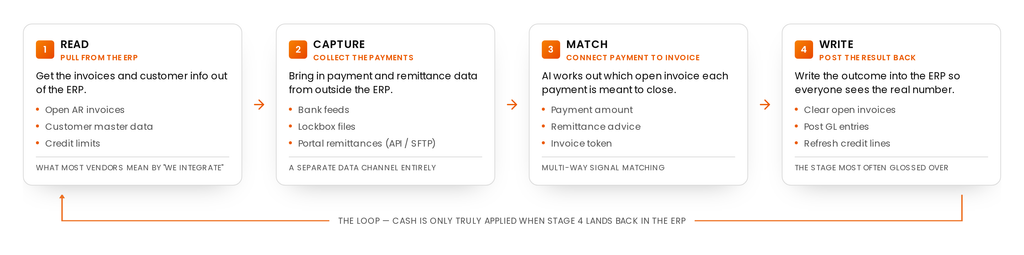
Integration Architecture: The Four Stages of Data Flow
"ERP integration" isn't one connection. It's a chain of four distinct stages, and a tool can be strong at one and weak at another without that gap being obvious until something breaks.
Read-side:
Pulls open AR invoices, customer master data, and credit limits from the ERP. This is the stage most vendors mean when they say "we integrate with your ERP."
Capture-side:
Ingests bank feeds, lockbox files, and portal remittances via API or SFTP. This is a separate data channel from the ERP entirely; it's about getting remittance information out of banks, lockboxes, and customer portals before matching can even start.
Match-side:
AI engines match multi-way signals, typically payment amount combined with remittance advice or an invoice token, to identify which open item a payment is meant to close.
Write-side:
A real-time or scheduled process posts the result back: clearing open invoices, posting general ledger entries, and refreshing credit lines so downstream teams see an accurate number.
Most integration conversations stop at read-side and capture-side. The write-side, actually confirming the outcome back into the ERP, is where the earlier point about posting-status confirmation lives, and it's the stage most likely to be glossed over in a sales conversation.
What Actually Moves Between Cash Application and the ERP
Direction
Data
Purpose
Inbound (ERP to Cash App)
Invoices, customer master data, credit limits
Basis for matching incoming payments to open items
Inbound (Banks/Lockbox/Portals to Cash App)
Bank feeds, lockbox files, portal remittances
Raw payment and remittance data to be matched
Outbound (Cash App to ERP)
Enriched payment file (matched invoice, payment, and remittance)
Closes the open AR item in the ERP
Outbound (Cash App to ERP)
Posting status / confirmation
Confirms the match actually landed, not just that a file was sent
The distinction that matters most: a payment file leaving the cash application tool is not the same event as a payment being posted in the ERP. A file can be sent, fail silently on the ERP side, and never post, and unless something is explicitly checking for that confirmation, nobody finds out until a customer disputes a dunning notice or a credit analyst works from a stale balance.
Integration Methods Compared
There are three common approaches, and the right one depends on ERP type, data volume, and how much customization the business needs.
Method
Speed
Maintenance
Best For
API-native
Real-time
Low to medium
High-volume environments and cloud ERPs
Flat-file / SFTP / Lockbox
Batch (1 to 3 day lag)
Low
Legacy setups or strict bank formatting requirements
ERP-native module (e.g., SAP, Oracle)
Real-time, tightly coupled
Low (single vendor)
Simpler, single-ERP environments with straightforward multi-way match needs
A few honest caveats worth adding here: API-native being "real-time" doesn't mean every implementation runs that way in practice, since it still depends on how the vendor has configured call frequency. Flat-file transfer trades speed for reliability and low maintenance, which is exactly why it remains the default for high-volume, legacy-ERP environments even though newer options exist. ERP-native modules are simplest to maintain precisely because they avoid a third-party integration layer entirely, but that simplicity comes at the cost of flexibility if the business runs more than one ERP.
Do you know the right cash application tool can help in 40% faster exception handling
Estimate the financial impact of automating AR cash application, from faster cash posting and approvals to lower write offs and greater analyst productivity.
Real-Time vs. Batch: Matching Transfer Frequency to the Business Need
Batch transfer moves data on a schedule, once a day or a few times a day. This is the right default for most cash application data. An invoice generated today, for example, isn't collectible for days regardless of how fast it reaches the cash application tool, so there's no operational benefit to moving it instantly.
Real-time transfer moves data the moment an event happens. This matters in specific, narrower cases: releasing a blocked order immediately so a shipment isn't delayed, or posting a payment the instant it's made on a self-service portal because a particular customer relationship requires it.
The useful question to ask a vendor isn't "is this real-time?" It's "which data actually needs to be real-time, and why?" Real-time transfer generally costs more to build and maintain on both sides, so it should be reserved for cases where the business impact of a delay is real, not applied everywhere by default.
Closing the Loop: Why Posting Status Has to Sync Back, Too
Matching a payment to an invoice inside the cash allocation software is only useful if that outcome is reliably reflected back in the ERP. That means the posting status itself needs to be a live, trackable field, not something inferred after the fact by checking two systems against each other manually.
Without that confirmation step, three things happen quietly and often go unnoticed until they cause a visible problem:
AR teams assume a payment posted because the file was sent, not because it was confirmed.
Collections teams work from an ERP balance that hasn't caught up, and contact a customer who's already paid.
Credit teams make exposure decisions on a number that's technically stale, even though it looks current.
It's also worth knowing that this kind of integration is rarely one-size-fits-all across ERPs. The field mapping and data normalization required to post a payment correctly typically differs by ERP platform: what counts as a "payment number" or how a status field is structured isn't identical between, say, SAP and a mid-market ERP. Genuine multi-ERP support means handling that per-platform mapping correctly, not just technically being able to connect to more than one system.
Five Warning Signs Your Cash Application Isn't Really ERP-Integrated
Analysts manually check the ERP to confirm whether a payment actually posted, rather than trusting a status field.
Unapplied cash grows steadily and nobody can explain why without investigating case by case.
Collections contacts a customer who has already paid, because the ERP balance hadn't updated in time.
Credit, AR, and collections teams report different "current balance" figures for the same customer.
"Integration" turns out to mean a nightly file drop with no step that confirms the result landed correctly.
70% of ERP Initiatives Fail to Fully Meet Their Business Goals.
This structured vendor evaluation scorecard helps compare cash application tools based on business outcomes, ERP integration and long-term scalability.
Security & Reliability in Cash Application Management
Data typically moves over SFTP or HTTPS, both well-established secure transfer protocols. For clients with stricter requirements, encrypted file transmission (such as PGP) is often supported on top of that. On the reliability side, a well-built integration tracks the last successful transfer point for each data type, so if something fails, the system resumes from where it left off rather than either losing data or reprocessing everything from scratch. That's a more honest and verifiable reliability claim than "we never have failures." Ask any vendor how they recover, not just whether they promise uptime.
Vendor Evaluation Checklist
AI-led cash application solutions should do more than automate payment matching. They should connect payment, remittance, customer, and receivables data to apply cash accurately and keep the ERP updated. Use this checklist to evaluate whether your existing platform can support high-volume, automated cash application.
Capability
Why It Matters
Two-way ERP synchronization
Keeps payment, customer, invoice, and application data aligned between the cash application platform and ERP.
Multi-channel payment ingestion
Captures payments from banks, lockboxes, portals, emails, EDI, and other sources without manual consolidation.
Automated remittance capture
Extracts remittance details from emails, PDFs, portals, and other formats to reduce manual data entry.
AI-powered payment matching
Matches payments to invoices using multiple data points, including amount, customer, invoice references, and payment history.
High straight-through processing
Automates a greater share of payments without analyst intervention, reducing manual application effort.
Exception handling
Routes unmatched, partially matched, and complex payments for efficient review and resolution.
Customer payment behavior
Uses historical payment patterns and customer-specific matching behavior to improve application accuracy over time.
Automated ERP posting
Posts validated cash applications back to the ERP without requiring manual re-entry.
Multi-ERP support
Enables consistent cash application processes across business units, entities, and ERP environments.
Real-time visibility
Provides visibility into applied cash, unapplied cash, exceptions, and application performance across payment sources.
Case Studies
How RedBull Achieved 96% Automated Cash Application with HighRadius
See how this firm managed high-volume cash application across 10,000 stores
How HighRadius Cash ApplicationIntegrates With ERP
Traditional cash application solutions often create integration challenges while still leaving teams dependent on manual matching and posting. As payment data, remittance details, customer records, invoices, and deductions sit across banks, emails, portals, and ERP systems, AR teams spend significant time gathering information before they can apply cash accurately.
HighRadius Cash Application integrates with 50+ ERP platforms, including SAP, Oracle, NetSuite, and Microsoft Dynamics 365, to continuously synchronize payment and receivables data with your ERP. The result is a connected cash application process that brings payment information, remittance details, and open receivables together to automate matching, accelerate cash posting, and reduce unapplied cash without disrupting existing ERP investments.
SAP Cash Application
Extend SAP with automated cash application that synchronizes payment, remittance, customer, and open receivables data to automate matching and accelerate cash posting across high-volume AR operations.
Oracle Cash Application
Connect Oracle ERP with intelligent cash application by bringing together bank payments, remittance information, customer data, and open invoices to reduce manual matching and improve posting accuracy.
NetSuite Cash Application
Automate cash application within NetSuite by synchronizing payment and remittance data with customer records and open invoices, helping AR teams accelerate matching and reduce unapplied cash.
Microsoft Dynamics 365 Cash Application
Enhance Dynamics 365 with connected cash application that unifies payment, remittance, customer, and receivables data to automate matching and enable faster, more accurate cash posting.
Analyst Reports
Recognized as an IDC MarketScape Leader in AR Automation
IDC recognized HighRadius for AI-driven AR automation across both enterprise and mid-market organizations.
Accelerate payment recovery from delinquent customers and boost cash flow through automated collection workflows.
Cash App
Achieve same day cash application with automated remittance aggregation
Credit
Mitigate credit risk, reduce bad debt, and streamline customer onboarding with AI-powered insights.
Deductions
Reduce Revenue Leakage with AI Prediction models that identify valid and invalid deductions.
Online Credit Application
Onboard customers seamlessly with a configurable online credit application. Cut down on back-and-forth and collect all customer details in one go.
FAQs:
What does "ERP-integrated" actually mean for cash application?
It means the cash application tool handles all four integration stages: reading ERP data, capturing remittances from banks and portals, matching payments to invoices, and writing the confirmed result back to the ERP, not just the first one or two.
Is a nightly file transfer the same as real ERP integration?
Not by itself. Flat-file batch transfer is a reliable and common integration method, but it only counts as complete integration if posting status is also confirmed back to the ERP, and failures are tracked and recovered from automatically.
Does cash application need real-time ERP sync to work?
No. Most cash application data, invoices and standard payments, works well with batch transfer, typically with a one to three day lag depending on the method. Real-time transfer matters for specific cases, like releasing a blocked order or posting a payment for a customer where same-day confirmation is required.
What happens if payment posting status isn't confirmed back to the ERP?
Teams end up working from mismatched numbers: AR may show a payment as applied while the ERP hasn't caught up, leading to unapplied cash, duplicate collections outreach, and credit decisions based on stale exposure data.
Can one cash application tool really support multiple ERPs?
Yes, but it requires per-ERP field mapping and data normalization, not just a generic connection. Ask a vendor how they handle ERP-specific configuration, not just which ERPs appear on their supported list.
How is cash application data kept secure during ERP transfer?
Typically through SFTP or HTTPS transfer protocols, with additional encryption (such as PGP) available for clients who require it.
Resource Library
Resource Hub
Order to Cash
Order to Cash software data sheet
Disconnected workflows can leave teams chasing data, while automated O2C has delivered 20% lower past dues.
HighRadius Named an IDC MarketScape Leader for the Second Time in a Row For AR Automation Software for Large and Midsized Businesses
HighRadius stands out as an IDC MarketScape Leader for AR Automation Software, serving both large and midsized businesses. The IDC report highlights HighRadius’ integration of machine learning across its AR products, enhancing payment matching, credit management, and cash forecasting capabilities.
Forrester Recognizes HighRadius in The AR Invoice Automation Landscape Report, Q1 2023
Forrester acknowledges HighRadius’ significant contribution to the industry, particularly for large enterprises in North America and EMEA, reinforcing its position as the sole vendor that comprehensively meets the complex needs of this segment.