Use our SMART AP Goals Checklist & Align Your Targets to Save Up to 30%
Download Free ChecklistWhere Does Your AP Organization Stand?
Use the assessment below to identify your current maturity stage. Select Yes or No for each statement:
Managing accounts payable manually can involve a long chain of repetitive activities.From receiving invoices and entering data to chasing approvals, matching documents, and scheduling payments. As invoice volumes increase, these manual steps can create delays, errors, duplicate payments, and limited visibility.
AP automation uses technology to digitize and automate these repetitive activities. It connects invoice processing, validation, approvals, payments, and reconciliation into a more streamlined workflow, reducing the amount of manual intervention required from AP teams.
But what is AP automation beyond simply digitizing invoices? Modern AP automation can help finance teams standardize processes, improve payment control, identify exceptions, and gain greater visibility across the entire accounts payable function.
This guide explains how AP automation works, what parts of AP can be automated, the benefits and challenges, and when businesses should consider automating their AP processes.
- Automate repetitive AP work to reduce manual data entry, approval delays, and errors across the accounts payable process.
- Connect the AP automation process from invoice receipt through payment and reconciliation to improve visibility, control, and processing efficiency.
- Start with high-impact processes where repetitive work, growing invoice volumes, or limited visibility are creating challenges for your finance team.
What Is AP Automation?
AP automation is the use of technology to automate repetitive accounts payable activities, including invoice processing, validation, matching, approvals, payments, and reconciliation.
Traditional AP processes often depend on manual data entry, spreadsheets, email approvals, paper documents, and employees moving information between different systems. AP automation replaces many of these manual steps with digital workflows that can automatically capture information, apply business rules, route approvals, and track transactions.
Modern AP automation software uses AI to identify duplicates, recognize unusual transactions, prioritize exceptions, and support more intelligent decision-making.Often termed “touchless” processing, AP automation minimizes manual data entry at every stage. Additionally, it comes equipped with dashboards and analytical tools to streamline process management and identify issues efficiently.
Cut Manual AP Work by 70% Without Replacing Your ERP
Learn how HighRadius integrates with your existing systems to automate invoice capture, matching, and payment.
Request a DemoHow Does AP Automation Work?
Now that we know what AP automation is, let’s look at how AP Automation works. Modern software integrates seamlessly with your ERP to streamline workflows from receipt to reconciliation. Here is the step-by-step breakdown:
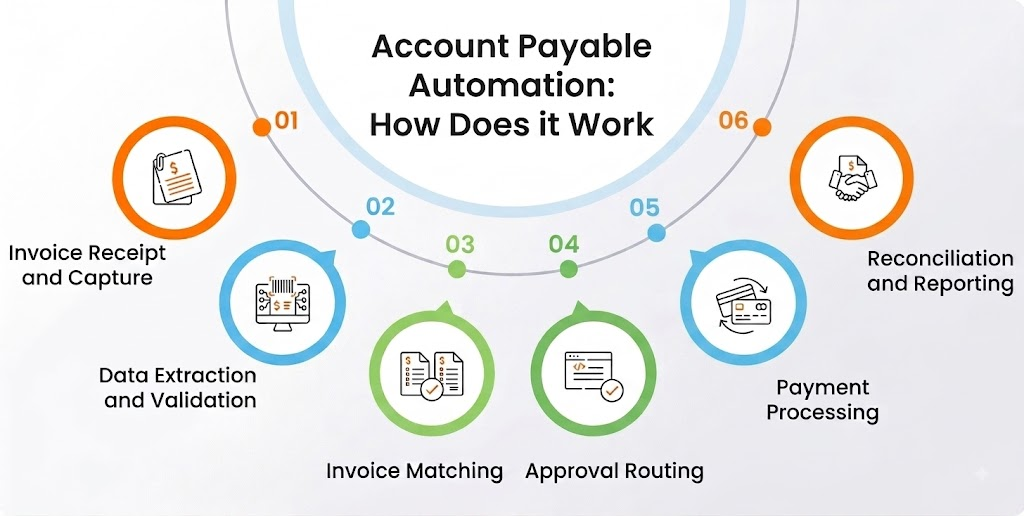
1. Invoice Receipt and Capture
The AP automation process begins when invoices are received electronically via email, supplier portals, or e-invoicing systems. This eliminates paper handling and centralizes all documents on a single, secure platform.
Using Optical Character Recognition (OCR) and AI, the software automatically captures invoice data from various formats (PDFs, scans, XML). This ensures 100% data capture accuracy and prevents the loss of documents.
2. Data Extraction and Validation
Once an invoice enters the system, relevant information such as supplier name, invoice number, invoice date, amount, tax, payment terms, and line-item details can be extracted automatically.
The information can then be validated against existing supplier and financial records. This helps identify issues such as Missing invoice information, Incorrect supplier details, Duplicate invoices or inconsistent payment information. Automation reduces the need for AP employees to manually enter and verify every invoice field.
3. Invoice Matching
Invoices often need to be compared with supporting documents before payment.For purchase-based invoices, the system can perform 2-way or 3-way matching between the invoice, purchase order, and goods receipt.
If the information matches within defined business rules, the invoice can continue through the workflow. If there is a discrepancy, it can be flagged for review.This helps AP teams focus their attention on invoices that actually require human intervention.
4. Approval Routing
Verified invoices are automatically routed to the correct approver based on your company’s hierarchy (e.g., invoices over $10k go to the CFO).
Instead of manually forwarding invoices through email, AP automation can route invoices to the appropriate approvers. Automated reminders can also help reduce approval delays and provide visibility into where an invoice is in the workflow.
5. Payment Processing
Once approved, the system schedules payments to optimize cash flow, ensuring you capture early payment discounts and avoid late fees.
Payments are executed electronically via your preferred method - ACH, wire transfer, check, or virtual card directly through the platform’s integration with your banking partners.
6. Reconciliation and Reporting
Finally, payment data is automatically posted back to your ERP, closing the loop. The system reconciles the payment against the bank statement in real-time.
Advanced dashboards provide visibility into the entire AP automation process, offering analytics on processing times, Days Payable Outstanding (DPO), and accruals to help finance leaders optimize working capital.
Manual Accounts Payable vs. AP Automation
The difference between manual AP and automated AP is primarily the amount of repetitive work performed by people.
| Aspect | Manual Accounts Payable | AP Automation |
| Invoice Capture | Invoices are received and entered manually from emails, paper, or PDFs. | Invoices are captured digitally from multiple sources with minimal manual input. |
| Data Entry | AP teams manually enter invoice details, increasing the risk of errors. | Invoice data is automatically extracted and validated. |
| Invoice Validation | Employees manually check invoice details against business records. | Automated validation identifies missing, incorrect, or duplicate information. |
| PO & Receipt Matching | Teams manually compare invoices with POs and receipts. | The system automatically matches invoices against POs and receipts. |
| Approval Process | Invoices are routed through emails or manual follow-ups. | Invoices are automatically routed to the appropriate approvers. |
| Exception Handling | AP teams manually identify and follow up on discrepancies. | Exceptions are automatically identified and routed for resolution. |
| Payment Processing | Payments require manual scheduling and execution. | Payments can be scheduled and processed through digital workflows. |
| Processing Time | Longer cycle times due to manual tasks and approval delays. | Faster processing through automated workflows and fewer manual handoffs. |
What Parts of Accounts Payable Can Be Automated?
AP automation can extend beyond invoice capture. Businesses can automate multiple activities across the accounts payable lifecycle.
Invoice Processing: Automate invoice receipt, data capture, validation, and routing to reduce repetitive data-entry work.
Invoice Matching: Automatically compare invoices with purchase orders and goods receipts to identify discrepancies before payment.
GL Coding: Use predefined rules and historical information to support the assignment of invoices to appropriate GL accounts and cost centers.
Approval Workflows: Automatically route invoices to the right approvers based on business rules and approval limits.
Exception Management: Identify invoices that require attention and route them to the appropriate stakeholders instead of manually tracking every issue.
Supplier Communication: Automate routine communication related to invoice status, payment status, and common supplier inquiries.
Payment Scheduling: Support payment scheduling based on due dates, payment terms, and business policies.
Reconciliation: Automate the matching of payment information with financial records to reduce manual reconciliation work.
Reporting and Analytics: Centralize AP information to help teams monitor processing times, exceptions, payment activity, and other performance metrics.
What Are the Benefits of AP Automation?
The AP automation benefits extend beyond faster invoice processing. By connecting multiple AP activities, automation can improve efficiency, accuracy, visibility, and financial control.
1. Touchless processing
Touchless accounts payable automation processing eliminates manual data entry throughout the AP workflow. While approvers may still need to authorize payments with a click, all data entry is automated, reducing errors and freeing up employee time for more strategic tasks
2. Centralized data storage
AP automation systems digitize and store all accounts payable data in a single, searchable system. This centralization simplifies access and auditing, ensuring that crucial information is readily available when needed.
3. Enhanced spend visibility
AP automation tools deliver real-time insights into spending, enabling businesses to track expenses and manage budgets effectively.
4. AP Invoice Automation for Faster, Accurate Payments
AP invoice automation streamlines invoice processing by capturing, validating, and routing invoices automatically. It reduces manual errors, prevents duplicate payments, and ensures timely approvals. Finance teams gain real-time visibility into cash flow, accelerate month-end closes, and improve overall operational efficiency.
5. Improved cash flow management
By streamlining payment processes, automated accounts payable processes ensure timely payments and better cash utilization, significantly enhancing cash flow management.
6. Reduced fraud risk
Automation includes features like duplicate payment detection and suspicious activity alerts, dramatically reducing the risk of fraud.
7. Better control over supplier payments
AP workflow software allows businesses to customize payment processes, giving them better control over how and when suppliers are paid and improving supplier relationships.
8. Time efficiency
Eliminating manual data entry and processing saves time, allowing employees to focus on strategic, value-adding tasks such as financial analysis, supplier relationship management, and process optimization.
13. Capitalization on early payment discounts
Automation helps businesses take advantage of early payment discounts, improving cash flow and financial efficiency.
By understanding what AP automation is and leveraging its numerous benefits, businesses can transform their accounts payable operations, achieving greater efficiency, reduced costs, and improved financial health.
14. Compliance assurance
Automated tracking and reporting simplify compliance with financial regulations, ensuring businesses are always audit-ready.
By understanding what AP automation is and leveraging its numerous benefits, businesses can transform their accounts payable operations, achieving greater efficiency, reduced costs, and improved financial health.
What Are the Challenges of Manual AP?
Managing accounts payable manually creates various inefficiencies and errors. Here’s an overview of the common AP automation challenges and how automation can resolve them:
1. Human errors in data entry
Manual data entry is prone to mistakes, causing inaccuracies like underpaid or overpaid invoices. These errors can lead to significant financial problems and wasted resources. AP automation reduces these errors by utilizing advanced data entry tools and scanning technologies.
2. Difficulties in managing and storing information
Storing invoices and documents manually makes it hard to access historical data, leading to inefficiencies in reporting and compliance. Automated accounts payable processes, like those offered by HighRadius, provide robust AP document management solutions, making information easily searchable and retrievable.
3. Slow approval processing
Manual approval delays can strain supplier relationships and lead to missed early payment discounts. Automation speeds up routing, enabling faster processing and improved cash flow management.
4. Increased fraud risk
Manual processes are susceptible to fraud due to the lack of checks and balances. AP automation involves fraud detection capabilities that identify questionable activities, thus lowering the likelihood of fraudulent transactions.
5. Lack of real-time visibility
Paper-based systems obscure the tracking of invoices and payments. Automated solutions offer real-time visibility into the AP process, facilitating better decision-making and transparency.
6. Poor cash management and working capital utilization
Manual processes hinder effective cash management by extending processing times and increasing days payable outstanding (DPO). Automation optimizes payment cycles, improving cash flow and enabling early payment discounts.
7. Duplicate invoices and payments
Manual AP processes often lead to duplicate invoices, causing overpayments and extra work to fix errors. Accounts payable invoice automation detects duplicates in real time, preventing errors and significantly reducing manual effort.
How to Automate Accounts Payable
A successful AP automation initiative should begin with the process not the technology.
1. Evaluate current processes
Begin by thoroughly assessing your current AP workflows. Identify pain points and areas where automation can significantly enhance efficiency. Look for bottlenecks, repetitive tasks, and opportunities for error reduction.
2. Set clear objectives
Define your goals for AP automation. These goals include streamlining processes, reducing operational costs, enhancing efficiency, and improving data accuracy. Clear objectives will guide your selection of an appropriate automation solution.
3. Research AP automation solutions
Investigate various AP automation solutions on the market. Look for platforms that align with your goals and business requirements. Evaluate features, integration capabilities, and user reviews to make an informed decision.
4. Develop an implementation plan
Create a detailed roadmap for implementing the chosen AP automation solution. Define roles and responsibilities, set realistic timelines, and ensure all stakeholders are on board.
5. Ensure seamless integration
Ensure the AP automation solution effortlessly integrates with your existing accounting or ERP software. This integration is vital to maintaining data consistency and avoiding disruptions in your financial workflows.
6. Conduct thorough testing and training
Conduct comprehensive testing before fully deploying the new system to ensure it functions correctly. Train all relevant employees to use the system effectively, ensuring they understand its features and benefits.
Calculate your AP Automation ROI For Free!
See how much you can save on automation instead of relying on a traditional manual approach with our free AP Automation ROI Calculator.
Calculate NowWhat Should You Look for in AP Automation Software?
When selecting AP automation software, it’s essential that the tool aligns with your organization’s specific needs. Consider factors like an intuitive user interface, robust data security, advanced automation features, and dynamic integration capabilities to maximize the efficiency and effectiveness of your AP processes. Analyst evaluations, including 2026 Gartner Magic Quadrant Recognition for Accounts Payable Automation Software can also help validate your vendor selection and make informed decisions.
1. Intuitive user interface
Here’s a structured approach to help you find the right account payable management software.
A well-designed user interface (UI) is critical for adopting AP automation tools successfully. A clean, intuitive dashboard helps staff quickly locate essential accounting functions and manage tasks efficiently.
2. Unmatched data security
Protecting sensitive financial data is paramount in AP automation. Ensure your chosen software provides advanced security measures such as two-factor authentication, encryption, and secure communication protocols.
3. AI-powered automation features
AI-powered automation will enable teams to handle more tasks in less time. From billing and invoicing to procurement, AI automation would streamline your AP operations efficiently.
4. Versatile payment options
Providing multiple payment options is essential for customer satisfaction and operational efficiency. Integrated payment gateways allow businesses to offer a variety of secure payment methods.
5. Dynamic integration capabilities
Integrating your AP automation software with other business systems enhances its functionality and flexibility. Ensure the software can connect seamlessly with your existing ERP, accounting, and other essential tools.
6. Flexible accounting methods
Your AP solution should support cash-based and accrual accounting methods to accommodate business needs.
7. Thorough reporting and analysis
Having strong capabilities in reporting and analytics is essential for gaining a deep understanding of financial performance and for making well-informed decisions.
8. Role-based access control
Ensure that your AP software allows you to assign role-based permissions, providing employees access to necessary functions while protecting sensitive data.
9. Tax compliance and management
Your AP solution should include comprehensive tax management features to ensure compliance and ease tax-related processes.
10. Mobile and cloud accessibility
Mobile and cloud-based features provide flexibility, allowing you to manage AP processes from anywhere.
11. Transparent pricing
Understand the cost implications of your AP software, considering factors like free trials, maintenance fees, and pricing structures.
How Does HighRadius Maximize Your Accounts Payable Automation Benefits in 2026?
Incorporating AP automation software into your financial processes can revolutionize your business operations by enhancing efficiency, reducing errors, and providing comprehensive oversight. Businesses can optimize costs, improve compliance and unlock significant benefits of AP Automation by leveraging advanced features such as AI-driven invoice processing, automated validations, and seamless ERP integration. HighRadius offers a state-of-the-art end-to-end AP automation solution that streamlines invoice handling, ensures accuracy through auto-validation and three-way matching, and provides robust exception handling. The platform's capabilities have also been recognized in the 2026 Gartner® Magic Quadrant™ for Accounts Payable Applications, highlighting HighRadius' continued innovation in enterprise AP automation.
HighRadius offers a state-of-the-art end-to-end AP Automation solution that streamlines invoice handling, ensures accuracy through auto-validation and three-way matching, and provides robust exception handling. With HighRadius’ account payable automation software, businesses can seamlessly integrate AP automation, resulting in substantial savings and swift implementation.
Manually entering invoice data is time-consuming and error-prone. HighRadius automates AP invoicing with Invoice Processing Software that automatically captures invoice data from multiple sources , including emails, portals, e-invoice networks, EDI, and cXML with over 90% invoice auto-matched, helping teams process. This unlocks significant Accounts Payable automation benefits like faster cycle times, reduced manual effort, and improved data accuracy.
Here are the critical steps involved in how HighRadius' accounts payable AP automation works:
1. Invoice data capture
HighRadius’ AP Invoice Automation software integrates with various channels, such as
- AP Email Inbox (a dedicated email account for receiving invoices)
- EDI networks (electronic data interchange systems for exchanging business documents)
- SFTP (secure file transfer protocol for secure data transfer)
- Supplier Portal (a platform for suppliers to submit invoices)
To receive supplier invoices in diverse formats (PDF, Image, Tiff, ANSII X12 EDI, cXML). The system captures the details at header and line levels, classifying invoices as PO or non-PO and auto-coding non-PO invoices to appropriate GL code combinations.
Related scenario: A supplier emails an invoice in PDF format for laptop purchases. HighRadius downloads the email attachments and parses them, extracting details such as the invoice number, date, amount, and item descriptions for AP processing.
2. Validation, matching & policy controls
After capturing the data, our AP Automation software validates invoice data, matches it with Purchase Orders (PO) and Goods Receipt Notes (GRN), checks business rules, and identifies exceptions.
Related scenario: A company orders 20 laptops at $500 each but receives only 19 due to damage—the supplier invoices for 20 laptops at $520 each. HighRadius identifies price and quantity discrepancies and flags them for review.
3. Exception resolution & approval workflows
Invoice exceptions are categorized and assigned to relevant stakeholders. Users access exceptions through a worklist, collaborate, and resolve issues. Approval workflows are configured for PO and non-PO invoices, with or without exceptions.
Related scenario: The buyer addresses price variances while the receiver handles quantity discrepancies, ensuring efficient resolution through collaboration.
4. AI-powered AP inbox
Our AP Automation software organizes the AP Inbox by categorizing emails and creating action items. It infers supplier intent from email content and suggests responses.
Related scenario: An AP team receives numerous emails daily. HighRadius labels these emails (e.g., W9, New Invoice, Payment Follow-Up) and drafts suitable responses.
5. ERP Integration
Our AP Automation software offers two-way integration to import master data, POs, and GRNs from ERP systems and export validated, matched, and approved invoices. Data exchange occurs via APIs or SFTP in real-time or scheduled batches.
Related scenario: The HighRadius NetSuite Connector imports POs and GRNs every 15 minutes for three-way matching and posts approved invoices to NetSuite via API.
6. Reporting & analytics
Out-of-the-box (OOB) reports and dashboards provide visibility into AP aging, process efficiency, invoices under exception, and spending trends.
Related scenario: AP managers can monitor invoices, track exceptions by reason code, and generate accrual reports for month-end activities.

With centralized monitoring, automated approval workflows, and 360° visibility through customized reports, HighRadius is the ideal partner for achieving your AP automation goals and driving financial success.
FAQs on AP Automation
1. What is AP automation?
AP automation is the use of software to automate repetitive accounts payable activities such as invoice processing, validation, matching, approvals, payments, and reconciliation. It helps reduce manual work while improving efficiency, accuracy, visibility, and control.
2. How does AP automation work?
The AP automation process typically starts with invoice receipt and data capture, followed by validation, matching, approval routing, payment, and reconciliation. Automation connects these stages into a digital workflow so information can move between processes with less manual intervention.
3. What are the main AP automation benefits?
The main AP automation benefits include reduced manual work, faster invoice processing, fewer errors and duplicate payments, better cash flow visibility, stronger controls, improved supplier relationships, and greater scalability.
4. Can AP automation prevent duplicate payments?
AP automation can prevent duplicate payments by incorporating automated checks and validations within the invoice processing workflow. The system flags potential duplicates by comparing invoice details against existing records, ensuring each invoice is processed only once.
5. Is AP automation only useful for large businesses?
No. Businesses of different sizes can benefit from AP automation. Smaller organizations can reduce manual workload, while growing and larger organizations can use automation to manage increasing transaction volumes and more complex AP processes.
6. What is AP process automation?
AP process automation refers to automating individual activities across the accounts payable workflow rather than treating invoice processing as a standalone task. It can include invoice processing, approvals, payments, reconciliation, supplier communication, and reporting.
7. Can AP automation work with an existing ERP?
Yes. Most modern AP automation approaches are designed to integrate with existing ERP and accounting systems. Integration allows invoice, supplier, purchase order, payment, and accounting information to move between systems without unnecessary manual entry.