Invoice processing errors can cost businesses up to 5% of their revenue. The biggest reason? Manual invoice processing. It slows finance teams, increases errors, and creates costly inefficiencies. That’s why companies are adopting invoice scanning and capture automation. These tools capture invoice data automatically, speed up approvals, and improve accuracy.
In this guide, we review the best invoice scanning and capture tools for 2026. We compare key features and help you choose the right solution for your AP workflow.
This section provides a quick overview of the leading invoice scanning tools in the market. It summarizes their key strengths, limitations, and ideal use cases so you can compare options at a glance before reviewing them in detail.
The list below outlines how each platform positions itself in the invoice scanning and approval landscape. It highlights which tools are pure data-capture solutions and which offer full workflow automation.
| Platform | Best Suited For | Key Features | Pricing |
| HighRadius | Mid-to-large enterprises seeking to transition from manual data entry to true "Straight-through Invoice Processing" | AI-driven invoice scanning and capture, touchless processing, three-way matching, ERP integration, and real-time analytics | Check Pricing |
| Envoice | SMBs seeking easy invoice management | Basic invoice scanning, expense tracking, and simple approval workflows | Contact for pricing |
| Kofax | Enterprises with high document volumes | Document capture and workflow automation | Contact for pricing |
| Docsumo | Businesses handling varied document types | Structured data extraction and export flexibility | Contact for pricing |
| Rossum | Companies looking for faster invoice data entry | Data capture and quick validation tools | Contact for pricing |
| Nanonets | Teams new to automation tools | Simple document uploads with ready made templates | Contact for pricing |
| Hyperscience | Enterprises managing large-scale document processing | Automated classification with optional review support | Contact for pricing |
| Docparser | Businesses with standard invoice formats | Customizable parsing templates and data export | Contact for Pricing |
| Tipalti | Global businesses managing vendor payments | Invoice management with payment scheduling and tax handling | Contact for pricing |
| ABBYY | Enterprises digitizing multi-format invoices | Advanced text recognition with multi-language support | Contact for pricing |
Here is the list of the top 10 invoice scanning and capture tools of 2026:
HighRadius’ AP Automation software is designed for accounts payable teams that need more than just basic data capture. Powered by AI and advanced OCR, the invoice scanning and capture module replaces legacy, template-based processes with intelligent automation.
With 24 specialized AI agents trained on over a decade of AP process data, the system autonomously completes up to 90% of invoice processing tasks, requiring less than 10% human oversight while continuously improving accuracy through machine learning.
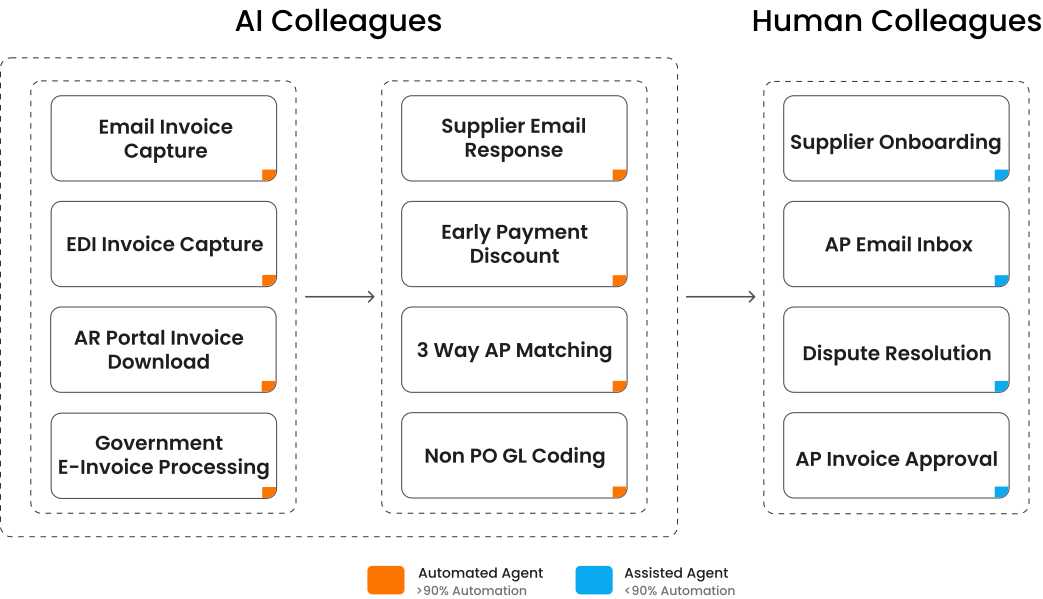
Key Agentic AI Capabilities:
Why Enterprises Choose HighRadius?
HighRadius has been recognized by IDC and The Hackett Group. The company was named among the Top 15 Vendors for Accounts Payable Solutions (2025) and recognized as a Leader in Worldwide Embedded Payment Applications (2024–2025).
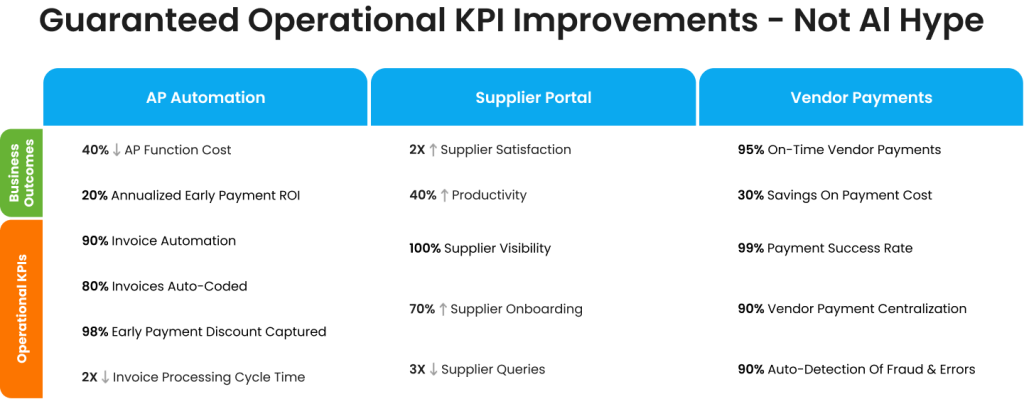
Enterprises trust HighRadius because its Agentic AI platform delivers strict, measurable business outcomes and operational KPIs that transform the Accounts Payable lifecycle. By deploying a suite of specialized Automated and Assisted Agents, the software guarantees targeted improvements across cost, speed, compliance, and vendor relations.
Envoice provides a straightforward, cost-effective solution for small to mid-sized businesses seeking to streamline invoice capture and approval workflows. It’s designed for quick adoption and integrates smoothly with accounting systems like Xero and QuickBooks.
Key capabilities:
Kofax is built for enterprises managing complex, high-volume invoices. Known for its strong OCR engine and RPA tools, it enables large organizations to automate document handling and compliance-heavy processes.
Key capabilities:
Docsumo is suitable for businesses that manage a variety of document types and need reliable data extraction. It utilizes OCR technology to extract information from invoices, receipts, and other documents, with APIs that facilitate seamless integration into existing systems.
Key capabilities:
Rossum is designed to help businesses process invoices efficiently by automating data extraction and validation. It uses AI technology to recognize different invoice formats and integrates with existing systems through APIs for real-time data transfer.
Key capabilities:
Nanonets provides an invoice scanning tool that automates data extraction without relying on pre-set templates. It supports structured and unstructured documents and connects with accounting or ERP systems to streamline processing.
Key capabilities:
Hyperscience offers an invoice processing solution tailored for organizations handling large volumes of complex documents. It combines machine learning with optional human review to maintain accuracy and consistency across varied invoice formats.
Key capabilities:
Docparser offers a customizable, no-code approach to invoice data extraction. It’s best for teams that want full control over their parsing rules and export formats.
Key capabilities:
Tipalti is used by large organizations that handle invoices and payments for global suppliers. It supports cross-border transactions and helps manage vendor details and compliance within one system.
Key capabilities:
ABBYY is used by enterprises that process large volumes of invoices in different languages and formats. Its OCR technology supports accurate data extraction and helps standardize document processing across global teams.
Key capabilities:
Manual invoice scanning is challenging due to errors, delays, higher costs, and a lack of visibility and security. Many businesses still rely on paper-based or spreadsheet methods, which create bottlenecks and inefficiencies in accounts payable. Here are the 8 key challenges of manual invoice scanning in an accounts payable process:
Entering invoice data manually is prone to mistakes, such as incorrect amounts, wrong PO numbers, or duplicate entries. These errors can lead to payment disputes, financial discrepancies, and additional work to correct mistakes.
Handling invoices physically, passing them between departments for approvals, or losing them can slow down the payment process. These delays affect cash flow and may result in late payments to vendors.
Manual processes are labor-intensive and require significant resources for data entry and invoice handling. Over time, these costs can outweigh the investment needed for automated invoice scanning tools.
Without digital systems, monitoring the status of invoices in real time is difficult. Finance teams struggle to track spending trends or identify bottlenecks in approvals.
Manual processes make it easier for fake or duplicate invoices to slip through unnoticed, increasing the risk of financial loss.
Businesses with high invoice volumes find manual methods unsustainable. More staff and resources are needed to keep up, which limits growth potential.
Late or inaccurate payments can damage trust with vendors, leading to strained relationships and potential loss of key suppliers.
Handling records manually complicates audits and regulatory compliance. Maintaining proper documentation is challenging, which may result in fines or penalties.
Invoice scanning tools enable accounts payable teams to work more efficiently by automating the receipt, processing, and approval of invoices. Instead of spending hours on manual data entry or chasing paper trails, teams can focus on managing cash flow and supporting the business.
By automatically capturing and routing invoice data, scanning tools expedite the movement of invoices through approval workflows. This means fewer bottlenecks, quicker payments, and a smoother month-end closing process.
Modern invoice scanning software reads and validates every invoice field with precision. It minimizes human errors, ensures the correct details reach the right systems, and maintains clean and reliable financial records.
Automating invoice capture reduces the need for manual effort, printing, and physical storage. It helps finance teams process more invoices with fewer resources, lowering overall administrative costs.
Every step of the invoice journey is tracked digitally, creating a clear audit trail. With this visibility, teams can easily track approvals, check payment statuses, and ensure compliance with company and regulatory policies.
When payments are processed on time and without errors, suppliers are more satisfied and confident in their partnerships. Reliable, timely payments help build long-term trust and smoother collaboration with the vendors.
Selecting the right OCR invoice scanning and approval vendor is critical for improving accounts payable efficiency. The right one can save time, reduce errors, and strengthen vendor relationships while integrating smoothly into your existing ERP and accounting systems. Here are the key factors to consider when choosing the best invoice scanning and approval vendors for your business:
Choose a vendor that provides the best invoice scanning tools with advanced AI and OCR technologies. The software should capture invoice details at both header and line-item levels accurately. Capturing all invoice data from different formats reduces manual corrections and errors and can lower processing costs.
The best invoice scanning and approval software offers end-to-end automation, including data validation, invoice matching, coding, and ERP posting. Features such as AI-driven decision-making and rule-based workflows allow invoices to be processed without manual intervention. This reduces repetitive work, speeds approvals, and improves payment cycles.
Look for vendors whose solutions integrate seamlessly with your ERP and accounting systems, such as QuickBooks, SAP, or Oracle. Integration with document management systems, email platforms, and payment gateways ensures all departments have real-time access to AP information, creating a unified workflow.
The invoice scanning software should have an intuitive interface with drag-and-drop features and simple navigation. A user-friendly design accelerates adoption and minimizes training time for your accounts payable team.
Every business has unique requirements for invoice scanning. The platform should support rule-based workflows that can be tailored to your needs and scale efficiently to handle increasing invoice volumes without reducing speed or accuracy.
The best invoice scanning vendors provide real-time insights and customizable dashboards. Detailed reports on processing times, invoice statuses, and compliance allow AP teams to identify bottlenecks, optimize workflows, and increase overall efficiency.
Protect sensitive financial data with features such as role-based access controls, data encryption, two-factor authentication, and automated audit trails. The platform should comply with GDPR and other industry regulations to ensure security and build trust with vendors and stakeholders.
Focus on long-term value rather than the cheapest option. Evaluate pricing models such as pay-per-scan, subscription-based, or volume-tiered fees, and consider additional support or maintenance costs. The right invoice scanning vendor should offer a balance of features and costs to deliver measurable ROI.
Invoice scanning software is accurate, with many systems being 90% accurate in extracting data. The accuracy depends on invoice quality, the software’s technology, ability to handle different invoice formats. Most of them use technologies like OCR to minimize errors & improve data capture.
OCR in accounts payable (AP) is technology that automatically extracts invoice data—like vendor details, amounts, dates, and line items, without manual entry. In AP workflows, OCR is used to speed up invoice processing, reduce errors, match invoices with POs/receipts, and route them for approval.
The best invoice scanning software depends on your business needs. Popular options include HighRadius, ABBYY FlexiCapture, SAP Concur, Zoho Invoice, and QuickBooks. These tools use advanced technologies like AI and machine learning to improve data extraction accuracy.
For invoice scanning, we primarily use Optical Character Recognition (OCR) technology to convert text on paper or digital invoices into machine-readable data. More advanced systems utilize AI and ML to comprehend invoice formats, automate data entry, and even learn from past corrections to enhance future accuracy.
Yes, there are alternatives to invoice scanning software. You can manually enter invoice data into spreadsheets or accounting software. Some businesses also use outsourced data entry services or e-invoicing, where invoices are directly submitted in a standardized digital format, eliminating the need for scanning.
AP teams should prioritize invoice scanning tools that offer accurate automated data capture, reliable invoice matching, ERP and accounting integration, rule-based validation, and configurable approval workflows. These features cut manual work, reduce errors, and speed invoice approvals.
Yes. Modern invoice scanning tools use OCR combined with AI to interpret handwritten notes and non-standard invoice layouts. They adapt to varied formats, extract fields reliably, and reduce manual correction needs, lowering verification effort and improving data consistency in AP systems.
The best invoice scanning tools process PDFs, scanned images, photos, and common files like Word or Excel. They extract data from structured tables, semi-structured invoices, and unstructured layouts so AP teams can handle diverse supplier documents without manual reformatting or extra conversions.
Yes. Many invoice scanning platforms capture multi-currency invoice data and record currency, tax, and payment terms accurately. When paired with AP and payment systems, they help multinational teams standardize processing, apply correct conversions, and maintain consistent handling of international vendor invoices.
OCR in modern invoice scanning tools reaches high accuracy when combined with AI validation and business rules. Solutions read header and line-item details, then verify against POs and vendor records to reduce mistakes. This layered process improves data quality, reduces exceptions, and supports reliable reporting.
Automated invoice scanning tools cut manual entry and routing, shortening processing cycles and lowering labor costs. By capturing data accurately and automating approvals, these tools free AP teams to focus on exceptions and analysis, boosting productivity and improving overall operational efficiency.
Not all. Standalone OCR tools only extract data and require you to export files to another system. However, comprehensive invoice scanning and approval software (like HighRadius) handles the entire lifecycle, capturing the data, validating it against POs, and routing it to managers for final sign-off in a single platform.
While many tools focus solely on capturing data, the best invoice scanning and approval software combines both steps into a single platform. HighRadius is a top choice for mid-to-large enterprises because it uses AI to scan invoices with 95% accuracy and immediately routes them into a multi-level approval workflow, ensuring no data is lost between the "scan" and "approve" stages.

Positioned highest for delivering comprehensive automation across collections, credit, deductions, disputes, and multi-ERP integration - enabling standardized, scalable I2C transformation.
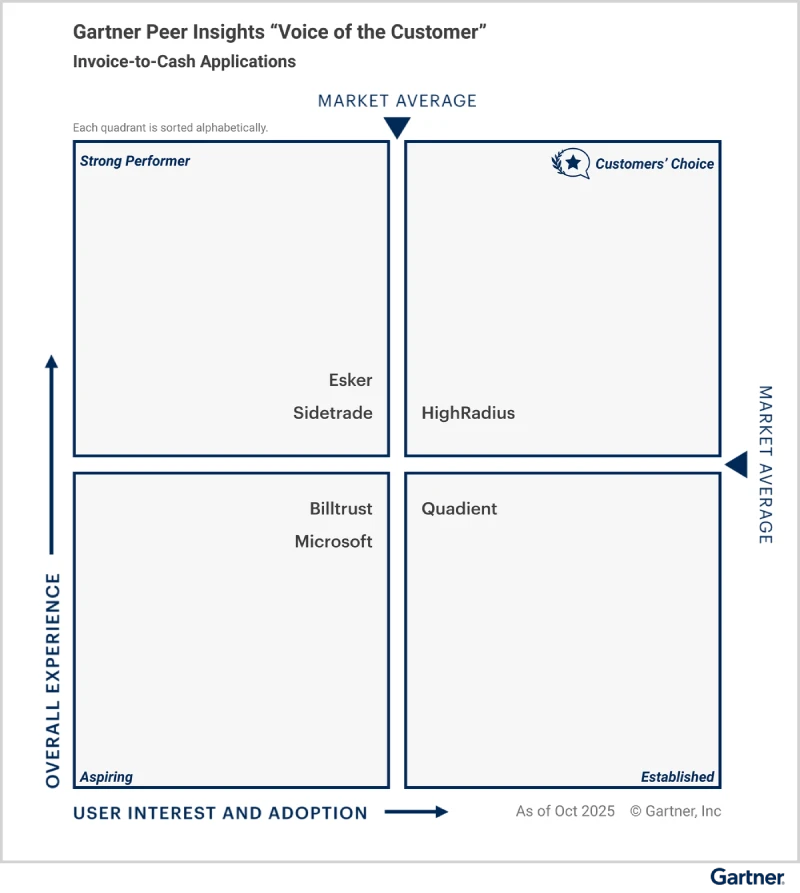
Explore why HighRadius has been a Digital World Class Vendor for order-to-cash automation software – two years in a row.

Recognized as a Leader in 2026 Vendor Assessment for unifying credit, collections, cash application, deductions, e-invoicing, and payments on one AI platform to advance enterprise-wide invoice-to-cash transformation.
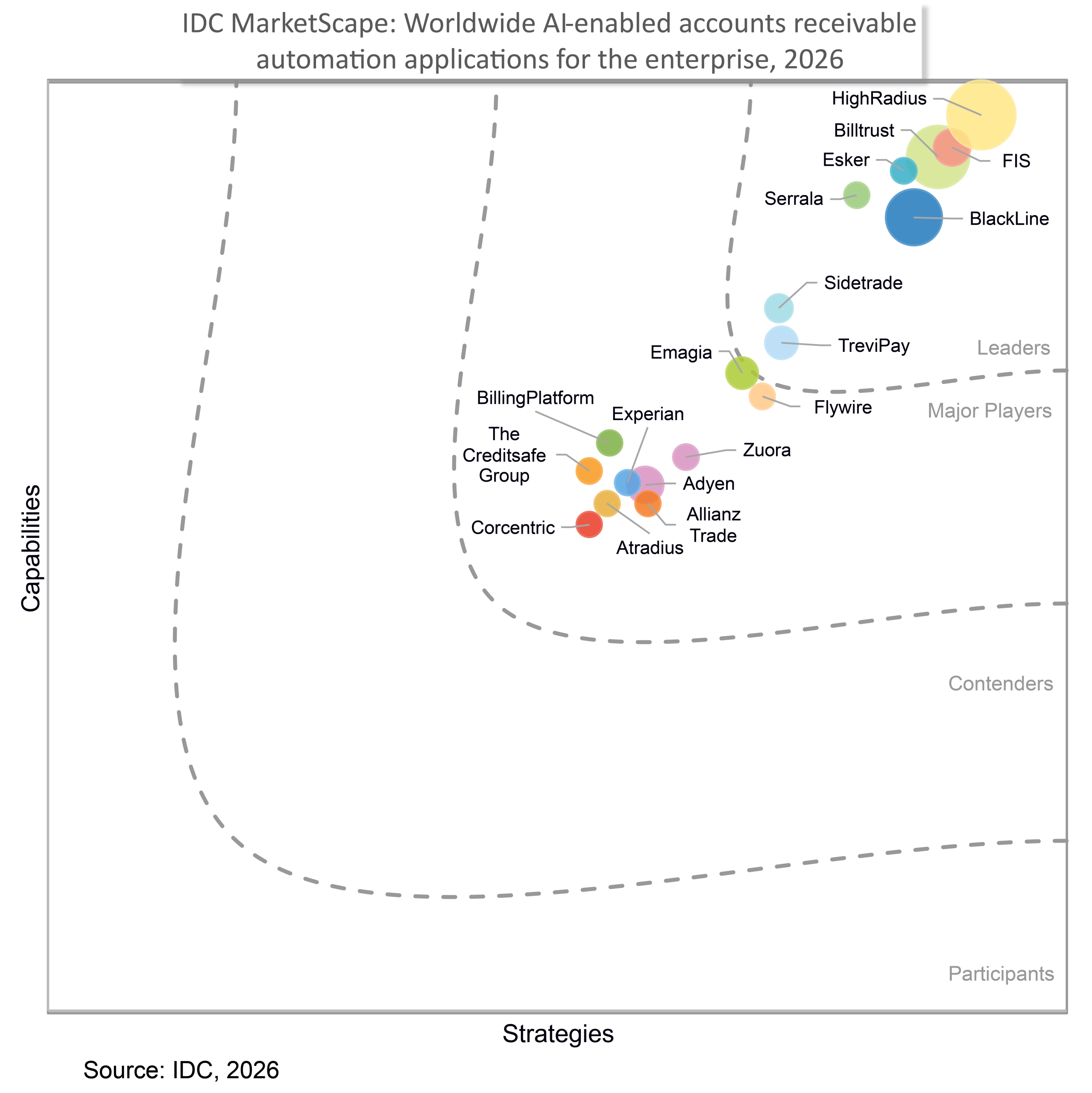
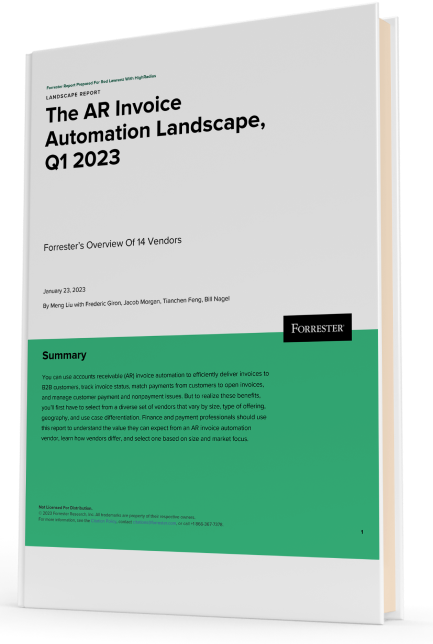
Forrester acknowledges HighRadius’ significant contribution to the industry, particularly for large enterprises in North America and EMEA, reinforcing its position as the sole vendor that comprehensively meets the complex needs of this segment.
Customers globally
Implementations
Transactions annually
Patents/ Pending
Continents
Explore our products through self-guided interactive demos
Visit the Demo CenterPlease fill in the details below
Please fill in the details below

We have seen financial services costs decline by $2.5M while the volume, quality, and productivity increase.

Colleen Zdrojewski
Trusted By 1300+ Global Businesses


